
Canonical Tag: What rel=canonical Is and How to Use It
The canonical tells Google which URL to show when the same content has several addresses. How to write it, when a 301 is better, filters, pagination, languages and how to check it in Search Console.

Eugenio Tommasi
Founder of SEO SRL
Published 10 min read

The canonical (rel="canonical") is an HTML tag that tells search engines which URL to treat as the main one among several pages with identical or very similar content; for Google it is a strong signal, not an obligation.
Table of contents (10 sections)
- What the canonical is and what it is for
- Where duplicates come from
- How to write the canonical (and where)
- Methods for indicating the canonical page
- Canonical or 301 redirect?
- Practical cases: what to do in each situation
- Mistakes to avoid
- How to check whether Google follows your canonical
- Canonical checklist
- Frequently asked questions
The canonical is an HTML tag, <link rel="canonical">, that tells search engines which URL to treat as the main one when the same content, or very similar content, can be reached from more than one address. For Google it is a strong signal but not a command: it can choose another page if the other signals point the other way.
It is one of those tags nobody looks at until something goes wrong: the right page disappears from the results, the version with parameters shows up in its place, and Search Console fills up with "duplicate page" reports.
What the canonical is and what it is for
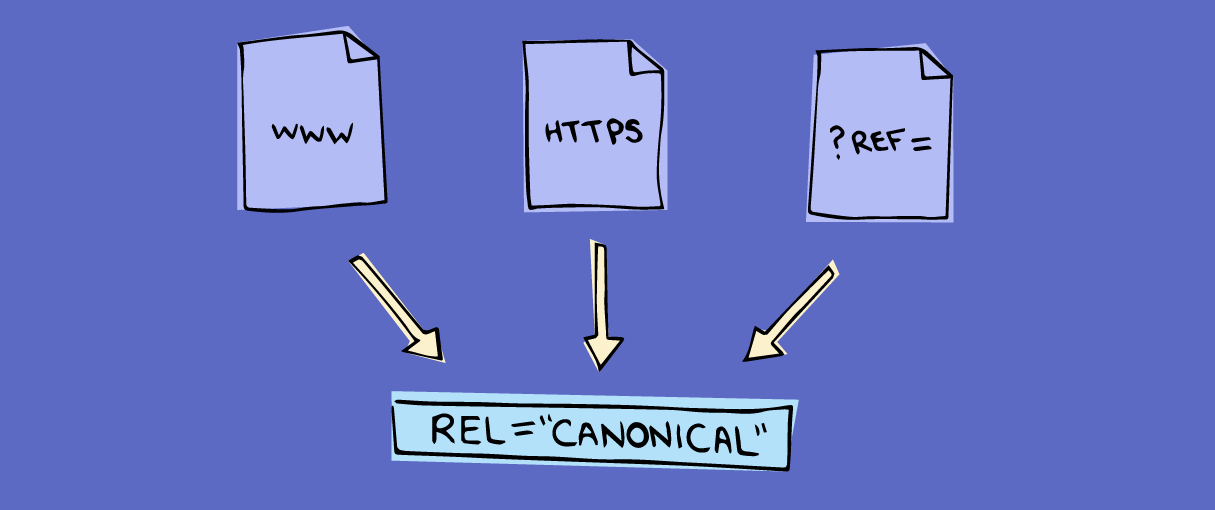
The canonical is described in the IETF's RFC 6596, an informational document from 2012. It goes in the head of the page:
<head>
  <title>Vestiti verdi</title>
  <link rel="canonical" href="https://www.esempio.it/vestiti/verdi/">
</head>
The tag says: "of all the versions of this page, the one to show in the results is this one." It does three concrete things:
- chooses the URL that appears in the results, instead of leaving the decision to Google;
- concentrates signals (links, performance data) on a single address, instead of splitting them across copies;
- reduces unnecessary crawling: Google crawls canonical pages more often and duplicates less often.
Two things the canonical does not do. It does not push a page up the rankings on its own. And it is not a shield against penalties: duplicates within your own site are normal and do not violate Google's policies, whereas copying other sites' content without adding anything is scraping, which the spam policies prohibit, and no tag will save you there. If that is the problem, you need penalty recovery work, not a canonical.
Where duplicates come from
Almost nobody creates them on purpose. The CMS, the server, filters and marketing tools generate them. A single product page can answer at all of these addresses:
http://esempio.it/scarpe/trail-x/
https://esempio.it/scarpe/trail-x/
https://www.esempio.it/scarpe/trail-x/
https://www.esempio.it/scarpe/trail-x
https://www.esempio.it/scarpe/trail-x/?utm_source=newsletter
https://www.esempio.it/scarpe/trail-x/?colore=rosso&ordina=prezzo
https://www.esempio.it/saldi/trail-x/
For a user it is the same page. For a search engine it is seven URLs. The most common causes are protocol variants (HTTP and HTTPS), sorting and filters, country versions in the same language, separate mobile versions and test environments left open to crawlers. In practice you also get www, trailing slashes and tracking parameters. Some of these are solved at the source with redirects (HTTP, www, trailing slash); the others with the canonical.
How to write the canonical (and where)
There are only a few rules, and each one has a reason.
- Only in the head. Google ignores a canonical in the body. And the head must be valid: an image or an iframe before the canonical can make Google think the head has already ended (I cover this in the article on the noscript tag, where it is the most frequent mistake).
- Absolute URL.
https://www.esempio.it/vestiti/verdi/, not/vestiti/verdi/. Relative paths are supported, but a copied test environment or a wrong domain is enough to make them point elsewhere. - Only one per page. Two different canonicals (often one from the theme and one from the SEO plugin) contradict each other, and Google may not trust conflicting signals.
- In the source code, not added by JavaScript. If the site uses JavaScript, the canonical should already be in the HTML and the script should not modify it.
- On the canonical page too. The self-referencing canonical, which points to the page itself, is also recommended by Google: it closes the door on versions with parameters that nobody anticipated.
In practice, the main page and its duplicates carry the same tag:
<!-- in https://www.esempio.it/vestiti/verdi/?ordina=prezzo -->
<link rel="canonical" href="https://www.esempio.it/vestiti/verdi/">

<!-- in https://www.esempio.it/vestiti/verdi/ (self-referencing) -->
<link rel="canonical" href="https://www.esempio.it/vestiti/verdi/">
For files that have no head, such as PDFs, the canonical is sent as an HTTP header. For example: you have a guide in HTML and the same guide in PDF, and you want the HTML page to appear in the results. The server answers the PDF request with:
Link: <https://www.esempio.it/guida-taglie/>; rel="canonical"On Apache you set it in the .htaccess file:
<Files "guida-taglie.pdf">
  Header add Link "<https://www.esempio.it/guida-taglie/>; rel=\"canonical\""
</Files>
With WordPress you do not need to touch the code: the CMS already adds a self-referencing canonical to posts and pages, and SEO plugins such as Yoast SEO or Rank Math let you change it page by page. If anything, the risk is the opposite: two plugins that both insert it.
Methods for indicating the canonical page

The tag is not the only way. Google weighs several signals, each with a different strength:
| Method | Signal strength | When to use it |
|---|---|---|
| Redirect (301, 308) | Strong | When the duplicate should no longer exist: URL change, HTTP→HTTPS, www, domain change |
rel="canonical" in the HTML | Strong | When the duplicate must stay visible to users: filters, sorting, parameters, variants |
rel="canonical" in the HTTP header | Strong | Non-HTML files, such as PDFs |
| Inclusion in the sitemap | Weak | Always, as confirmation: only canonical URLs belong in the sitemap |
Google also weighs the protocol: with equal content, it prefers HTTPS over HTTP. Internal links are not among the methods Google lists, but keeping them consistent is common sense: if the menu links to the version with parameters and the canonical points to the clean one, you are sending two opposite messages. The rule that matters most is consistency: canonical, sitemap, internal links and hreflang must all point to the same URL.
Canonical or 301 redirect?
Both consolidate signals on one URL, but they work in opposite ways for people visiting the site.
| Canonical | 301 redirect | |
|---|---|---|
| What the user sees | The duplicate page, which stays navigable | Lands directly on the new URL |
| Nature | A hint: Google may not follow it | A server instruction: the old page is gone |
| Works across different domains | Yes, but for syndication Google now recommends something else | Yes |
| Typical case | Filters, sorting, parameters, product variants | Moved or deleted page, migration, HTTP→HTTPS |
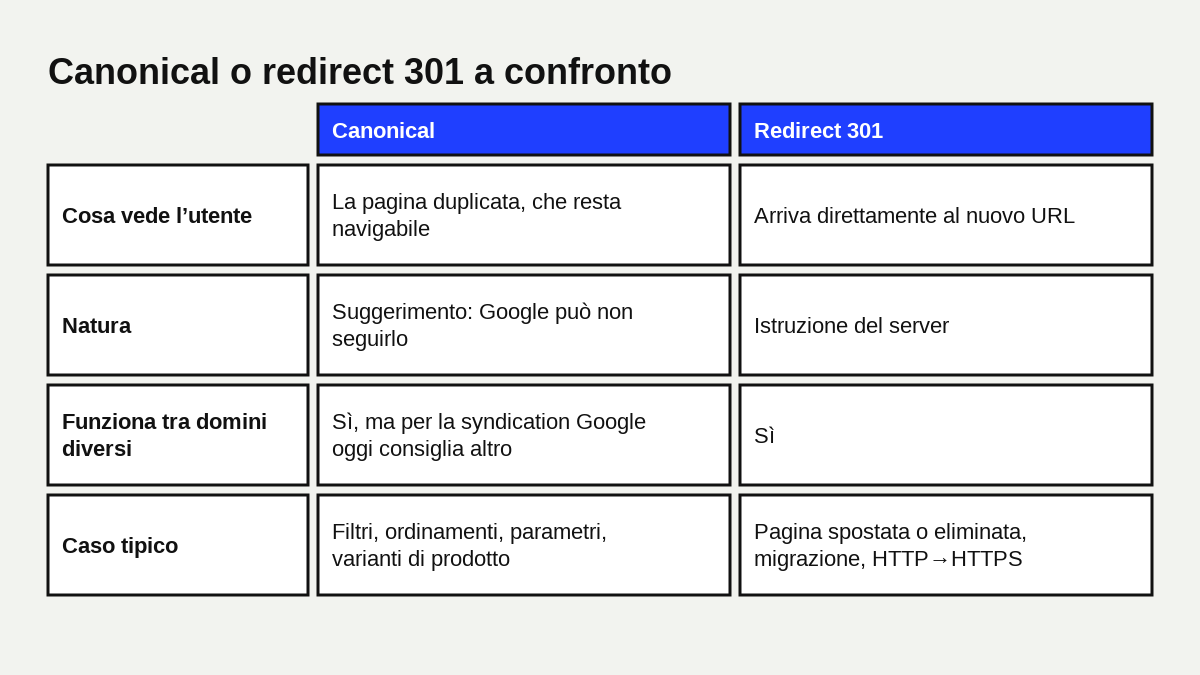
The question to ask is simple: does a user have a reason to see that version? If so, canonical. If not, redirect. A page sorted by price is useful to the user, so canonical. An old URL for a product that has moved is useful to nobody, so 301.
Practical cases: what to do in each situation
Tracking and sorting parameters
Canonical to the clean URL, always. Nobody searches Google for "trail shoes sorted by ascending price". Better still: do not link internally to URLs with utm_, which are only meant for external campaigns.
E-commerce filters
Here you need to make a choice, not apply a rule. A filter like "size 42" or "price 50-100 €" usually has no search demand of its own: canonical to the category. A filter like "waterproof trail shoes" may have real searches: in that case it is worth turning it into an indexable page, with a clean URL, its own copy and a self-referencing canonical. What makes the difference is keyword research, not the CMS.
Product variants (color, size)
If the variants have separate, nearly identical pages, canonical to the main product page. If a variant has demand of its own (someone searching specifically for "red sneakers model X") and a page with different photos and data, it can stay indexable with a self-referencing canonical. The more similar the pages are, the more likely Google is to treat them as duplicates whatever you declare.
Pagination
Classic mistake: putting a canonical to page 1 on pages 2, 3 and 4 of a category. Google advises against it: every page in the sequence should have its own canonical, because the products on page 3 are not on page 1. Pages should be connected with normal <a href> links. Google no longer uses the rel="next" and rel="prev" tags.
<!-- in https://www.esempio.it/scarpe/?page=3 -->
<link rel="canonical" href="https://www.esempio.it/scarpe/?page=3">
Versions in other languages or for other countries
Each language version has its own self-referencing canonical, and the versions are linked to each other with hreflang. The canonical of a German page must not point to the Italian version: the German one would be treated as a duplicate not to be shown. Pages for different countries in the same language (Italy and Italian-speaking Switzerland, for example) are instead the case where the versions end up nearly identical: a self-referencing canonical on each, plus hreflang, helps Google show the right URL in each country.
Articles republished on other sites
If a partner republishes one of your articles, for years the answer was: a canonical on the partner's site pointing to the original. Today Google no longer recommends it for syndication, because partner pages are often very different from the original. The most effective solution is for partners to block indexing of the republished content, for example with noindex. In practice you cannot always get that: at the very least, ask for a visible link to the original.
Mistakes to avoid
- A canonical pointing to a page that returns a redirect, a 404 or a noindex. You are naming as the main page one that cannot be.
- A canonical different from the URL in the sitemap or in hreflang. Three different signals for the same page: Google will choose on its own.
- A canonical pointing to the home page on every page, because of a template error. It happens, and it is one of the fastest ways to make a site vanish from the results.
- Using robots.txt to handle duplicates. If Google cannot crawl the page, it does not see the canonical either; and blocked URLs can still end up in the index without content.
- Using noindex to choose the canonical among pages on the same site. Noindex only blocks the page, it does not pass anything on.
- Using the URL removal tool in Search Console: it hides all versions, including the one you want to keep.
- A canonical with a fragment (the part after
#) or with the HTTP version of the site. - A canonical between pages that are different from each other, to "gather" signals on a stronger page. If the content is not equivalent, Google tends to ignore it, and rightly so.
How to check whether Google follows your canonical
The canonical you declare and the one Google chooses can differ. To find out:
- Source code. Open the page, press Ctrl+U, search for "canonical": there should be only one, in the head, with the right absolute URL.
- Search Console URL Inspection. It shows two lines: the user-declared canonical URL and the one selected by Google. If they differ, Google found signals stronger than your tag.
- Page indexing report. There are three statuses to know: "Alternate page with proper canonical tag" (all fine, Google followed the tag); "Duplicate without user-selected canonical" (the tag is missing, Google decided); "Duplicate, Google chose different canonical than user" (Google did not follow you, worth a look).
- A crawler such as Screaming Frog, on large sites: extract all the canonicals and compare them with the URLs in the sitemap and with internal links.
When Google picks a different canonical, the cause is almost always one of these: the pages are not really equivalent, internal links point to the other version, the sitemap lists the other version, or the canonical is hidden in an invalid head. It is rarely a whim of the algorithm.
Canonical checklist
- Every indexable page has a single canonical, in the head, with an absolute HTTPS URL.
- Main pages have a self-referencing canonical.
- The canonical points to a page that returns 200, is indexable and is in the same language.
- Canonical, sitemap, internal links and hreflang point to the same URL.
- Tracking and sorting parameters have a canonical to the clean URL.
- Paginated pages each have their own canonical.
- HTTP, www and trailing slash are handled with redirects, not just with the canonical.
- In Search Console, pages flagged "Google chose different canonical than user" are few and explainable.
Duplicates and canonicals are among the first things to check in an SEO audit, especially on e-commerce sites, where filters multiply URLs without anyone noticing. If you want a full check, there is the SEO audit we offer; if the problem is broader, start with how to get your site indexed.
Is Search Console flagging duplicate pages and you don't know which version Google is showing? Find out what is holding your site back on Google with the SEO audit: you get the 5 things to fix first, starting with canonicals, duplicates and indexing.
Frequently asked questions
Is the canonical mandatory?
No. Without a canonical, Google picks on its own the version it considers best among the duplicate pages. Specifying it makes Google show the URL you prefer and concentrates signals on a single address; that is why it is worth adding to all indexable pages.
Do I need a self-referencing canonical?
Yes, it is a good idea. A page that points to itself protects you from versions with parameters you did not anticipate, such as those created by campaigns, filters or external tools. Most CMSs add it automatically.
Can Google ignore the canonical?
Yes. It is a hint, not an obligation. Google can choose another canonical if the pages are not equivalent, if the sitemap and internal links point to a different URL, or if the tag sits in an invalid head. The URL Inspection tool shows the declared canonical and the one chosen by Google.
Can I set a canonical to another domain?
Technically yes, and Google takes it into account. For articles republished on partner sites, though, it is no longer the recommended route: it is better for partners to block indexing of the republished content, for example with a noindex.


