
Hreflang: What It Is, How to Write It and Mistakes to Avoid
What hreflang is, how to write the value, the three implementation methods with full code, x-default, how it relates to canonical, common mistakes and how to check it.

Eugenio Tommasi
Founder of SEO SRL
Published 9 min read

Hreflang is an HTML annotation that links the versions of the same page in different languages or for different countries and tells Google which one to show each user; it is not used to identify the language of the text.
Table of contents (12 sections)
- What hreflang is (and what it doesn’t do)
- When you need hreflang
- How to write the hreflang value
- The three implementation methods, with code
- x-default: the page for everyone else
- Hreflang and canonical: how they work together
- The most common mistakes (and how to fix them)
- Hreflang on WordPress and other CMSs
- How to check hreflang
- Beyond hreflang: what a multilingual site needs
- Hreflang checklist
- Frequently asked questions
Hreflang is an HTML annotation that links together the versions of the same page in different languages or for different countries, and tells Google which audience each one is meant for. It makes the right version show up in the results for each user: the Italian page for people searching in Italian, the Swiss page for people searching from Switzerland.
It is also one of the tags that gets implemented wrong most often. In 2023 Ahrefs analyzed 374,756 domains that use hreflang: 67% had at least one issue.
What hreflang is (and what it doesn’t do)

Hreflang is an attribute used together with rel="alternate". In every version of the page you declare: “this page also exists in these languages, at these addresses”. Google uses the set of these declarations to choose which URL to show to searchers. Google’s page on localized versions is the reference for the details.
Three things hreflang does not do, although it often gets credit for them:
- It doesn’t tell Google what language the text is in. Google detects it with its own algorithms and uses neither hreflang nor the
langattribute for that. - It doesn’t make a page rank in a country. It helps swap one version for another in the results. If the German page doesn’t rank in Germany, hreflang won’t push it up.
- It doesn’t fix a poor translation. A page that was machine-translated and never reviewed is still a poor page, in any language.
When you need hreflang
You need it when you have the same page in several versions and want each user to see theirs:
- multilingual sites: the same page in Italian, English, German;
- multi-regional sites in the same language: English for the UK and the US, Italian for Italy and Switzerland, with different prices, currencies or shipping. This is where it matters most, because the pages are nearly identical and Google risks treating them as duplicates;
- sites with a translated template but untranslated main content (for example forums or user reviews): here too the versions are similar and hreflang helps.
You don’t need it for a site in a single language aimed at a single market. And it isn’t mandatory: without annotations Google tries to work out on its own which version to show. The catch is that it sometimes gets it wrong, and the Swiss user lands on the Italian page with prices in euros.
How to write the hreflang value

The value has a required part and an optional part, separated by a hyphen:
| Part | Standard | Required | Examples |
|---|---|---|---|
| Language | ISO 639-1 | Yes | it, en, de |
| Country | ISO 3166-1 Alpha 2 | No | it-IT, it-CH, en-GB |
Uppercase and lowercase make no difference. The most frequent value errors, all invalid:
- Country only:
hreflang="ch"doesn’t mean Switzerland, it means the Chamorro language (ISO 639-1). Google doesn’t infer the language from the country. - Reserved codes:
en-UKis wrong, the United Kingdom isGB.EUandUNaren’t valid either: Google ignores that part. - Unsupported regional codes, such as
es-419for Latin America. - Underscore instead of hyphen:
it_ITis the format some CMSs use, not the hreflang one.
The three implementation methods, with code
The three methods are equivalent. Using more than one together gives no advantage and multiplies the things you have to keep in sync: pick one. The same two rules apply to all three:
- every version lists all versions, itself included (self-reference);
- links are reciprocal: if the Italian page points to the English one, the English one must point back to the Italian one. Without return links, Google may ignore the annotations.
URLs must be absolute, with https://. They can live on different domains or subdomains.
1. In the page head
This is the most widely used method. The same block, identical, goes in the head of every version:
<link rel="alternate" hreflang="it" href="https://www.esempio.it/noleggio-bici/">
<link rel="alternate" hreflang="it-CH" href="https://www.esempio.it/ch/noleggio-bici/">
<link rel="alternate" hreflang="en" href="https://www.esempio.it/en/bike-rental/">
<link rel="alternate" hreflang="de" href="https://www.esempio.it/de/fahrradverleih/">
<link rel="alternate" hreflang="x-default" href="https://www.esempio.it/en/bike-rental/">
Here there is a generic Italian version (it), one for Italian-speaking Switzerland (it-CH), an English one, a German one and a fallback for everyone else. The block must sit in a valid head: an image or an iframe placed before it, perhaps inside a noscript, can cause everything that follows to be ignored.
2. In the XML sitemap
This is the most convenient method when there are many languages or pages, because you keep everything in one file and don’t weigh down the HTML. You need the xhtml namespace, and every URL lists all its variants, itself included:
<?xml version="1.0" encoding="UTF-8"?>
<urlset xmlns="http://www.sitemaps.org/schemas/sitemap/0.9"
        xmlns:xhtml="http://www.w3.org/1999/xhtml">
  <url>
    <loc>https://www.esempio.it/noleggio-bici/</loc>
    <xhtml:link rel="alternate" hreflang="it" href="https://www.esempio.it/noleggio-bici/"/>
    <xhtml:link rel="alternate" hreflang="en" href="https://www.esempio.it/en/bike-rental/"/>
    <xhtml:link rel="alternate" hreflang="x-default" href="https://www.esempio.it/en/bike-rental/"/>
  </url>
  <url>
    <loc>https://www.esempio.it/en/bike-rental/</loc>
    <xhtml:link rel="alternate" hreflang="it" href="https://www.esempio.it/noleggio-bici/"/>
    <xhtml:link rel="alternate" hreflang="en" href="https://www.esempio.it/en/bike-rental/"/>
    <xhtml:link rel="alternate" hreflang="x-default" href="https://www.esempio.it/en/bike-rental/"/>
  </url>
</urlset>
xhtml:link elements don’t count toward the 50,000-URL limit per file. All the other rules of the sitemap apply here too: canonical URLs only, returning a 200.
3. In the HTTP header
This is for files that have no head, such as PDFs. The server responds with a Link header listing all versions:
Link: <https://www.esempio.it/listino.pdf>; rel="alternate"; hreflang="it",
      <https://www.esempio.it/en/price-list.pdf>; rel="alternate"; hreflang="en"
x-default: the page for everyone else
The x-default value marks the page to show when the user’s language or country doesn’t match any version. It is usually a language selector, or the English version if that works best for an international audience.
It isn’t mandatory, but it is the most common omission (see the table below). My advice is to always add it. It costs one line, and it decides what a Brazilian user searching for your brand sees when you don’t have Portuguese.
Hreflang and canonical: how they work together
This is where the most damage is done. The rules:
- every language version has its own self-referencing canonical;
- hreflang annotations point only to canonical, indexable URLs that return a 200;
- the canonical of a translated page must never point to another language. If the German page has its canonical pointing to the Italian one, you are telling Google that the German page is a duplicate not to be shown, and the hreflang annotations lose their meaning.
<!-- In https://www.esempio.it/de/fahrradverleih/ -->
<link rel="canonical" href="https://www.esempio.it/de/fahrradverleih/">
<link rel="alternate" hreflang="it" href="https://www.esempio.it/noleggio-bici/">
<link rel="alternate" hreflang="de" href="https://www.esempio.it/de/fahrradverleih/">
<link rel="alternate" hreflang="x-default" href="https://www.esempio.it/noleggio-bici/">
A special case is same-language versions for different countries (en-GB and en-US) with nearly identical text. For Google these are similar versions to be handled with canonical and hreflang together. With correct hreflang, though, it still shows the right URL to each country: this is one of the cases where the annotation does the most work.
The most common mistakes (and how to fix them)
The 2023 Ahrefs study shows where people go wrong. The data is a few years old, but the mistakes are the same ones you see today. Each row comes with its fix:
| Mistake | Domains affected | Fix |
|---|---|---|
| Missing x-default | 56.3% | Add an x-default line pointing to the selector or the main version |
| Missing self-reference | 18% | Every page must also list itself |
| Hreflang pointing to redirected or broken pages | 16.9% | Point to the final URL, which returns a 200 |
| Missing return link | 15.3% | Make the links reciprocal across all versions |
| Hreflang pointing to non-canonical URLs | 8% | Use the same URL given in the canonical |
| Wrong values | 4.6% | ISO 639-1 language required, ISO 3166-1 country optional, hyphen |
| Declared language differs from the page’s language | 3.2% | Check the mappings in the plugin or template |
| Multiple pages for the same language | 2.5% | One URL per hreflang value |
To these I add two setup mistakes that no crawler flags:
- Automatic redirects based on language or location. They are discouraged: Googlebot usually crawls from US addresses and with no preferred language, and it may never see the other versions. Better to use separate URLs and a visible language selector, perhaps with a banner that suggests the right version without forcing it.
- Language in parameters or cookies. Every version must have its own URL (subfolder, subdomain or domain). If the language changes with a cookie on the same URL, Google sees only one version.
Hreflang on WordPress and other CMSs
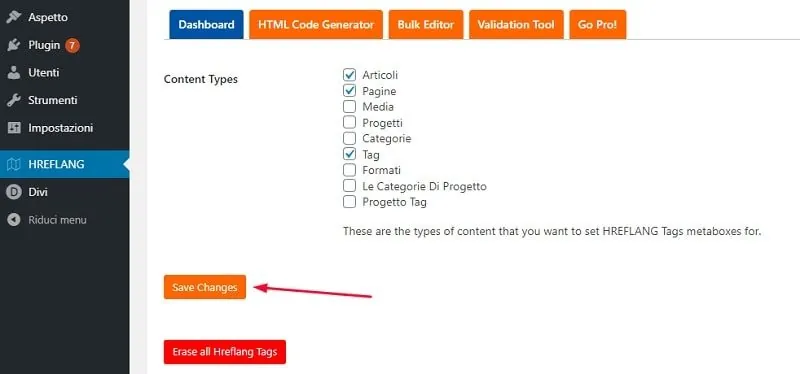
WordPress on its own doesn’t handle multiple languages: hreflang is added by the multilingual plugin (WPML, Polylang, TranslatePress and similar), based on the translations linked together.
The problem with CMSs isn’t adding the tag, but adding it on pages that don’t have a translation yet. If a page exists only in Italian, it shouldn’t appear in the hreflang of the other languages. Badly configured plugins sometimes point to the language’s home page as the alternative for every untranslated page: that is a wrong link, and no link is better.
How to check hreflang
Search Console used to have an “International Targeting” report that showed hreflang errors. Google announced its removal for September 22, 2022, along with the target country setting. Hreflang is still supported, but checks now have to be done another way.
- Source code of every version (Ctrl+U, search for “hreflang”): the block must be identical in all of them, with the self-reference.
- Search Console URL Inspection on the foreign version: check that the canonical Google chose is the page itself and not the one in another language.
- Crawlers such as Screaming Frog or the site audits of SEO tools: they check reciprocity, codes, redirects and non-canonical URLs across the whole site. On large sites it is the only serious way.
- Third-party testing tools, to check one page at a time.
- Performance by country in Search Console: if the Italian page gets impressions in Switzerland while an
it-CHversion exists, something isn’t working.
Beyond hreflang: what a multilingual site needs

Hreflang takes care of the technical side. The rest is market work:
- Keywords for each language. People don’t search for translations of your keywords: a German speaker searches “Fahrrad mieten”, not a translation of “noleggio bici”. Keyword research has to be redone for each market.
- Translations reviewed by someone who knows the language, with translated URLs when it makes sense.
- A clear URL structure: subfolders (
/en/), subdomains or country-code domains. Subfolders are the simplest solution to manage; country-code domains give the strongest geographic signal but multiply the work. - A correct
langattribute in thehtmltag. Google doesn’t use it for language, but it matters for accessibility and other search engines: in its official 2011 guidelines, Bing lists thecontent-languagemeta tag and thelangattribute as language signals.
Hreflang checklist
- Every version has its own URL, reachable without cookies or automatic redirects.
- Every page lists all versions, itself included, with absolute URLs.
- Links are reciprocal across all versions.
- Correct values: ISO 639-1 language required, ISO 3166-1 country optional (
GB, notUK), hyphen. - There is an
x-default. - Hreflang points only to canonical URLs that return a 200.
- Every version has its canonical pointing to itself, never to another language.
- One method only (head, sitemap or HTTP), applied consistently.
- Untranslated pages don’t appear in the hreflang of other languages.
The full checking procedure is in the guide to the SEO audit; if the site is still to be built, it’s worth planning for this at the design stage. URL structure, keyword research by country and measurement by market are the work of international SEO. Win back the traffic you are losing in foreign markets: this is where to start.
Frequently asked questions
Does hreflang matter for Bing?
Bing’s official language guidelines, published in 2011, cite the content-language meta tag and the lang attribute as signals, not hreflang. When in doubt, keep both hreflang and a correct lang attribute in every version.


