
SEO Audit: What It Is and How to Do One, Step by Step
What an SEO audit is and how to really do one: tools with prices, the checks from crawling to AI answers, each with an example and a typical mistake, then priorities, the report and how often to repeat it.

Eugenio Tommasi
Founder of SEO SRL
Published 32 min read

An SEO audit is a complete analysis of a site to find what stops its pages from being crawled, indexed and chosen by Google, and to decide the order in which to fix it.
Table of contents (20 sections)
- What an SEO audit is and what it isn't
- When you need an SEO audit
- Audit tools: free and paid
- Before you start: goals, starting point and urgent checks
- Indexing and coverage in Search Console
- Crawling, robots.txt and server health
- The XML sitemap
- Canonicals, duplicates, redirects and errors
- Architecture and internal links
- Speed and Core Web Vitals
- Mobile, HTTPS and security
- Structured data
- Content, intent and cannibalization
- Inbound links and competitors
- Local SEO, if the site works in one area
- AI answers: AI Overview, AI Mode and chatbots
- How to rank priorities: the impact/effort matrix
- How to write the audit report
- How often to repeat the audit
- Frequently asked questions
An SEO audit is not the score a tool hands you in thirty seconds. It is a check of your site done in the order Google works, and it ends with a short list of fixes, each with a reason and a priority.
This guide covers the method I follow when I run an audit: what to check at each stage, where to look, an example and the typical mistake for each step, then how to rank priorities and how to write the report. It is for anyone who has a site and wants to understand what is holding it back, and for anyone who has to run or commission an audit.
What an SEO audit is and what it isn't
An SEO audit is a complete analysis of a site to find what stops its pages from being crawled, indexed and chosen by Google, and to decide the order in which to fix it. It is also called a site SEO analysis or a technical and content review: it's the same thing.
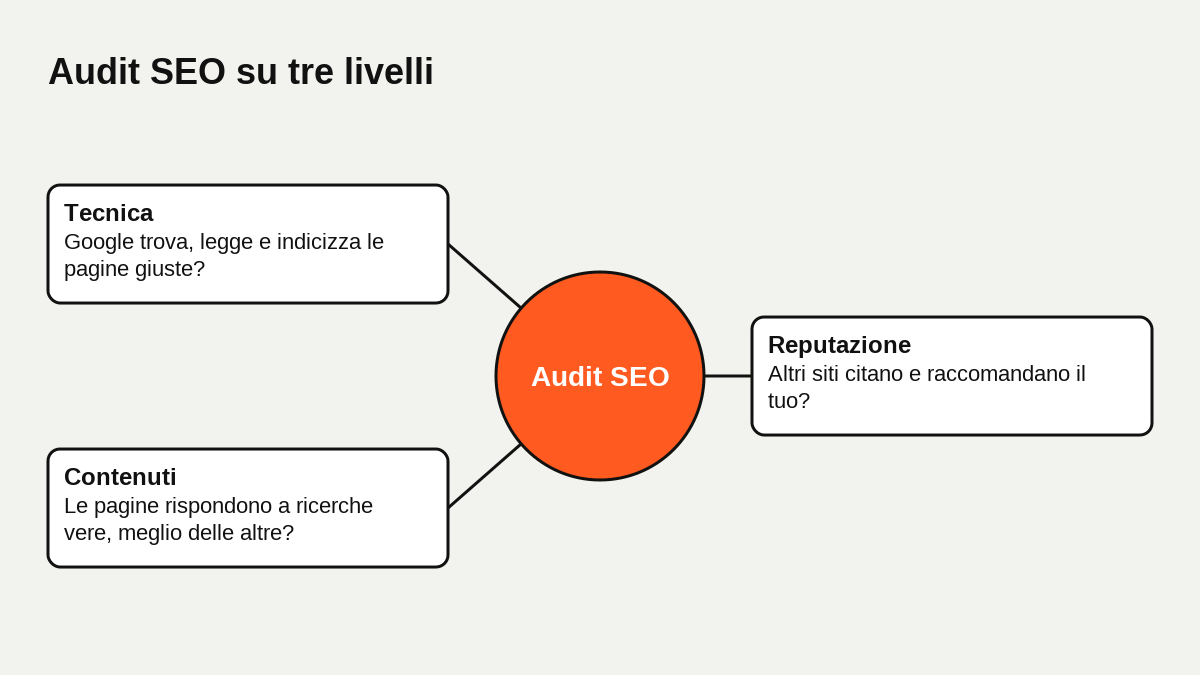
It looks at the site on three levels, the same ones SEO works on:
| Area | The question | What gets checked |
|---|---|---|
| Technical | Does Google find, read and index the right pages? | Crawling, robots.txt, server, sitemap, canonical, redirects, speed, mobile, HTTPS, structured data |
| Content | Do the pages answer real searches better than the others? | Intent, titles, weak or outdated pages, cannibalization, architecture |
| Reputation | Do other sites cite and recommend yours? | Inbound links, risky links, competitors, reviews for local businesses |
The end product is a document with a few priority fixes, explained so that whoever works on the site knows what to do. The full list of defects is there too, but it sits at the end, as an appendix.
What an audit is not
- It is not an export. A tool finds hundreds of warnings. Most concern pages that don't matter or details that carry little weight. Handing them all over with the same urgency paralyzes the people who have to act.
- It is not a grade. “Site health 87/100” doesn't tell you how much traffic you are losing or why. Two sites with the same score can have opposite problems.
- It is not a strategy. The audit tells you what is holding the site back today. Which searches to target and with which new pages is a different job, and it comes afterwards.
- It is not just technical. Many technically clean sites don't rank because their pages don't answer what people are searching for. An audit that stops at the code sees only half the picture.
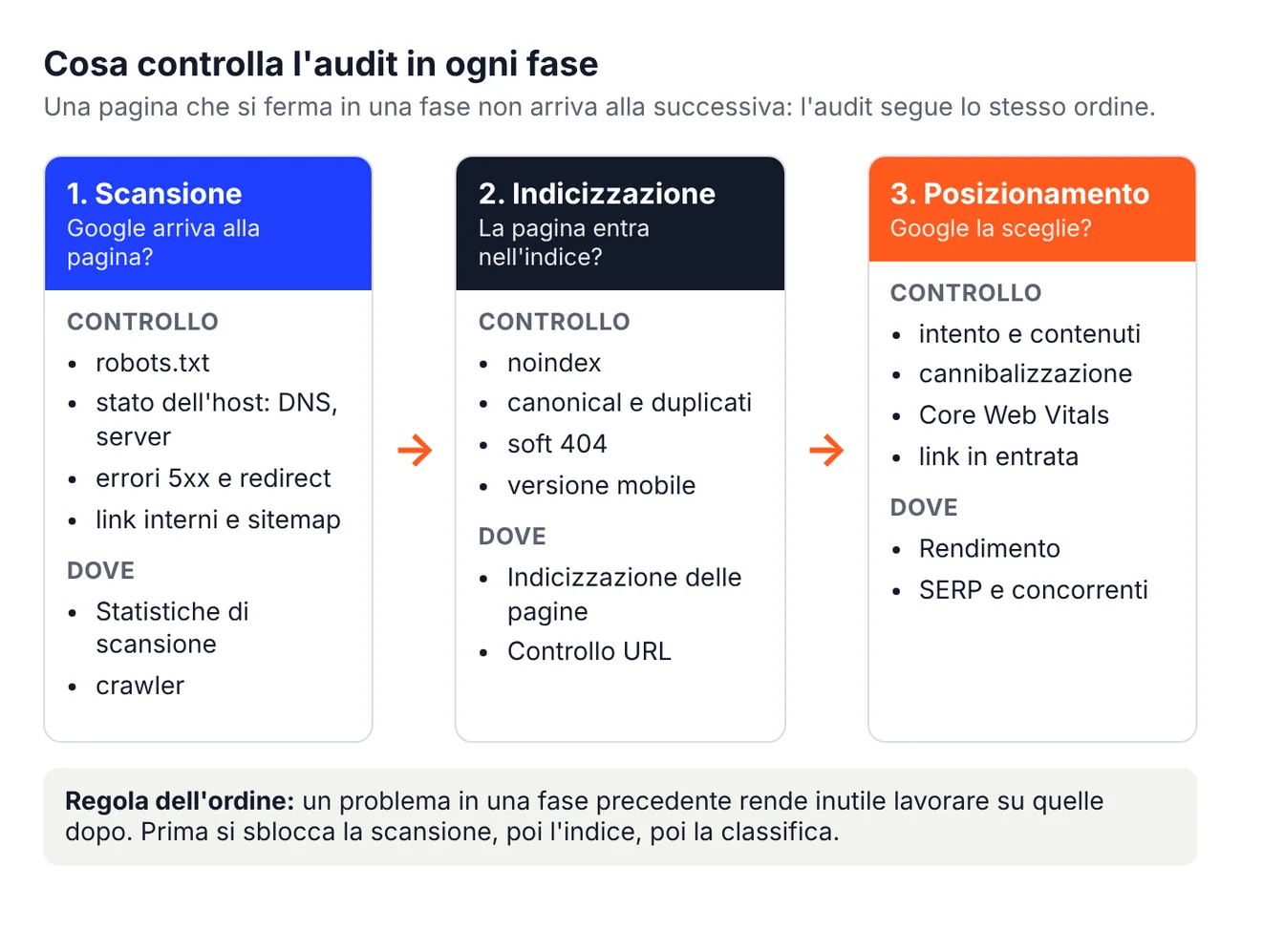
The order of the chapters follows this diagram. If Google can't crawl a section, there's no point discussing its titles. If a page is excluded from the index, its speed doesn't matter.
When you need an SEO audit
There are moments when an audit is not a routine check but a necessity. Here they are, with what changes in the approach.
| Situation | Why you need it | What it focuses on |
|---|---|---|
| Traffic drop with no clear reason | You need to separate the causes: technical issues, a Google update, seasonality, competition | Dates of the drop, affected pages and queries, host status, manual actions |
| Before and after a migration or redesign | URLs, templates and CMS change: this is when you lose the most | Redirect map, canonicals, sitemap, before/after comparison |
| Before a strategy or a new provider | You need a snapshot of the starting point, otherwise results can't be measured | Everything, with a saved numerical baseline |
| Site stuck for months despite new content | The bottleneck may be indexing, architecture or intent | Coverage, internal links, content competing with itself |
| Email alert from Search Console | Google has detected a new problem | The flagged report, then a check extended to the same area |
A traffic drop has specific causes, and Google lists them in its debugging guide: algorithm updates, technical problems, security problems, spam policy violations, seasonality, migrations with URL changes. The audit tells you which of the six is yours.
Hypothetical example. A dental practice in Bologna loses half its organic visits in a week. The first thought is a Google update. The Crawl stats report instead shows server connectivity errors on the same days: a botched hosting change. The problem is not page quality, and no rewrite would have solved it.
Typical mistake. Starting the fixes before dating the drop. In the Performance report you compare the last three months with the previous period and with the same period a year earlier: if the drop shows up the year before too, it's seasonality.
Audit tools: free and paid
A first audit can be done with free tools. Paid ones save time on large sites and are mainly useful for inbound links and competitors.
| Tool | Cost | What you use it for in the audit |
|---|---|---|
| Google Search Console | Free | Indexing, Performance by query and page, Crawl stats, Core Web Vitals, HTTPS, manual actions, security |
| PageSpeed Insights | Free | Real user data (last 28 days) and Lighthouse lab tests, page by page |
| Rich Results Test | Free | Structured data validity |
| Google Analytics 4 | Free | Behavior and conversions of organic traffic |
| Screaming Frog SEO Spider | Free up to 500 URLs; license £199 a year | Full crawl: status codes, titles, canonicals, redirects, depth, internal links |
| Ahrefs | Limited free plan; paid from $29 a month (Starter), 129 (Lite), 249 (Standard), 449 (Advanced), taxes excluded | Inbound links, competitor keywords, automated audit |
| SEOZoom | €69, €99 or €199 a month plus VAT (Essential, Evolution, Power) | Keywords and competitors on the Italian market, rank tracking |
Prices read on the official pages on November 11, 2026, with monthly billing; they drop with annual billing.
Search Console is the only tool that shows what Google sees of your site. The others estimate. Metrics like Domain Rating or Authority Score are calculations by private companies, not values Google uses.
The crawler is the second indispensable tool: it simulates a search engine's path, starting from the home page and following every link. The result is the list of URLs the site really exposes, which almost never matches what the owner believes it has. The free version of Screaming Frog is enough for a site of up to 500 URLs.
Before you start: goals, starting point and urgent checks
Before opening a crawler I write down three things: what the site is for, which pages bring in revenue and which searches matter. An e-commerce store selling across Italy and a professional practice working in one city look at different things.
The starting snapshot
From the Search Console Performance report I export clicks, impressions, CTR and average position by query and by page, over the longest range available. From GA4 I take the conversions of organic traffic by landing page.
These files are the baseline for comparison. Without them, in six months nobody will be able to say whether the fixes worked or whether traffic grew for other reasons.
Manual actions and security issues
These are the two reports that can change the whole rest of the audit, and they take a minute to check.
- Manual actions: a Google reviewer found pages that violate the spam policies. The site may be shown partially, lower in the results or not at all. You fix all the affected pages, then request a review from the report itself, explaining the problem, what you did and with what results.
- Security issues: content compromised by an attack, malware, deceptive pages. Affected pages may get a warning label in the results and the browser may block the visit with a warning page.
If you find something in either of these two reports, the audit changes priority: you fix that first, then continue.
Typical mistake. Trusting that “the site opens normally.” Security warnings depend on the browsing context and you don't always see them from your own computer: the Search Console report is what counts.
Indexing and coverage in Search Console
The Page indexing report tells you how many URLs Google knows, how many it has indexed and why the others are out. It's the check I start from, because it immediately tells you whether the problem is big or small.
What to look at
The absolute number of indexed pages matters less than you think. Google itself writes that you shouldn't expect every URL on a site to be indexed, only the canonical pages. The right questions are different:
- Are the important pages in? Take the 20-30 pages that bring or should bring customers and check them one by one with URL Inspection.
- Among the excluded ones, are there pages you want in the results? Open each exclusion reason and scroll through the example URLs.
- Are there pages in the index that shouldn't be? Filters, tags, internal search results, test pages, URLs with parameters.
The most frequent exclusion reasons and how I read them:
| Status in the report | What it means | When to worry |
|---|---|---|
| Excluded by ‘noindex’ tag | The page asks to stay out | If the examples include a page that should rank |
| Alternate page with proper canonical tag | Google respected the canonical you specified | Almost never: it's the expected behavior |
| Duplicate, Google chose different canonical than user | You declared a canonical, Google preferred another | If it happens on important pages: the site's signals contradict each other |
| Discovered – currently not indexed | Google knows the URL but hasn't crawled it yet | If it affects many new pages or an entire section |
| Crawled – currently not indexed | Google read it and decided not to keep it | If it affects pages you invested in: often a sign of weak content or content too similar to others |
| Soft 404 | The page returns 200 but looks empty or like an error | Always: it must become a real 404 or be filled with content |
The full list, with an explanation of each status, is in the Page indexing report guide.
URL Inspection, page by page
For each important page, URL Inspection shows whether it's on Google, the canonical you declared and the one Google chose. The live test tells you whether Google can access the page right now.
Remember two limits. The data for the indexed version refers to the last crawl, not to today's page. And “URL is on Google” means the page can appear, not that it appears for the searches you care about.
Hypothetical example. A training course site in Milan has 40 course pages, all in the sitemap. The report shows 14 of them as “Crawled – currently not indexed.” Opening them, they are almost identical pages: only the course title and date change. The problem is not technical, and no indexing request will solve it.
Typical mistake. Answering a quality problem by requesting indexing URL by URL. The request doesn't guarantee entry into the index, has a daily limit and doesn't change the reason Google discarded the page.
Crawling, robots.txt and server health
Here you check whether Googlebot reaches the pages and whether the server answers it well. There are three tools: the robots.txt file, the crawler and the Crawl stats report.
The robots.txt file
Open yoursite.com/robots.txt and read it line by line. Look for three things:
Disallowrules that block sections meant to rank;- blocks on CSS or JavaScript files without which the page can't be understood: in that case Google may fail to analyze it properly;
- the
Sitemap:line with the full URL of the sitemap.
Keep in mind the rule that generates the most errors: robots.txt is not for keeping a page out of Google. A blocked URL can still be indexed, without a description, if other sites link to it. To exclude a page you need noindex, on a page Google can crawl.
The robots.txt file is also where you decide whether to let in the crawlers of AI systems. It's a choice, not an error: the audit checks that it was made on purpose and not through a firewall or plugin default.
Crawl stats
The report lives in the Search Console property settings, under Crawl stats, and is available for domain properties or root-level properties. It shows the trend of Googlebot requests, the response codes and the host status, split into three categories:
- robots.txt fetch: if requests for the file fail (a valid file or a 404 count as successful, a 429 or 5xx don't), Google may stop crawling the site;
- DNS resolution: the DNS server didn't recognize the site name or didn't respond;
- Server connectivity: the server didn't respond or gave an incomplete response.
The status should be green. A problem with the DNS servers, a firewall blocking Googlebot or undersized hosting shows up here before it shows up in rankings.
Crawling with the crawler
Run the crawler on the main version of the site. From the result, extract the URLs that don't return 200 and group them by type. 5xx errors and the 429 code ask Google to slow down crawling; if an indexed URL keeps returning 5xx, sooner or later it drops out of the index.
Hypothetical example. A real estate listings portal has Disallow: /immobili/ in its robots.txt, added during development and never removed. The listings are still shown because they are linked from outside, but without a description: Google knows the address and not the content.
Typical mistake. Using robots.txt to remove already-indexed filter pages from the index. By blocking them, Google can no longer read the noindex you added, and the pages stay in.
The XML sitemap
The sitemap is the list of URLs you want Google to know about. In the audit you check that it tells the truth: it should contain only canonical, indexable pages that return 200.
What to check
- That it exists and has been submitted. In the Search Console Sitemaps report you see when Googlebot read it and whether there are processing errors.
- That it respects the limits. Each file holds at most 50,000 URLs or 50 MB uncompressed; beyond that it is split into several files, linked by a sitemap index.
- That it contains full URLs. Absolute addresses with protocol and domain, not relative paths.
- That it doesn't contain wrong URLs. Run the sitemap through the crawler (in Screaming Frog, list mode) and look for redirects, 404s, noindex pages and pages with a canonical pointing to another page.
- That
lastmodis credible. Google uses it only if it is consistently accurate: it must change when the main content changes, not on every save.
Google ignores the priority and changefreq fields. If your plugin fills them in, there's no need to correct them.
Hypothetical example. An online store in Verona has a CMS-generated sitemap with 12,000 URLs. Running it through the crawler, 3,100 are product variants with a canonical pointing to the main product page and 400 are deleted products returning 404. The sitemap promises Google pages that the site itself declares useless.
Typical mistake. Thinking the sitemap gets pages indexed. Submitting it is a suggestion: if a page isn't indexed, the cause lies in the page or in the internal links, not in the sitemap.
The file structure, the types of sitemap and the submission procedure are covered in the chapter on the sitemap.
Canonicals, duplicates, redirects and errors
This is the chapter where you decide which URL represents each piece of content. When a site exposes the same page at several addresses, Google has to pick one, and it doesn't always pick the one you'd like.
Site versions
Open the site with http:// and https://, with and without www, with and without the trailing slash. All the variants must reach the main version with a single permanent redirect.
Canonicals and duplicates
Google groups very similar pages and picks a canonical for each group. The signals you give it have different strength:
| Signal | Strength | When to use it |
|---|---|---|
| Permanent redirect (301, 308) | Strong | When the copy is no longer needed by users |
rel="canonical" | Strong | When the copy must stay accessible (filters, tracking parameters, print versions) |
| Presence in the sitemap | Weak | Always, but on its own it isn't enough |
These are hints, not orders. That's why in the audit you count how many important pages end up in the “Google chose different canonical” status: if there are many, the site's signals contradict each other. Usually the canonical says one thing and the internal links or the sitemap say another.
From the crawler, also look for duplicate titles and meta descriptions, near-identical pages and URLs with parameters reachable from internal links. Every indexable page should have a canonical pointing to itself.
Redirects, 404s and soft 404s
- Permanent and temporary redirects. 301 and 308 say the page has moved for good and push Google to treat the destination as canonical. 302, 303 and 307 are temporary and don't send this signal. For a permanent move you use a permanent redirect.
- Chains. Googlebot generally follows up to 10 redirect hops, but each hop slows down users and crawling. Internal links should point straight to the final destination.
- 404 errors. Google doesn't index URLs that return 4xx and removes from the index those that were there. It's the correct way to say a page no longer exists. You only fix the 404s that receive external links or traffic, with a redirect to the most relevant page, and broken internal links.
- Soft 404s. Empty or error pages that return 200. They must always be fixed: either a real 404, or real content.
Multilingual sites
If the site has versions for different languages or countries, this is where you check hreflang. The rules that break most often: each version must point to itself and to all the others, and the link must be reciprocal. The codes are ISO 639-1 for the language, with the ISO 3166-1 country optional; a country code alone isn't valid. The x-default value marks the version for users who don't match any of the others.
Reciprocity errors and special cases are covered in the chapter on hreflang.
Hypothetical example. A machinery company in Turin has /prodotti/pressa-idraulica/ and /en/products/hydraulic-press/. The English version points to the Italian one, but the Italian one doesn't point back: Google ignores the pair, and in Italy the English page shows up for searches on the model name.
Typical mistake. Putting a canonical to the home page or to the first page of the category on all filter pages without looking at the content. If the pages are too different, Google ignores the canonical and chooses on its own.
How to choose and write the canonical case by case is covered in the chapter on the canonical tag.
Architecture and internal links
Architecture determines how easy it is, for Google and for people, to reach the important pages. In the audit you measure it with four checks.
- Depth. From the crawler, see how many clicks from the home page the pages that matter are. Pages that bring customers should be two or three clicks away, not six.
- Orphan pages. Compare three lists: the sitemap URLs, those with traffic in GA4 or Search Console and those found by the crawler. Pages present in the first two and missing from the third receive no internal links. Every important page should have a link from at least one other page on the site.
- Links Google can follow. Google reliably follows only links written as an
<a>element with anhrefattribute. Menus and buttons that work only through JavaScript events risk not being followed. - Link text. A descriptive, concise anchor tells you what the linked page is about. “Click here” and “learn more” don't.
In the crawler, sort pages by number of inbound internal links. The top ones should be the pages you care about most. If at the top you find the privacy policy, the contact page and the blog tags, the structure is pushing the wrong pages.
Hypothetical example. An accounting firm in Padua has a page for each service, reachable only from a dropdown menu built in JavaScript. The crawler, with rendering turned off, finds 9 pages out of 45. The service pages exist, but for anyone following links they aren't there.
Typical mistake. Fixing the architecture by changing all the URLs. Every change requires redirects and risks losing something. Almost always it's enough to add new internal links from strong pages and clearer navigation, leaving the addresses where they are.
Speed and Core Web Vitals
Core Web Vitals measure the real experience of people visiting the page. They are three metrics, with fixed thresholds:
| Metric | What it measures | Good value |
|---|---|---|
| LCP (Largest Contentful Paint) | How long the main content takes to appear | Up to 2.5 seconds |
| INP (Interaction to Next Paint) | How responsive the page is to clicks, taps and keystrokes | Up to 200 milliseconds |
| CLS (Cumulative Layout Shift) | How much elements shift during loading | Up to 0.1 |
The thresholds are measured at the 75th percentile of visits, separating phone and desktop. A page passes only if it meets all three. The details are on the web.dev page on Core Web Vitals.
Where to look
- Search Console Core Web Vitals report: it groups similar pages and tells you which groups are good, need improvement or are poor. It's the starting point, because it works by page template.
- PageSpeed Insights: for a single page it shows two different things. Field data comes from real Chrome users over the last 28 days; lab data comes from a simulated Lighthouse load, useful for finding the cause. The two numbers may not match.
How much they weigh
Google recommends having good Core Web Vitals, and also writes that good results in the reports don't guarantee top rankings: Search always tries to show the most relevant content. In the audit I treat them this way: important pages with poor values go on the list; pages with “needs improvement” values on marginal metrics go after indexing and content.
Hypothetical example. A recipe site has poor LCP on all article pages on mobile. PageSpeed Insights shows that the largest element is the opening photo, 2.4 MB, loaded lazily. A single fix to the page template repairs thousands of URLs.
Typical mistake. Chasing a Lighthouse 100 on the home page. The lab score is not a Core Web Vital, the home page is often the least representative page and what matters are the page templates that bring traffic.
Mobile, HTTPS and security
The mobile version
Google indexes and ranks pages using the smartphone version. What is missing on mobile, for Google, doesn't exist.
In the audit I compare the two versions on the main pages:
- same main text, with no sections cut on mobile;
- same titles and meta descriptions;
- same structured data;
- same images with the same alt text;
- no content that appears only after a scroll, a click or typing: Google doesn't load content that requires an interaction.
For a practical comparison I open the page in URL Inspection, run the live test and look at the rendered HTML: it's the version Google really reads.
HTTPS
The Search Console HTTPS report tells you which pages are served securely and what to fix on the others. In the audit I also check that the certificate is valid on all variants of the domain, that no resources are loaded over HTTP inside HTTPS pages and that internal links already point to the secure version.
Interstitials and security
Among the questions Google suggests for evaluating page experience are these too: does the content display well on mobile, is the page served over HTTPS, does it avoid intrusive interstitials. A pop-up that covers the content as soon as you arrive from a phone is a problem for people before it is a problem for Google.
Hypothetical example. A hotel site in Rimini shows a stripped-down version on mobile, with no room descriptions and no reviews. On desktop the page is complete. Google indexes the poor version, and the page shows up for far fewer searches than the full text could cover.
Typical mistake. Hiding the “heavy” blocks on mobile, such as tables and FAQs, thinking it helps speed. You take away from Google exactly the content that makes the page useful.
Structured data
Structured data explicitly describes what is on the page: a product with price and availability, a local business with address and hours, an article with author and date. Google recommends the JSON-LD format when the site setup allows it.
What to check
- That it's there where needed. Product pages, location pages, articles, recipes, events: each page template has its own type.
- That it's valid. The Rich Results Test tells you whether the markup has the required properties to be eligible for rich results. Search Console has a report for each detected type.
- That it matches the page. You don't mark up information the user doesn't see, even if it's true.
- That it's consistent. Price in the markup and visible price the same, reviews marked up only if they're on the page, a single block per entity instead of two plugins writing different data.
Hypothetical example. An e-commerce store in Florence has two plugins that both generate Product markup: one with the current price, the other with the list price. The test flags both as valid, but Google receives two different prices for the same product page.
Typical mistake. Adding review or FAQ markup on pages that don't show them, to get more space in the results. Besides not working, it is markup that doesn't match the visible content.
Content, intent and cannibalization
Here the audit becomes less automatic and more useful. No tool can tell you whether a page answers a searcher's question well: you find out by looking at the page and the SERP.
Search intent
For each important page I take the main query from the Performance report and search for it on Google. If the top results are guides and the page is a sales page, or the other way around, the problem is not optimization: it's the wrong type of page for that search.
Titles and snippets
In the Performance report, sort pages by impressions and look at CTR. A page with many impressions and few clicks often has a title that doesn't say what's inside or that is the same as other pages on the site. From the crawler, extract titles that are duplicate, too generic or that don't contain the topic of the page.
Weak and outdated pages
- pages with little original text or nearly identical to others;
- old information: prices, regulations, years in the title that are no longer valid;
- declining pages: compare the last three months with the same period a year earlier, page by page.
Really updating a page that used to bring traffic is often the fix with the best ratio between effort and result. “Really” means in the content: changing the date without substantial edits is one of the signals Google points to as content made for search engines.
Cannibalization
Two or more pages on the same site competing for the same search split impressions and clicks, and often neither rises. In Search Console, filter the Performance report by a query and open the Pages tab: if several URLs take impressions in turn, with alternating positions, you have cannibalization.
There are three solutions: merge the pages into one with a permanent redirect, differentiate them on two different intents, or leave only one indexable. The choice depends on how much content and how many links each has.
Hypothetical example. A travel blog has three articles on “weekend in Matera,” written in different years. For the main query they alternate in eighth, twelfth and fifteenth position. By merging them into a single updated guide, with redirects from the other two, the signals that were split across three pages end up on one.
Typical mistake. Treating as cannibalization every case where two pages appear for the same query. A category page and a product page can both be in the results without problems: it's cannibalization when they swap places and neither stabilizes.
Inbound links and competitors
Links from other sites remain one of the ways Google evaluates a page's reputation. In the audit you look at two things: whether the profile is healthy and what your competitors have that you don't.
The link profile
With a backlink tool, or with the Search Console Links report for a first look, check:
- how many different domains link to you, not how many links in total;
- how relevant they are to your industry and your area;
- which pages they point to: often all to the home page and none to the pages that sell;
- links to pages that now return 404, to recover with a redirect.
Google's spam policies count as link spam, among others, links bought or sold for ranking, excessive exchanges, links created with automated programs and those with optimized anchors inside sponsored articles and press releases. Paid links are allowed if they carry rel="nofollow" or rel="sponsored". The full list is in Google's spam policies.
Your real competitors
SEO competitors are the sites that show up for your searches, not the ones you consider competitors in the market. For each one you look at which searches it ranks for and you don't, what kind of pages it uses and where its links come from. This is often where the best ideas for content to write after the audit come from.
Hypothetical example. A window and door company in Brescia has 80 domains linking to it, almost all directories and trade fair sites. The two competitors ahead of it have fewer, but from trade associations, local newspapers and suppliers. The difference is not quantity, it's relevance.
Typical mistake. Taking the tools' authority scores at face value as if they were Google values. They are estimates by private companies, useful for comparing, not for deciding whether a link is good.
Local SEO, if the site works in one area
If the business receives customers at a location or works in a specific area, the audit includes the business profile on Google. For local results Google looks mainly at three factors: relevance, distance and prominence, meaning how well known the business is, including through links and reviews.
What I check:
- verified profile, with the correct primary category and attributes filled in;
- complete information matching the site: name, address, phone, hours, including holiday hours;
- reviews: how many, how recent, whether they get a reply;
- photos of the premises, products and work;
- a page on the site for each location, with address, hours, directions and local business markup.
Local ranking can't be bought and can't be requested from Google: it depends on these elements and on how well the profile matches the search.
Hypothetical example. A physiotherapy center with two locations, in Bologna and Imola, has a single contact page with both addresses and two Google profiles pointing to the home page. Two separate location pages, each linked to its profile, give each location a page that answers people searching in that city.
Typical mistake. Different hours across the site, the profile and other directories. Someone who finds the location closed leaves a negative review, and the problem becomes one of reputation.
AI answers: AI Overview, AI Mode and chatbots
More and more searches end with a generated answer, with links to sources. In the audit this chapter is short, because for Google the rules are the same as ever.
To appear as a source in AI Overview and AI Mode, a page must be indexed and eligible to be shown with a snippet. Google writes that there are no additional technical requirements: no special files, dedicated markup or particular structured data are needed. The official page is the one on AI features and your website.
What I check:
- snippet directives:
nosnippet,data-nosnippetandmax-snippetlimit what Search can show, including in AI answers. They are often left over from old configurations; - crawler access: the robots.txt rules for Googlebot and, if the site wants to be cited by ChatGPT or Perplexity, for their bots;
- pages that answer specific questions, with the answer in the first lines and the details below;
- measurement: traffic from AI Overview and AI Mode is included in the Search Console Performance report, Web search type, together with everything else.
Typical mistake. Adding an llms.txt or rewriting the text in fragments “for AI” while half of the important pages are out of the index. A page that isn't on Google can't be cited by Google's answers.
How to rank priorities: the impact/effort matrix
At the end of the checks you have a long list. The audit is worth what the ordering is worth: of the many things found, few really move the results.
I give each problem two scores, from 1 to 3:
- Impact: how many important pages it affects, how much traffic or revenue flows through those pages, whether it blocks an entire stage (crawling, indexing) or worsens a detail.
- Effort: how many hours it takes, who has to do it, whether a setting is enough or a developer is needed, whether it touches one page template or a thousand pages by hand.
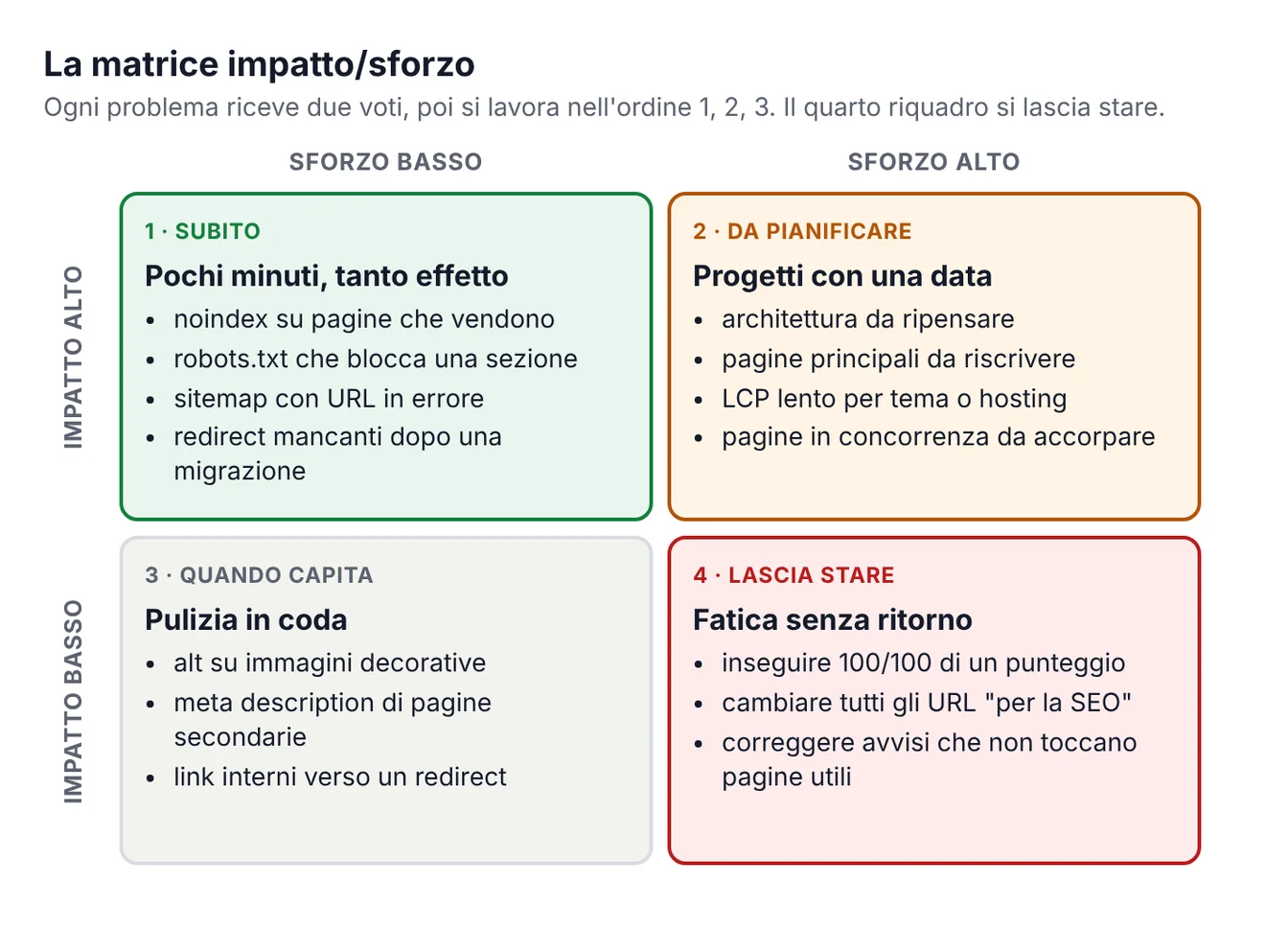
Then I apply two rules that come before the matrix:
- Stages before details. A problem that blocks crawling or indexing of important pages goes to the top, whatever the effort.
- Pages near the top before the others. A page in fourth or fifth position for a search that matters gains more from a fix than a page in thirtieth.
The second rule has a basis in the numbers. Across the 22 sites I follow, in July-September 2026 third position had a CTR of 3.1% and from fifth position down it falls below 1%: between third and fifth position the CTR is divided by four. The data comes from Google Search Console, searches from Italy, 14 million impressions, aggregated and anonymous.
Typical mistake. Prioritizing what you know how to fix instead of what matters. Meta descriptions can be fixed in an afternoon and give the feeling of having done a lot; the noindex section can't, but it weighs a hundred times more.
How to write the audit report
The report is the tool through which whoever works on the site will know what to do. I write it for the people who have to act, not to show how much I checked.
The structure
- One-page summary: the state of the site in three or four sentences and the five to ten priority fixes, in order.
- The fix rows: one per problem, with the same fields for all.
- The plan: who does what and in which month, separating quick fixes from projects.
- The numerical baseline: the starting snapshot, for later comparisons.
- The appendices: crawler exports, URL lists, screenshots of reports.
One row of the report
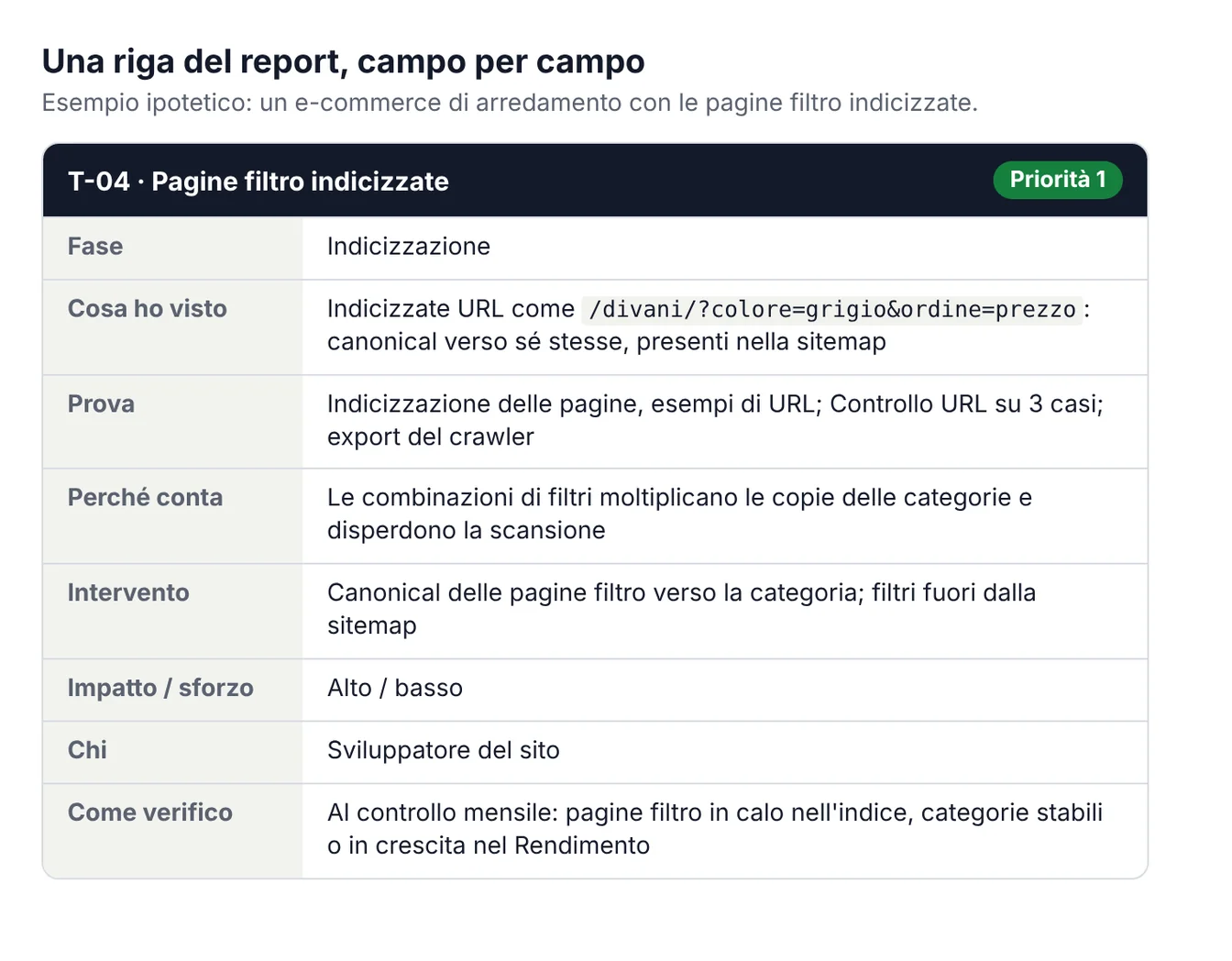
Each row has the same fields: what I saw, the evidence, why it matters, the fix, impact and effort, who does it, how it's verified. The evidence is what makes the report credible: an example URL, a screenshot of the report, a number from the export.
The same hypothetical example in table form, as I deliver it in a spreadsheet:
| ID | Problem | Fix | Impact | Effort | Who |
|---|---|---|---|---|---|
| T-04 | Filter pages indexed and present in the sitemap | Canonical to the category, filters out of the sitemap | High | Low | Developer |
| C-02 | Three articles on the same topic competing | Merge into one, permanent redirects from the others | Medium | Medium | Editorial team |
| T-11 | Decorative images without alt | Empty alt on decorative images | Low | Low | Editorial team |
Language matters. “Canonicals not optimized” means nothing to a developer. “The 230 filter pages declare themselves as canonical: the tag must point to the category” does.
If you're curious what a delivered audit looks like and what it contains, I describe it on the SEO audit service page.
Typical mistake. A hundred-page report organized by tool (“Screaming Frog,” “Search Console,” “PageSpeed”) instead of by priority. Whoever receives it reads the first ten pages and stops, and the first ten aren't the most important.
How often to repeat the audit
A site changes every week: updated plugins, new templates, pages added and removed. An audit done once and never repeated is a snapshot of a site that no longer exists.
Google doesn't set a frequency for audits. For Search Console it recommends checking the account roughly once a month and whenever you change the site's content; for new problems it sends an email. The rhythm I follow:
| What | When | On what |
|---|---|---|
| Search Console check | Every month | Indexing, host status, Core Web Vitals, manual actions, security, Performance trend |
| Mini audit | Every three to four months | Full crawl with the crawler, main pages, progress on the report's fixes |
| Full audit | Once a year | All the chapters of this guide, with a new starting snapshot |
| Targeted audit | After every major change | The part touched: a new template, a CMS change, a migration, a new section |
Between audits I keep the fixes file open: each row has a status (to do, in progress, done, verified). At the next mini audit I check the “done” rows first, because a fix that hasn't been verified isn't closed.
After a fix, the results should be read patiently. Google suggests waiting a few weeks before analyzing the site again in Search Console: a check the next day shows only noise.
Typical mistake. Redoing the audit from scratch every time, with a new list, without looking at what happened to the previous fixes. The comparison with the starting snapshot is the part that tells you whether the work paid off.
Frequently asked questions
What is the difference between an SEO audit and a technical SEO audit?
A technical audit is one part of an SEO audit: it looks at crawling, server, indexing, canonicals, redirects, speed, mobile, HTTPS and structured data. A full SEO audit adds content, search intent, cannibalization, inbound links and competitors. You can do only the technical one, for example after a migration, but it won't explain why technically clean pages don't rank.
Can I do an SEO audit myself?
On a site of a few dozen pages, yes, with Search Console, PageSpeed Insights and the free version of a crawler. It becomes hard with thousands of URLs, filters, several languages, a migration in progress or a drop you can't explain: there, having seen many cases helps you understand, for example, why Google picks a different canonical or whether a drop is technical or algorithmic.


