
Noscript: What the HTML Tag Is and How It Affects SEO
What the noscript tag is, how to write it in the head and in the body, what Googlebot sees, and why a noscript with an image in the head can make Google ignore canonical and hreflang. With correct code.

Eugenio Tommasi
Founder of SEO SRL
Published 8 min read

Noscript is an HTML tag that contains alternative content, shown only when the browser does not run the page's scripts because JavaScript is disabled or unsupported.
Table of contents (9 sections)
- What the noscript tag is
- How to write it: noscript in the head and in the body
- Noscript and SEO: what Google sees
- The noscript-in-head error that makes Google ignore canonical and hreflang
- The Google Tag Manager noscript
- When to use noscript and when not to
- Modern alternatives to noscript
- How to check noscript on your site
- Frequently asked questions
<noscript> is an HTML tag that holds alternative content, shown only when the browser does not run the page's scripts because JavaScript is disabled or unsupported. If scripts run, its content does not appear.
For SEO, noscript is not there to make your content readable: Google reads it because Google executes JavaScript. But a badly written noscript in the <head> can make Google ignore your canonical, your hreflang tags and your meta robots.
What the noscript tag is
A script is a piece of code, almost always JavaScript, that the page loads with the <script> tag and the browser executes: an image gallery, a form that validates itself, a cart that updates without reloading the page. If JavaScript does not run, those features disappear.
The <noscript> tag exists for exactly that case. It is a standard HTML element, supported by all browsers, and it works like this:
- with scripts enabled, the browser treats the noscript content as text and does not display it;
- with scripts disabled, the content is read as normal HTML and appears on the page.
Do not confuse it with NoScript, the free extension for Firefox- and Chromium-based browsers that blocks scripts from untrusted sites. Same name, different things: the extension is a security tool for people browsing, and those who use it are exactly the kind of users who will see your noscript tag.
How to write it: noscript in the head and in the body
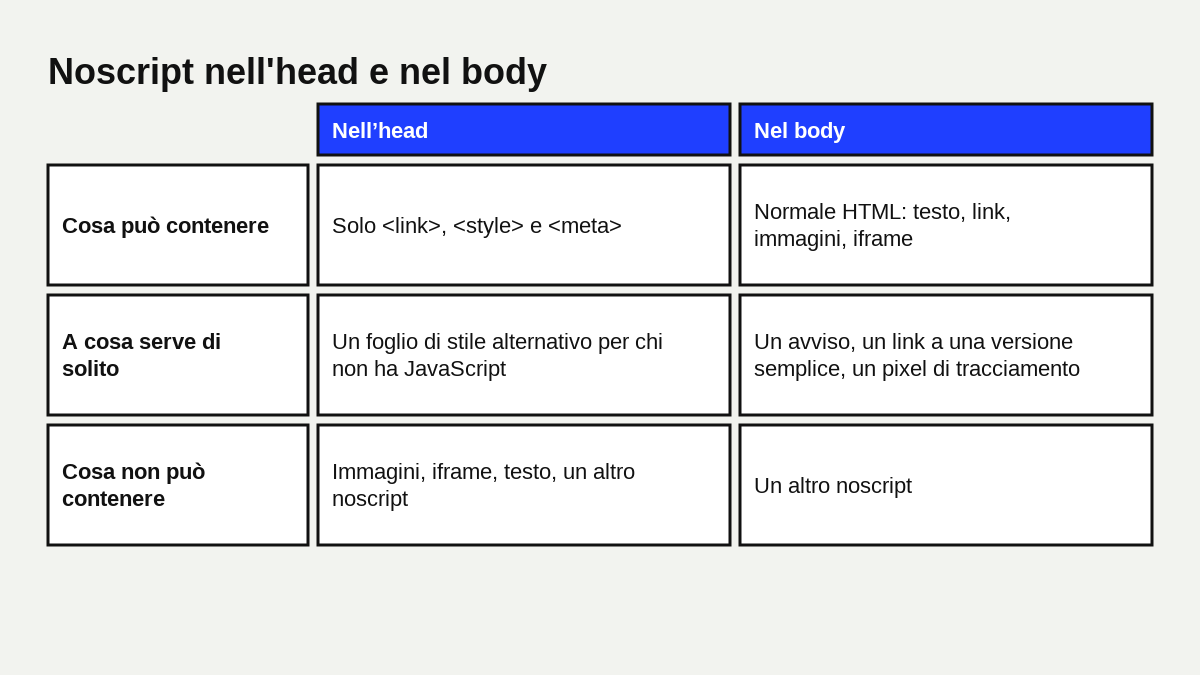
The tag opens with <noscript> and closes with </noscript>; both are required and it has no attributes of its own. It can sit in two places, with different rules.
| In the head | In the body | |
|---|---|---|
| What it can contain | Only <link>, <style> and <meta> | Normal HTML: text, links, images, iframes |
| What it is usually for | An alternative stylesheet for people without JavaScript | A notice, a link to a simple version, a tracking pixel |
| What it cannot contain | Images, iframes, text, another noscript | Another noscript |
A correct use in the head, with a CSS file that shows elements hidden while waiting for JavaScript:
<head>
  <title>Catalogo bici elettriche</title>
  <link rel="canonical" href="https://www.tuosito.it/bici-elettriche/">
  <noscript>
    <link rel="stylesheet" href="/css/senza-js.css">
  </noscript>
</head>
A correct use in the body, after a gallery that only works with JavaScript:
<div id="galleria"></div>
<script src="/js/galleria.js"></script>
<noscript>
  <p>La galleria richiede JavaScript.
     <a href="/foto/">Sfoglia le foto in una pagina semplice</a>.</p>
</noscript>
The noscript text should say what is missing and what to do about it, not just "enable JavaScript". A link to an alternative is worth more than a scolding.
Noscript and SEO: what Google sees
Google processes pages in three phases: crawling, rendering and indexing. In rendering, a headless, up-to-date version of Chromium runs the JavaScript, and Google indexes the resulting HTML. In practice Googlebot looks at the page like a user with scripts enabled. And with scripts enabled, the noscript content is just text the browser does not display.
The practical consequences:
- Do not put important text or links in noscript hoping Google will use them. How Google treats noscript content is not documented, and there is no reason to entrust it with anything that matters.
- Do not use it to "rescue" a site that only shows content with JavaScript. The fix is to get text and links into the HTML from the start, with server-side rendering or pre-rendering. Google recommends this too: it makes the site faster for everyone, and not all bots execute JavaScript.
- AI crawlers. Neither OpenAI nor Anthropic documents whether its crawlers execute JavaScript. The only public measurement I know of is from Vercel, December 2024: GPTBot and ClaudeBot downloaded JavaScript files but did not execute them, while Gemini used Googlebot's infrastructure, with full rendering. That may have changed since, and how these bots treat noscript is not documented. The right answer is still server-side HTML. For OpenAI's bots, see the guide to GPTBot.
The noscript-in-head error that makes Google ignore canonical and hreflang
This is where noscript really touches SEO. In the head, only these elements are valid: title, meta, link, script, style, base, noscript and template. When Google finds an invalid element, such as an <img> or an <iframe>, it assumes the head has ended and ignores the elements that come after. This is stated on Google's page about valid page metadata.
The typical case is a tracking code pasted entirely into the head, including the noscript part with the image or iframe:
<!-- Da evitare -->
<head>
  <title>Scarpe da trail</title>
  <script>/* codice del pixel */</script>
  <noscript><img src="https://esempio-pixel.com/tr?id=123" width="1" height="1"></noscript>
  <link rel="canonical" href="https://www.tuosito.it/scarpe-trail/">
  <link rel="alternate" hreflang="en" href="https://www.tuosito.it/en/trail-shoes/">
  <meta name="robots" content="max-image-preview:large">
</head>
Canonical, hreflang and meta robots come after an image, that is, after the point where Google may consider the head closed. The risk is that they get ignored, and nobody notices until duplicate pages show up in the index or language versions get mixed. The fix is simple:
<!-- Corretto -->
<head>
  <title>Scarpe da trail</title>
  <link rel="canonical" href="https://www.tuosito.it/scarpe-trail/">
  <link rel="alternate" hreflang="en" href="https://www.tuosito.it/en/trail-shoes/">
  <script>/* codice del pixel */</script>
</head>
<body>
  <noscript><img src="https://esempio-pixel.com/tr?id=123" width="1" height="1" alt=""></noscript>
  ...
Two rules that hold for any site: SEO tags (canonical, hreflang, meta robots) go at the top of the head; images and iframes, even inside a noscript, go in the body. If a vendor tells you to paste everything into the head and you cannot move it, at least place it after the tags you want Google to read.
The Google Tag Manager noscript
This is the most common case. Google Tag Manager is installed with two snippets: the script goes in the head, as high as possible; the noscript part with the iframe goes right after the opening <body> tag, as the installation instructions say. The second snippet looks like this, with your own ID in place of the example one:
<body>
<noscript><iframe src="https://www.googletagmanager.com/ns.html?id=GTM-ABCDEFGH"
height="0" width="0" style="display:none;visibility:hidden"></iframe></noscript>
Moving it into the head "for convenience", perhaps with a plugin that only inserts code there, recreates exactly the error described above. I explain how to set it up properly in the guide to Google Tag Manager.
When to use noscript and when not to
| Situation | Noscript? | What to do |
|---|---|---|
| A feature does not work without JavaScript (gallery, map, configurator) | Yes | A clear notice with a link to an alternative |
| Tracking code with a fallback version | Yes, in the body | Paste it right after <body> |
| Stylesheet for people without JavaScript | Yes, in the head | Only <link> or <style> |
| Text and links that need to rank | No | Put them in the HTML served by the server |
| Site built entirely client-side (single-page app) | No | Server-side rendering, static generation or pre-rendering |
| Lazy-loaded images | Usually no | Use native loading="lazy": the image is already in the HTML |
The last row deserves a note. Years ago it was common to duplicate every image loaded via JavaScript inside a noscript. Today browsers support native lazy loading, and Google lists it among the methods that do not depend on user interaction. The image sits in src from the start, and the noscript becomes unnecessary.
Modern alternatives to noscript
If the goal is to adapt the page for people without JavaScript, there are cleaner tools today.
The scripting media query, available in all major browsers since December 2023. It lets you change the style directly in the CSS:
.menu-mobile { display: none; }

@media (scripting: none) {
  .menu-mobile { display: block; }  /* senza JS il menu resta aperto */
}
The no-js class, an old but solid trick: the HTML starts with <html class="no-js">, the first line of JavaScript changes it to js, and the CSS uses the two classes to show or hide elements.
Progressive enhancement, which is the real solution: the page works with plain HTML and normal links, and JavaScript adds convenience. A form that submits data even without scripts, a menu made of real links, products in the source code. It is also the simplest way to avoid problems with both Googlebot and bots that do not execute JavaScript. If the site is yet to be built, it is best to start from here already at the design stage.
How to check noscript on your site
- Open the source code (Ctrl+U or Cmd+Option+U) and search for "noscript". For every occurrence in the head, check that it contains only link, style or meta.
- Look at the order of the head. Canonical, hreflang and meta robots must come before any third-party script and any invalid element.
- Use Search Console's URL Inspection and open the rendered HTML: check that the declared canonical is the one you expect and that the main content is there.
- Turn off JavaScript in the browser (from the developer tools) and browse: if a page goes blank, the problem will not be solved with a noscript.
- Check the plugins that insert code into the head: they are the most frequent cause of images and iframes in the wrong place.
These checks are part of a technical SEO audit. If you want your site's head checked, set your priorities with a professional SEO audit.
Frequently asked questions
Is noscript the same thing as the NoScript extension?
No. The noscript tag is an HTML element you add to your own site; NoScript is a browser extension that blocks scripts from untrusted sites. People who use the extension see the content of noscript tags.


