
Sitemap: What It Is, How to Create It and Submit It to Google
When you need a sitemap, how to write an XML file, what Google uses and ignores, how to create and submit it, and how to fix errors in the Sitemaps report.

Eugenio Tommasi
Founder of SEO SRL
Published 17 min read

A sitemap is a file that lists the URLs of a site you want search engines to find, with optional data such as the last modified date: it helps page discovery, not rankings.
Table of contents (15 sections)
- What a sitemap is and what it does not do
- When you need a sitemap and when you don’t
- Formats: XML, RSS and Atom, text
- What an XML file looks like
- What Google uses and what it ignores: lastmod, priority, changefreq
- File limits and the sitemap index
- Sitemaps for images, videos and news
- Other-language versions in the sitemap
- What to put in the sitemap and what to leave out
- How to create a sitemap
- How to submit the sitemap to Google and other search engines
- Reading the Sitemaps report and fixing errors
- The HTML sitemap for people, and accessibility
- The mistakes I find most often and how I check for them
- Frequently asked questions
A sitemap is a list: you tell Google which pages on your site you want it to find and, if you like, when they last changed. It does not guarantee that they will be crawled or indexed.
This guide is practical. You will work out whether you need one, write or generate the right file, submit it, read the Search Console report and clean up the errors I find most often when I run an audit.
What a sitemap is and what it does not do
A sitemap is a file that lists the pages, videos and other files on your site and describes the relationships between them, for example the date of the last change or the versions of a page in other languages. Google reads it to crawl the site more efficiently.
The comparison with a book’s index only goes so far. An index tells you where everything is; a sitemap lists only what you want to be found, and it is a suggestion, not an order. Googlebot still discovers pages mostly by following links, as I explain in how search engines work.
The file helps with discovery and crawling. What Google decides to keep in its index depends on other things: page quality, duplicates, blocks, canonicals.
When you need a sitemap and when you don’t
Google lists three cases where a sitemap helps and three where it probably doesn’t.
| You need one if… | You may not need one if… |
|---|---|
| The site is large: it is hard to link every page from at least one other page, and new pages risk not being found | The site is small, around 500 pages at most, counting only the ones you want to show in search |
| The site is new and has few links from other sites: Googlebot may not find the pages | The site is well linked internally and the important pages can be reached from the home page |
| You have a lot of media content or news, and the extra information in the sitemap is useful to Google | You have few media files or news items to show in search |
My position is to create one anyway. It costs little, most CMSs generate it automatically, and in Search Console it gives you a comparison that links can’t: the pages you declared against the pages Google indexed. When the two numbers diverge, you have found where to start.
A small site without a sitemap has no problem in itself. The problem starts when the sitemap exists and is wrong, because it sends contradictory signals.
Formats: XML, RSS and Atom, text
Google has no preference between formats. What changes is what each one can tell it.
| Format | What it contains | When I use it |
|---|---|---|
| XML | URLs, last modified date, images, videos, news, localized versions | Almost always: it is the most versatile |
| RSS 2.0 and Atom 1.0 (also mRSS for videos) | Only recent URLs; video information with mRSS, no images or news | As an addition, because many CMSs generate them automatically |
| Text (.txt) | One URL per line, only HTML pages and other indexable text pages | Small sites, when nothing else is needed |
The XML format follows a protocol shared by search engines, published on sitemaps.org. For RSS and Atom feeds Google also supports WebSub, a way to notify search engines when the feed changes.
What an XML file looks like
A minimal sitemap with two pages:
<?xml version="1.0" encoding="UTF-8"?>
<urlset xmlns="http://www.sitemaps.org/schemas/sitemap/0.9">
  <url>
    <loc>https://www.tuosito.it/</loc>
    <lastmod>2026-11-03</lastmod>
  </url>
  <url>
    <loc>https://www.tuosito.it/servizi/consulenza/</loc>
    <lastmod>2026-10-05T10:30:00+02:00</lastmod>
  </url>
</urlset>
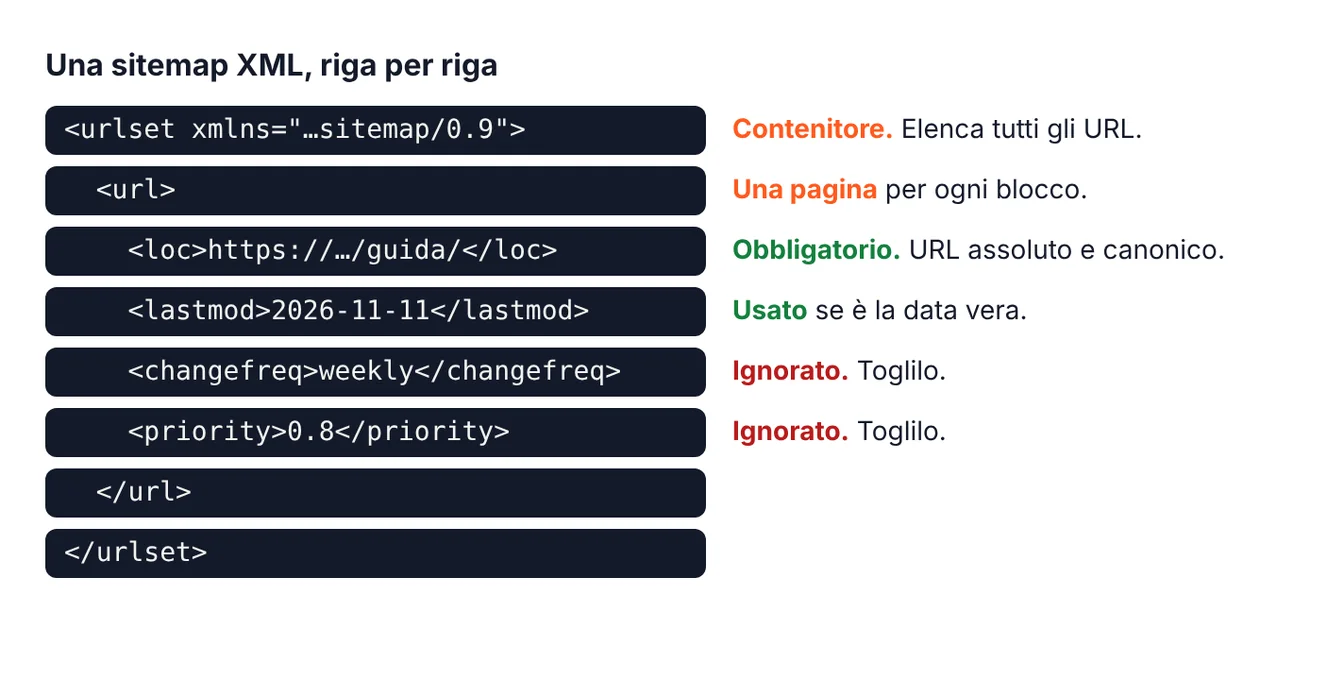
The structure is nested: urlset contains one url block for each page, and each block contains its own fields. The figure shows the same layout with what each line does.
Writing rules
- UTF-8 and XML-escaped values: an
&in a URL is written&. The other characters to replace are the apostrophe ('), the quotation mark (") and the angle brackets (<and>). - Absolute, complete URLs, with protocol and host:
https://www.tuosito.it/pagina/, never/pagina/. The value oflocmust be shorter than 2,048 characters. - Canonical URLs: if there is a desktop and a mobile version, list only one.
- Location: preferably in the site root. If you don’t submit it through Search Console, a sitemap only covers the URLs in its own folder and subfolders: a sitemap in
/blog/cannot list/prodotti/.
What Google uses and what it ignores: lastmod, priority, changefreq
Of the optional fields, Google uses lastmod and ignores priority and changefreq. The protocol describes them as hints, and Google doesn’t read them.
| Tag | Required | Does Google use it? |
|---|---|---|
<loc> | Yes | Yes |
<lastmod> | No | Yes, if it is consistent and verifiable |
<changefreq> | No | No, it ignores it |
<priority> | No | No, it ignores it |
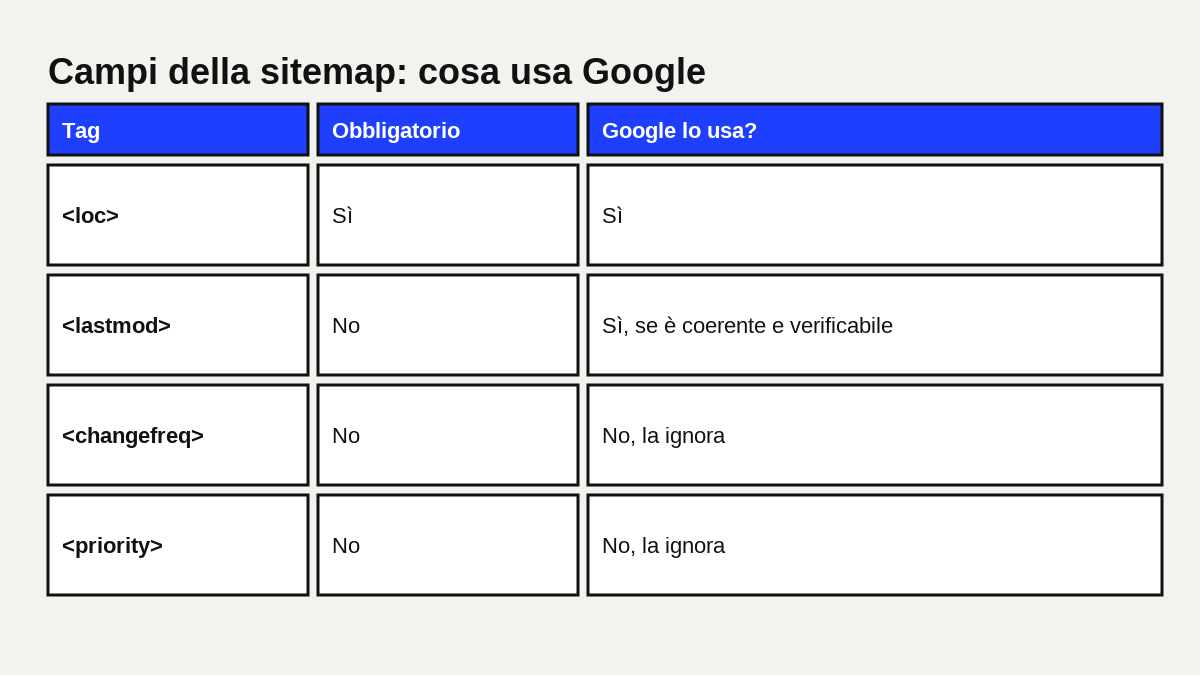
It is worth pausing on lastmod. Google only uses it if it matches the last significant update of the page: changing the copyright date in the footer doesn’t count.
The date must be written in W3C Datetime format: either just the day (2026-11-03) or with time and time zone. It must reflect the last change to the page, not the moment the file was generated.
On priority and changefreq my choice is clear: I remove them. The protocol itself says that giving a high priority to all the URLs on a site probably doesn’t help, and a shorter file is quicker to check.
File limits and the sitemap index
Each sitemap can contain at most 50,000 URLs and weigh at most 50 MB uncompressed. You can compress the file with gzip to save bandwidth, but the 50 MB limit applies to the decompressed file.
Beyond those limits you split the list into several files and gather them in a sitemap index. Even sites under the threshold do well to split by content type: articles, products, categories.
<?xml version="1.0" encoding="UTF-8"?>
<sitemapindex xmlns="http://www.sitemaps.org/schemas/sitemap/0.9">
  <sitemap>
    <loc>https://www.tuosito.it/sitemap-articoli.xml</loc>
    <lastmod>2026-11-05</lastmod>
  </sitemap>
  <sitemap>
    <loc>https://www.tuosito.it/sitemap-prodotti.xml.gz</loc>
    <lastmod>2026-11-07</lastmod>
  </sitemap>
</sitemapindex>
The index rules are few. It can list up to 50,000 sitemaps, each with a single loc. The listed sitemaps must be on the same site and in the same folder as the index or a more specific one: an index in /public/ can point to /public/shared/, not to another folder.
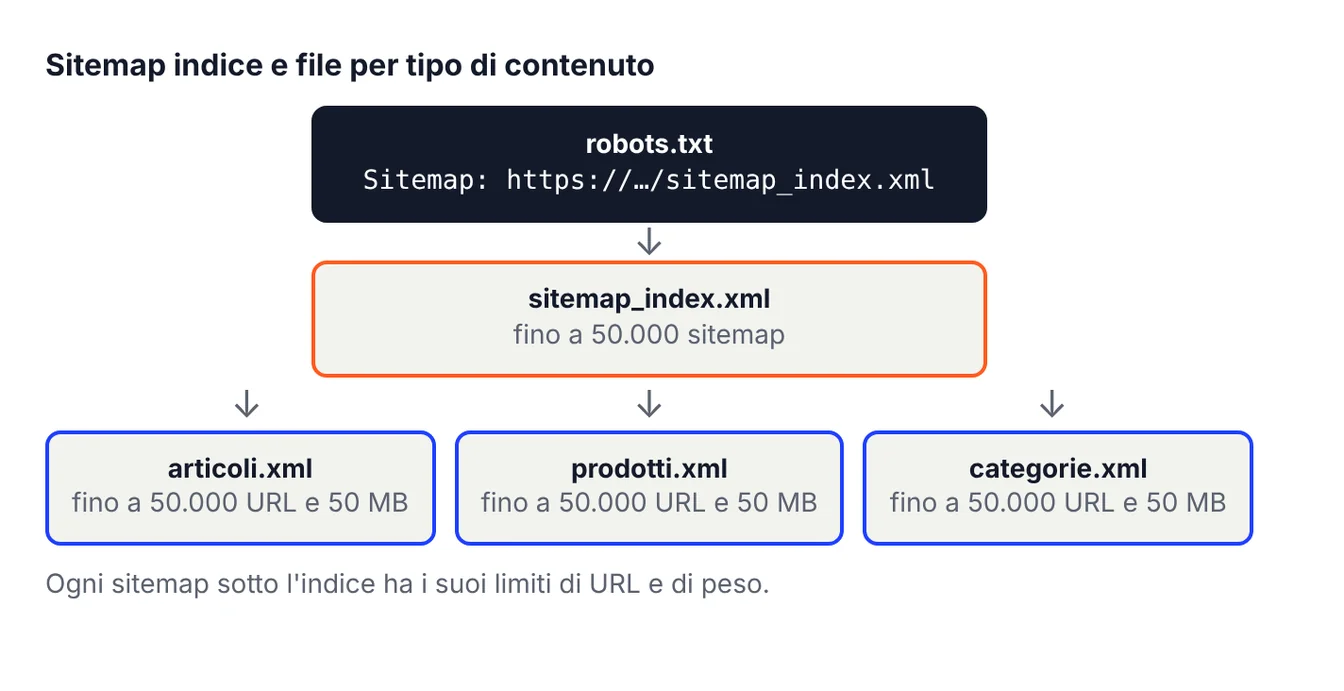
In Search Console you can submit up to 500 index files per site. The practical advantage of splitting by type is in the Page indexing report: filtering by sitemap shows you at once which group has indexing problems. For example, if almost all products are indexed and almost none of the filter pages are, you already know where to look.
Sitemaps for images, videos and news
XML accepts extensions for other content types, which you can also combine in the same file: you declare the namespace of each one in the urlset tag and add their tags inside the page’s url block. Combining extensions makes the file grow a lot, so the limits still apply.
Images
An image sitemap is used to flag images that Google might not find on its own, for example those reachable through JavaScript. Each url can contain up to 1,000 images.
The required tags are image:image and image:loc. Title, caption, geographic location and license have been removed from the documentation.
<urlset xmlns="http://www.sitemaps.org/schemas/sitemap/0.9"
        xmlns:image="http://www.google.com/schemas/sitemap-image/1.1">
  <url>
    <loc>https://www.tuosito.it/prodotti/bici-elettrica/</loc>
    <image:image>
      <image:loc>https://cdn.tuosito.it/img/bici-elettrica.jpg</image:loc>
    </image:image>
  </url>
</urlset>
If the images are on another domain, such as a CDN, both domains must be verified in Search Console, and robots.txt must not block them. Google’s page on image sitemaps has all the details.
Videos
Each video needs a thumbnail (video:thumbnail_loc), a title, a description (up to 2,048 characters) and the address of either the file (video:content_loc) or the player (video:player_loc). For videos embedded from platforms like YouTube or Vimeo, you use the player.
<url>
  <loc>https://www.tuosito.it/video/montaggio-bici/</loc>
  <video:video>
    <video:thumbnail_loc>https://www.tuosito.it/thumbs/montaggio.jpg</video:thumbnail_loc>
    <video:title>Montaggio della bici elettrica</video:title>
    <video:description>Il montaggio in sei passi.</video:description>
    <video:content_loc>https://www.tuosito.it/video/montaggio.mp4</video:content_loc>
  </video:video>
</url>
News
The news sitemap is for publishers who want to appear in Google News. It contains only articles published in the last two days, up to 1,000 news:news tags: after two days the URL leaves the file or loses its news metadata.
It needs the publication name, the language, the date the article was first published on the site and the article title, without author, publication name or date. An empty news sitemap, after a few days without articles, can trigger a warning in Search Console but does not cause problems in search.
Other-language versions in the sitemap
The sitemap is one of the ways to declare the language versions of a page, alongside tags in the head and HTTP headers. It is the most convenient when there are many languages, because the code lives in a single file. The hreflang rules stay the same.
Each url lists all the versions, including itself, with one xhtml:link per version. For the fallback page, such as a language selector, you use x-default.
<urlset xmlns="http://www.sitemaps.org/schemas/sitemap/0.9"
        xmlns:xhtml="http://www.w3.org/1999/xhtml">
  <url>
    <loc>https://www.tuosito.it/it/pagina/</loc>
    <xhtml:link rel="alternate" hreflang="it" href="https://www.tuosito.it/it/pagina/"/>
    <xhtml:link rel="alternate" hreflang="en" href="https://www.tuosito.it/en/page/"/>
    <xhtml:link rel="alternate" hreflang="x-default" href="https://www.tuosito.it/"/>
  </url>
  <url>
    <loc>https://www.tuosito.it/en/page/</loc>
    <xhtml:link rel="alternate" hreflang="it" href="https://www.tuosito.it/it/pagina/"/>
    <xhtml:link rel="alternate" hreflang="en" href="https://www.tuosito.it/en/page/"/>
    <xhtml:link rel="alternate" hreflang="x-default" href="https://www.tuosito.it/"/>
  </url>
</urlset>
The xhtml:link blocks don’t count toward the 50,000 URL limit. The file still grows fast, though: with ten languages every page has ten lines of alternates, and every language has its own page.
What to put in the sitemap and what to leave out
The sitemap should contain the URLs you want to see in Google’s results. Put the other way round, these stay out:
- URLs that respond with a redirect (3xx) or an error (4xx, 5xx);
- pages with
noindex; - URLs blocked by robots.txt;
- duplicate or non-canonical pages: if a page has a canonical pointing elsewhere, the other one goes in the sitemap;
- URLs with tracking, sorting or session parameters;
- utility pages: cart, account, internal search results, thank-you pages.
Every wrong URL is a contradictory signal: you tell Google “this page is important” and when it arrives it finds a redirect or a noindex. It is not a penalty, but a site that contradicts itself wastes crawls and makes it harder to tell which pages are the good ones.
How to create a sitemap
Writing it by hand makes sense for a few dozen URLs that rarely change, using a text editor. Beyond that, the site has to generate it from the database or the list of pages, and update it every time you publish or remove something.
With WordPress
Since version 5.5 (2020) WordPress creates a sitemap on its own at /wp-sitemap.xml, which is the index of all the others. By default it includes public post types and taxonomies, pages, author archives and the home page, and each file contains at most 2,000 URLs.
A few things to know, all from the feature’s launch post:
- the sitemap switches itself off when the site asks search engines not to index it;
- the launch post doesn’t describe an option to exclude noindex content: you go through the
wp_sitemaps_posts_query_argsfilter, which lets you exclude individual posts; - at launch
lastmodwas not included and had to be added with thewp_sitemaps_posts_entryfilter: open your file and check whether it is there today and whether it makes sense; - to remove author archives or taxonomies you don’t want indexed you need the
wp_sitemaps_add_provider,wp_sitemaps_post_typesandwp_sitemaps_taxonomiesfilters.
// Toglie dalla sitemap nativa gli archivi per tag
add_filter( 'wp_sitemaps_taxonomies', function ( $taxonomies ) {
    unset( $taxonomies['post_tag'] );
    return $taxonomies;
} );
With an SEO plugin, the native sitemap is usually replaced by the plugin’s own, at a different address. The right address is the one written in robots.txt. How to choose and configure the plugin is covered in the guide to WordPress SEO plugins.
With other CMSs and custom sites
If you use a CMS such as Wix or Blogger, the sitemap is probably already available. Before looking for a plugin, check the address and the content of the file the system produces.
On custom-built sites the sitemap is generated from the database or the list of routes every time content changes. It is the cleanest solution, because lastmod can take the real modification date saved for each page.
With generators and crawlers
Online generators and crawlers that export a sitemap take a snapshot of the site at a given date. They are fine for a static site or for a check, but if the site changes, the sitemap goes stale.
Whichever route you choose, open the file in your browser and check three things: that it opens without errors, that the URLs are the canonical ones, with https and the right domain, and that there are no sections you don’t want indexed, such as tags, author archives or attachments.
How to submit the sitemap to Google and other search engines
There are three ways, and you can use them together. Submitting is only a suggestion: it does not guarantee that Google will crawl the URLs.
1. The line in robots.txt
In the robots.txt file you add a Sitemap: line with the full URL. It is optional and repeatable: you can list as many as you need.
User-agent: *
Disallow: /carrello/

Sitemap: https://www.tuosito.it/sitemap_index.xml
Google does not assume or check whether the http, https, www and non-www variants exist, so the line must use the exact address of the site.
2. The Search Console Sitemaps report
To use it you must be an owner of the property. First check with URL Inspection and “Test Live URL” that Googlebot can fetch the file, then open the Sitemaps report, paste the URL in the “Add a new sitemap” field and click “Submit”.
Google fetches the file right away, but crawling the individual URLs can take time. If it can’t fetch the file, it retries for a few days and then stops: once you have fixed the error, you resubmit it.
The rest of the report is covered in the guide to Google Search Console.
3. The Search Console API
If you manage many sites, you can submit sitemaps through the Search Console API, without using the interface.
Pinging is no longer used
The old “ping”, an HTTP request to a Google address with the sitemap as a parameter, is no longer supported: Google announced the end of the endpoint in June 2023, and the current submission documentation doesn’t mention it.
To notify search engines of a change there is IndexNow, a protocol where the site signals that a URL has been added, updated or deleted; participating search engines share the URLs they receive. The documentation I read doesn’t say whether Google takes part, so I don’t rely on IndexNow for Google.
Reading the Sitemaps report and fixing errors
For each sitemap the report shows a status.
- Success: the file was fetched and read without errors.
- Has errors: the file was fetched but with one or more parsing errors. The readable URLs are still crawled.
- Couldn’t fetch: Google can’t get the file.
The “Success” status only says the file was read: the Sitemaps report counts the pages discovered, not the pages indexed. To find out how many are indexed, open the Page indexing report and filter by sitemap.
| Error | Typical cause | What to do |
|---|---|---|
| Couldn’t fetch | 404 error, file blocked by robots.txt, unresolved manual action, temporary server errors | Open the URL in a browser, then try URL Inspection with the live test |
| Parsing error | Unescaped characters in the XML code, such as a bare & | Validate the file and fix the escapes |
| URLs not allowed | URLs at a higher level, in a sibling folder or on another domain relative to the sitemap | Move the sitemap to the root or align the URLs |
| Invalid URL | Spaces, unsupported characters or wrong protocol | Encode the URLs and use the correct https |
| Invalid date | lastmod in a format other than W3C Datetime | Write 2026-11-03 or 2026-11-03T10:30:00+01:00 |
| Empty sitemap, too many URLs, size error, compression error | The generator finds no content, or the file exceeds the limits, or the gzip is corrupted | Check the generator; above the limits, split into several files with an index |
The report shows at most 1,000 submissions. If you manage many, one index per site is the choice that keeps the report readable.
The “Discovered – currently not indexed” and “Crawled – currently not indexed” statuses in the Page indexing report are not sitemap errors: they are a problem with the page’s quality or priority. I cover them in how to get your site indexed.
The HTML sitemap for people, and accessibility
The same word covers two different things. The XML sitemap is for search engines; the HTML sitemap is a normal page on the site, usually linked from the footer, with links to the main sections and pages, written for people.
| XML sitemap | HTML sitemap | |
|---|---|---|
| Who it’s for | Search engines | People |
| Format | .xml file (or RSS, Atom, text) | Web page, with links in a list |
| What it contains | Absolute URLs, dates, images, videos, languages | Links to the main sections and pages |
| Effect | Helps discovery and crawling | Helps orientation and adds internal links |
On a blog or a brochure site with a good menu, the page is superfluous. On a catalog with many categories, or on a site where people get lost, it can still be useful.
Accessibility is another reason a “Site map” page shows up in footers. WCAG 2.2 success criterion 2.4.5, “Multiple Ways”, level AA, requires more than one way to locate a page within a set of pages.
W3C lists as sufficient techniques, to be used two or more at a time, links to related pages, a table of contents, a site map, a search function, a list of links to all other pages and links to all pages from the home page. The criterion doesn’t apply to pages that are the result of a process, such as a bank transfer confirmation or search results.
An HTML site map, then, is not mandatory in itself: if you already have internal search and good navigation, the criterion is met without it. All the details are on the W3C page on criterion 2.4.5.
The mistakes I find most often and how I check for them
When I open a sitemap in an audit I always follow the same order. It is a method, not a Google rule: it starts from the file and ends at the report.
- I open the file. It must return 200, with no text before
<?xmland no error pages inside. - I check the address. Protocol and host must match the main version of the site: https, with or without www.
- I crawl the sitemap’s URLs with a crawler. Every URL must return 200, be indexable and have itself as its canonical.
- I read
lastmod. If all pages have the same date, or today’s date, the field is fake. - I compare with the Page indexing report. I filter by sitemap and look at how many pages are indexed and why the others are not.
The problems that come up are almost always the same.
- URLs with noindex. You ask Google to index a page and in the page you tell it not to. Remove the page from the sitemap or the noindex from the page, depending on what you actually want.
- Redirects. After a migration the sitemap still lists the old addresses, which redirect to the new ones. The sitemap should contain the destination addresses; for redirects see 404 errors and 301 redirects.
- Non-canonical URLs. Variants with parameters or with the wrong www, which declare a different canonical. Only the canonical stays in the sitemap.
- URLs blocked by robots.txt. You list them and block them: Google can’t read them.
- Fake
lastmod. The same date across the whole site, or the date the file was generated. Fix it or turn it off. - Several overlapping sitemaps. The CMS one and a plugin’s, or an old sitemap left in robots.txt after a system change.
The check is done after every migration, plugin change or site restructure, and it is part of the technical SEO audit together with robots.txt, canonicals and indexing.
Frequently asked questions
Where do I find a site’s sitemap?
Usually in the root of the domain, with names like /sitemap.xml or /wp-sitemap.xml (WordPress without a plugin). The quickest way to find it is to open /robots.txt: it often contains a line that starts with Sitemap: followed by the full address.
Can I put the URLs of several sites in a single sitemap?
Yes: a sitemap can list URLs from several sites, even on different domains, but in Search Console you must verify ownership of each one. With robots.txt, the sitemap must be hosted on a site you control and referenced from the robots.txt of the corresponding site.
Does a gzip sitemap count toward the 50 MB limit?
The 50 MB limit applies to the uncompressed file. Gzip reduces the bandwidth used, not the size Google counts.


