
How to Index a Website on Google: Tips to Get It Ranking
Indexing a website means getting its pages stored in Google's index. The 6 steps in Search Console, how to read the statuses in the indexing report and what to do about each one.

Eugenio Tommasi
Founder of SEO SRL
Published 9 min read

Indexing a website means getting Google to crawl its pages and store them in its index: only indexed pages can appear in search results.
Table of contents (10 sections)
- Crawling, indexing and ranking: three different things
- How to index a website on Google in 6 steps
- How to check whether a page is indexed
- Pages that aren't indexed: causes and fixes
- How long it takes
- What about Bing? Bing Webmaster Tools and IndexNow
- How to remove a page from the index
- How much does it cost to index a website?
- The mistakes that keep a site out of Google
- Frequently asked questions
Indexing a website means getting Google to crawl its pages and store them in its index: only indexed pages can appear in search results. It usually happens on its own, but with Search Console you can check it, speed it up and find out why some pages are left out.
If you want the theory first, meaning what happens inside a search engine between crawling and ranking, read how search engines work.
Crawling, indexing and ranking: three different things

People often mix them up, but the problems and the fixes are different:
| Stage | What happens | How to check it |
|---|---|---|
| Crawling | Googlebot finds the URL (from links or a sitemap) and downloads the page, also running its JavaScript | URL Inspection, Crawl stats |
| Indexing | Google analyzes the content, picks the canonical version among similar pages and stores it | Page indexing report, URL Inspection |
| Ranking | At every search, Google orders the indexed pages | Performance report |
An indexed page doesn't necessarily rank well: indexing is the condition for entering the race, not winning it. How to measure your position once you're in is covered in the guide to ranking on Google. Neither crawling nor indexing is guaranteed, even when a site follows all of Google's guidelines.
How to index a website on Google in 6 steps

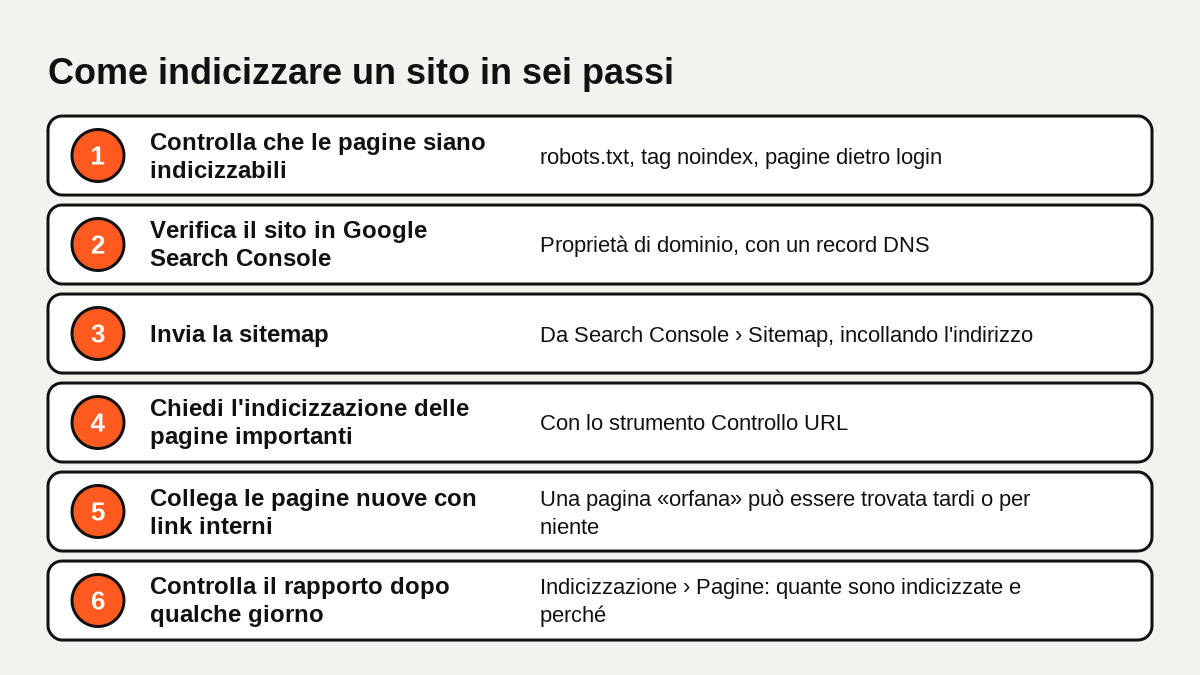
1. Check that your pages can be indexed
Before asking Google for anything, remove the blockers. There are three minimum technical requirements: Googlebot must not be blocked, the page must return an HTTP 200 status code, and it must have indexable content. In practice, check:
- the
robots.txtfile (you'll find it atyoursite.com/robots.txt): aDisallow: /line underUser-agent: *blocks the whole site; - the noindex tag in the head of your pages, which often stays on after a new site launches (it's always where I start);
- pages behind a login or password, which Googlebot can't open.
The two lines to look for appear like this:
<!-- in the page head: excludes it from the index -->
<meta name="robots" content="noindex">

# in robots.txt: blocks crawling of the whole site
User-agent: *
Disallow: /
In WordPress the switch is under Settings › Reading, at "Discourage search engines from indexing this site": it must be turned off.
2. Verify your site in Google Search Console
Search Console is free and it's the only tool that shows what Google actually has in its index. You can add your site in two ways:
- domain property: covers all subdomains (www, m and so on) and both http and https. It can only be verified with a DNS record, from the panel of whoever manages the domain. It's the best choice;
- URL-prefix property: covers only addresses starting with that prefix, protocol included. It can be verified with several methods.
3. Submit your sitemap
The sitemap is the list of URLs you want Google to know about. Almost every CMS generates it automatically (in WordPress it's usually /wp-sitemap.xml or the one from your SEO plugin). Submit it from Search Console › Sitemaps by pasting the address and clicking Submit, and add it to your robots.txt too:
Sitemap: https://www.yoursite.com/sitemap.xmlEach sitemap can contain at most 50,000 URLs or 50 MB uncompressed; beyond that, split it into several files. Remember it's only a hint: Google doesn't guarantee it will download or use it.
4. Request indexing for your important pages
For a new or freshly updated page, use the URL Inspection tool: paste the address in the top bar of Search Console and, if the page isn't on Google yet or has changed, click Request indexing. Three things to know:
- there's a quota of requests, so use it on the pages that matter;
- repeating the request for the same URL doesn't speed anything up;
- for many URLs at once, the right route is the sitemap, not a hundred manual requests.
5. Link new pages with internal links
Googlebot discovers pages mostly by following links. A page that no other page on the site links to (an "orphan" page) may be found late or not at all, especially if it isn't in the sitemap either. Link it from a page that already gets visits, with link text that says what the page is about.
6. Check the report after a few days
Open Indexing › Pages: you'll see how many pages are indexed, how many aren't and why. After fixing a problem you can click Validate fix: Google rechecks the affected URLs, and validation generally takes up to two weeks.
How to check whether a page is indexed
The right tool is Search Console's URL Inspection. If it answers "URL is on Google", the page is in the index; if it says it isn't, you'll find the reason below, along with the date of the last crawl. With Test live URL you can also see the page as Googlebot sees it, which is useful when content is loaded via JavaScript.
For an overview, use the Page indexing report. Don't expect every URL to be indexed: what should be indexed are the canonical versions of your important pages, not duplicates and variants.
The site: operator and the number of results
Many people check indexing by searching site:yoursite.com on Google. It's fine for a quick look, not for counting pages: the operator doesn't necessarily return all indexed URLs and the list isn't always complete, especially on large sites. Watch the format too: site:https://www.example.com and site:https://example.com/ give different results.
The number of results you see when searching site: is an estimate, not a count of the pages in the index. To find out how many pages are indexed and why some are left out, use Search Console's Page indexing report; for a single page, use URL Inspection.
Pages that aren't indexed: causes and fixes
In the Page indexing report, every group of excluded URLs has a reason. The most frequent ones, with the exact name you see in Search Console, are these.
| Reason in Search Console | What it means | What to do |
|---|---|---|
| Excluded by 'noindex' tag | The page asks not to be indexed | If that's intentional, nothing. If not, remove the tag and request indexing |
| Blocked by robots.txt | The robots.txt forbids crawling | Fix the rule in robots.txt |
| Discovered – currently not indexed | Google knows the URL but hasn't crawled it yet, often to avoid overloading the server | Improve server speed and internal links; if it happens on many URLs, cut the useless pages |
| Crawled – currently not indexed | Google read the page and, for now, decided not to index it | No need to resubmit it: make it more useful and different from the others, and link it better |
| Duplicate, Google chose different canonical than user | Google considers another URL the main version | If it's the right page, that's fine. If not, review the canonical and the duplicate content |
| Alternate page with proper canonical tag | It's a variant of a page that's already indexed | Nothing: it's the correct behavior |
| Not found (404) | The URL doesn't exist | If the page was moved, set up a 301 redirect |
| Soft 404 | The page says "not found" or is nearly empty, but returns 200 | Return a real 404 or fill the page with real content |
| Server error (5xx) | The server responded with an error | Check with your hosting provider: load, timeouts, firewall |
| Page with redirect | The URL points elsewhere | Nothing: the destination gets indexed |
The most frustrating case is "Crawled – currently not indexed". It isn't a technical error: Google looked at the page and didn't find it useful enough, for now. Repeated requests don't help; a better page does. If you see it on hundreds of URLs, an SEO audit is worth it to work out which pages to merge or remove.
How long it takes
Crawling can take anywhere from a few days to a few weeks, and even after crawling, indexing isn't guaranteed. New sites with few links from other sites usually wait longer; new pages on an already known, well-linked site often get in sooner. If an important page still isn't there after a few weeks, open URL Inspection: the reason is usually written there.
What about Bing? Bing Webmaster Tools and IndexNow
Bing has its own free tool, Bing Webmaster Tools, where you can import sites already verified in Search Console and submit the same sitemap. Bing also supports IndexNow, a protocol that lets a site notify search engines when a page changes; the engines listed by the project include Bing, Yandex, Naver, Seznam.cz, Yep and Amazon, while Google doesn't appear. Many SEO plugins turn it on with one click. It's worth it, because Bing's results are also used by other search services.
How to remove a page from the index
Sometimes you need the opposite: making a page disappear from Google. The key rule is that robots.txt doesn't remove pages from the index, it only manages crawling. A page blocked in robots.txt can stay indexed, and Google can't see the noindex if it can't crawl the page.
- permanently: return a 404 or 410, protect the page with a password, or use noindex while leaving the page crawlable;
- immediately but temporarily: Search Console's Removals tool hides the URL for about 6 months, enough time to apply one of the permanent solutions.
How much does it cost to index a website?

Indexing itself is free: Google doesn't accept payment to crawl a site more often or to improve its ranking. Be wary of anyone selling "inclusion on Google" or submission to hundreds of search engines.
What does cost money is the technical work to make the site easy to crawl and index: fixing errors, blocked or duplicate pages, and sorting out sitemaps and internal links. You usually start with a technical audit. Indexing, however, is only one part of SEO work: the total cost also depends on the on-page and off-page optimization needed to rank the site.
To understand what your site really needs, you can start with the SEO audit, with the 5 things to fix first.
The mistakes that keep a site out of Google

- The noindex from the site under construction left on after publishing. It's the most common mistake and the easiest to fix.
- The robots.txt copied from the test environment, with
Disallow: /. - Every page's canonical pointing to the home page, set by mistake by a theme or plugin: Google indexes only the home page.
- Content visible only after a click or a login, which Googlebot doesn't see.
- Thousands of nearly empty pages (filters, tags, archives) that waste crawling and lower the site's average quality.
- Shortcuts: link networks, copied content and other Black Hat SEO techniques can lead to a manual action. If that happens you'll see it in Search Console, in the Manual actions section, and you'll need specific work on penalties.
Do you have important pages that Google isn't indexing? Win back the visits you're losing: here is where to start, with the 5 things to fix first, beginning with robots.txt, noindex, canonical and the indexing report.
Frequently asked questions
How long does it take Google to index a site?
There's no fixed time. Crawling can take from a few days to a few weeks, and even after crawling, indexing isn't guaranteed. A new site with few links from other sites usually takes longer; a new page on an already known, well-linked site often gets in sooner.
How do I know if a page is indexed?
Paste the URL into the URL Inspection tool in Google Search Console: if it answers "URL is on Google", it's indexed; otherwise you'll find the reason. For an overview, there's the Page indexing report. The site: operator on Google gives only a rough indication.
Can you pay Google to index a site faster?
No. Google doesn't accept payment to crawl a site more often or to improve its ranking. You can, however, request a new crawl at no cost from Search Console's URL Inspection with the Request indexing button, or submit a sitemap for many URLs at once.
Why isn't Google indexing some pages on my site?
The most common causes are a noindex tag, a block in robots.txt, server errors or 404s, duplicate pages for which Google chose another canonical version, or content Google doesn't consider useful enough. The Page indexing report shows the reason for each group of URLs.
What does "Crawled – currently not indexed" mean?
It means Google read the page but, for now, decided not to put it in the index. It isn't a technical error and there's no need to submit it again: Google may index it in the future. To improve the odds, make the page more useful and different from the others on the site, and link to it from important pages with internal links.
Does the site: operator show how many pages are indexed?
No, it only gives an indication: it doesn't necessarily return all indexed URLs, and since May 2024 it no longer shows the estimated number of results by default. For the real figure, use Search Console's Page indexing report and, for a single page, URL Inspection.


