
What Is SEO? Meaning, How It Works and How to Start
What SEO is, what it means and how it works: the engine's three stages, the four areas, the differences from SEA and SEM, AI answers, timelines and eight first steps with examples and typical mistakes.

Eugenio Tommasi
Founder of SEO SRL
Published 25 min read

SEO (Search Engine Optimization) is the set of technical, content and reputation work that helps a site get found in the organic, unpaid results of Google, Bing and AI answers.
Table of contents (12 sections)
- What SEO means and what it really does
- How a search engine works: crawling, indexing, ranking
- Why do SEO, and what a position is worth
- The four areas of SEO, with an example and a mistake for each
- SEO, SEA and SEM: the differences
- SEO and AI answers: Search Everywhere Optimization
- How long it takes and what to expect
- How to get started: the first steps one by one
- Myths to debunk
- SEO tools: free and paid
- Do it yourself or get help
- Frequently asked questions
Many people think SEO is a bag of tricks to “please Google”. It isn't: it's the work that makes a site easy to find, easy to read and easy to choose, for search engines and for people.
This guide covers what SEO means, how a search engine works, how the work is divided and what you can do yourself, one step at a time. It is written for people starting from zero who have to make decisions: business owners, managers, marketing leads.
What SEO means and what it really does
SEO stands for Search Engine Optimization. In Italian, “la SEO” refers to the activity and “il SEO” to the person who does it, although in everyday use the two forms get mixed up.
Google's SEO starter guide sums it up like this: helping search engines understand your content, and helping users find your site and decide whether to visit it. It's a modest definition, and it's the right one. SEO doesn't force Google's hand: it removes its doubts.
In practice it tells Google three things about every page:
- what it is about, with clear text, headings and structure;
- why it can be trusted, with content written by people who know the subject and mentions from other sites;
- which search it is the right answer for, by choosing one precise question instead of a hundred.
The result shows up in the organic results: the ones that appear because they are relevant to the search, not because someone paid. Ads, by contrast, carry the “Sponsored” label.
A hypothetical example: a physiotherapy practice in Bologna. Without SEO it only appears when someone searches for its name. With SEO it can also appear for “physiotherapist Bologna”, “back pain after running what to do” or “tecar therapy price”. These are searches by people who don't know the practice yet but need exactly what it offers.
I built my first website in 1997, at age 12, with FrontPage: it was about Bob Marley and I knew nothing about SEO. I have worked in SEO since 2009, and the definition I use today is simpler than it used to be: SEO is the work that makes what you offer match what people are searching for.
How a search engine works: crawling, indexing, ranking

To understand SEO you have to understand what a search engine does. Google works in three stages, one after the other. A page that stops at one stage never reaches the next.
| Stage | What the engine does | What can go wrong | What SEO does |
|---|---|---|---|
| Crawling | Googlebot discovers URLs by following links and sitemaps, then downloads the pages | Pages blocked by robots.txt, server errors, pages with no links | Makes the site reachable and readable |
| Indexing | Analyzes text, title, alt attributes, images and videos, and stores the page in the index | Thin content, forgotten noindex tags, too many copies of the same page | Gets the right pages into the index, one version of each |
| Ranking | For every search, retrieves the relevant pages and sorts them | Pages that are not relevant, useful or credible enough | Makes each page the best answer for one specific search |
Crawling: Google must be able to reach the page
There is no central registry of web pages. Google discovers them continuously, mostly by following links from pages it already knows and by reading the sitemaps that sites send it.
During crawling, Googlebot also runs JavaScript, using a recent version of Chrome. If the server returns errors, it slows down. If robots.txt blocks a folder, it doesn't go in.
Indexing: Google must understand what is inside
Once the page is downloaded, Google reads its content and signals: language, target country, usability. It groups very similar pages and picks a canonical version for each group, the only one that can appear in the results.
Indexing is not guaranteed. A thin page, one almost identical to another, or one with a noindex meta tag stays out.
Ranking: Google must choose yours over the others
When someone searches, Google pulls the relevant pages from the index and sorts them. To do so it looks at five groups of factors: the meaning of the search, the relevance of the content, its quality, the usability of the page and the searcher's context, such as language, location and device.
The same search run in Milan or in Bologna, from a phone or a computer, can return different results. That's why ranking isn't about the site in general, but about one page for one search, in one context.
A page going through the three steps
Hypothetical example: a company in Milan publishes the page “Forklift rental in Milan”.
- Crawling. The page is linked from the “Services” menu and is in the sitemap. Googlebot finds it within a few days. If it were reachable only from a PDF or an internal search form, it might never find it.
- Indexing. The page has its own text: available models, minimum rental period, delivery, indicative prices. If it were a copy of ten other identical pages, differing only in the city name, Google would keep one and discard the rest.
- Ranking. For “forklift hire Milan”, Google compares the page with competitors' pages. The one that answers best wins: clear prices, terms, areas served, reviews from real customers.
Each step has its own checks. To see where one of your pages stands, there's Search Console, which we'll cover in the first steps.
Why do SEO, and what a position is worth
The first reason is where people search. In September 2026, StatCounter gave Google 87.3% of searches made from Italy and Bing 6%. Searchers already have a need: you aren't interrupting them with a banner, you're answering a question.
The second reason is economic. With advertising you pay for every click, and when you switch off the budget the traffic stops. With SEO you pay for the work: a page that ranks keeps bringing visits even in months when you don't touch it.
The third is trust. Showing up in organic results, on maps and in AI answers for the questions in your industry builds the brand even when people don't click right away.
What a position is worth, though, has to be measured. I pooled the Search Console data of 22 Italian sites I work with: across the 14 million impressions analyzed, first position had a CTR of 6.8%, second 4.2%, third 3.1%. From fifth place down it falls below 1%, and in tenth place it is 0.3%.
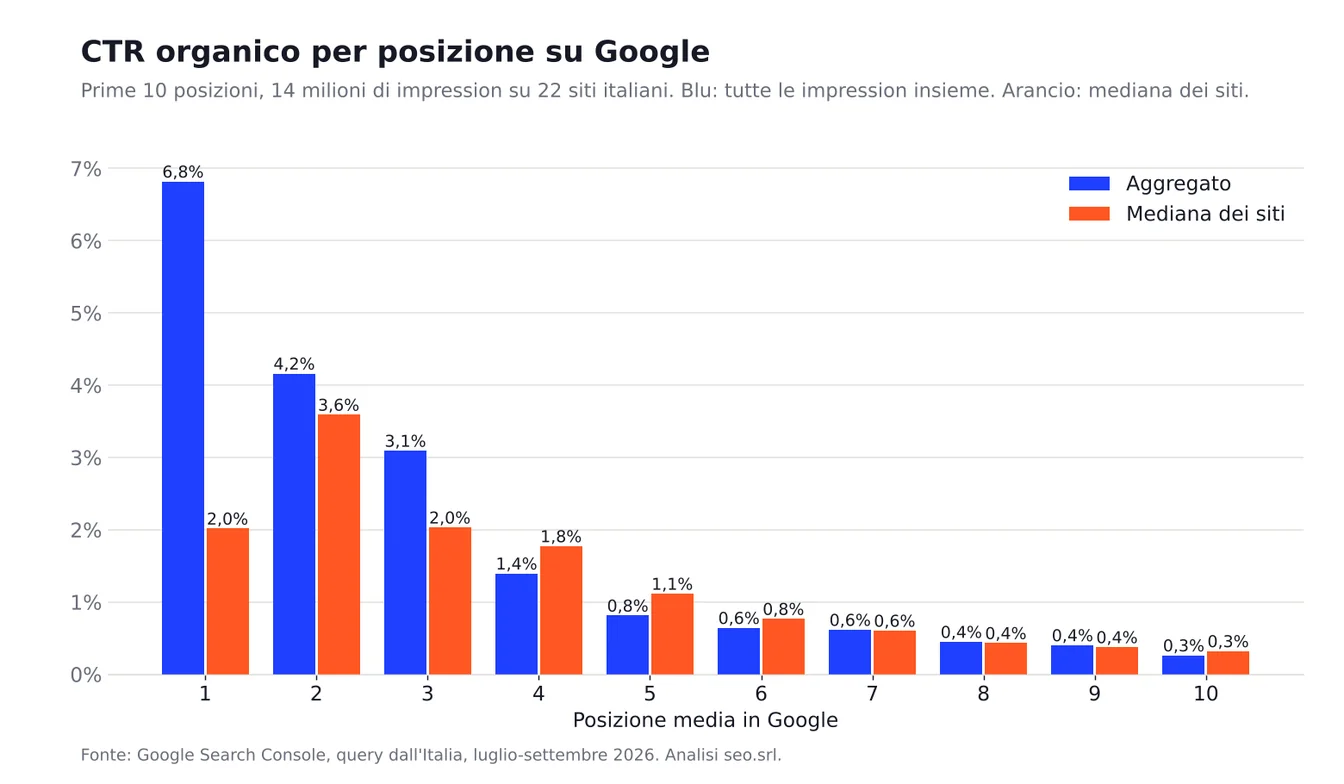
Google Search Console data from 22 Italian sites I work with, searches from Italy, July-September 2026 (14 million impressions) and, for comparison, July-September 2025. Aggregated, anonymous data.
CTR is the share of people who click your result after seeing it. The sample is mostly informational queries, where answers, boxes and images sit above the results. So the absolute value matters less than the shape of the curve: between third and fifth position, CTR is cut by a factor of four.
The practical consequence is simple. Moving from fifteenth to twelfth position changes little. Moving from fifth to third, on the same search, can multiply that page's clicks.
The basics of ranking, and how to check it without being fooled by personalization, are in the guide to Google rankings.
The four areas of SEO, with an example and a mistake for each
The work is usually split into four areas. You need all of them, but not with the same weight for every site: an e-commerce store with thousands of product pages has technical problems that a professional with ten pages will never have.
| Area | What it works on | Who it matters most for |
|---|---|---|
| Technical SEO | Crawling, indexing, speed, structure | Large sites, e-commerce, sites just rebuilt or migrated |
| Content and on-page SEO | Copy, titles, headings, images, internal links | Everyone, always |
| Off-page SEO | Links, brand mentions, reputation | Highly competitive sectors, new sites |
| Local SEO | Business profile on Google, reviews, Maps | Anyone with customers in one area: practices, shops, restaurants, tradespeople |
Technical SEO
This is the part you don't see: code, loading speed, the mobile version, sitemap, robots.txt, canonical, structured data, redirects. It doesn't lift a site on its own, but a technical error can keep it out of Google entirely.
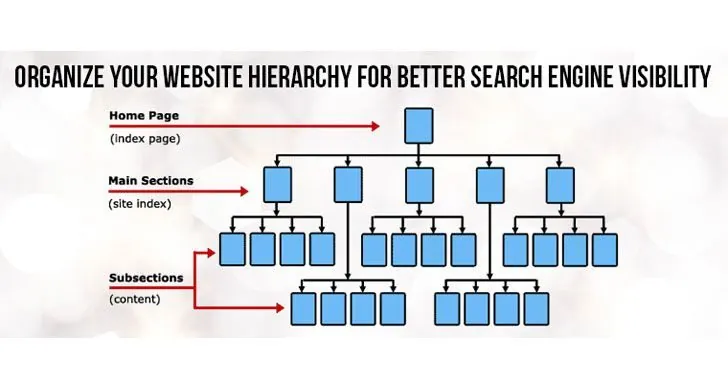
Structure matters too: pages organized by topic, linked to each other, with readable URLs. An engine understands a site better when the general page links to the specific ones and vice versa.
Example. A recently rebuilt site loses half its visits in three weeks. The check shows that the old pages have no redirect to the new ones: people arriving from Google hit a 404 error.
Typical mistake. Leaving in place after launch the block set up during development: a noindex on the whole site or a “Disallow: /” in robots.txt. The site is online, but for Google it doesn't exist.
Content and on-page SEO
This is the most visible part and, today, the most important. Every page should answer one specific search better than the others. In the code, these matter most:
- title tag: the title shown in the results. Unique per page, clear, with the topic at the start;
- meta description: the text that may appear under the title. It doesn't move rankings, but it persuades people to click;
- headings (H1, H2, H3): they break up the text and help readers find the part they need right away;
- alt text of images: it describes the image to those who can't see it, search engines included;
- internal links: they connect the page to others that go deeper on related concepts.
Before writing, though, comes the choice of which search to target. Keywords are divided by intent: informational (“how to work out at home”), commercial (“best running shoes”), transactional (“running shoes price”) and navigational (a brand name). Each intent calls for a different type of page.
Good content is original, written for people, with information you can't find elsewhere, by someone who knows the subject. Google has no preferred word count: what counts is how well the page answers.
Example. The “Services” page of an accounting firm lists ten activities in ten lines. It becomes three pages, one for each main service, covering who needs it, how it works, how long it takes and the questions clients really ask on the phone.
Typical mistake. Writing for the engine instead of the reader: the same phrase repeated ten times, an almost identical page for every city, long texts that circle the answer without giving it.
Off-page SEO
This covers what happens outside the site: mainly links from other sites, but also brand mentions, citations and reviews. A link from an authoritative site in your industry works like a recommendation.
Example. A window and door manufacturer publishes a table of the home renovation tax bonuses currently in force in Italy and the documents to prepare, updated every year. Trade associations and some local newspapers cite it with a link, because it is useful to their readers.
Typical mistake. Buying link packages or swapping links to climb. Buying and selling links for ranking falls under link spam in Google's policies: advertising links must be marked with rel="sponsored" or rel="nofollow". What works without risk is covered in link building without PBNs.
Local SEO
If you have customers in your area, appearing in the map pack and on Google Maps matters. There, Google ranks businesses using three criteria: relevance, distance and prominence, meaning how well known the business is, including through links and reviews. You can't pay to rise in local results.
Example. A restaurant in Bologna has its profile under the category “Pizzeria” even though it mainly serves Emilian cuisine. It changes the primary category, adds holiday hours, menu and photos of the dishes, and answers reviews.
Typical mistake. Adding words to the business name that aren't part of the real name (“Da Mario Best Pizza Bologna Centro”) or offering discounts in exchange for reviews. Google's rules forbid both, and unnecessary information in the name can cost you a profile suspension.
SEO, SEA and SEM: the differences
These are three acronyms that often get confused. SEO works on organic results, SEA on paid ads, such as Google Ads, and SEM covers both.
| SEO | SEA (e.g. Google Ads) | |
|---|---|---|
| Where you appear | Organic results | Ads labeled “Sponsored” |
| How you pay | The work, not the clicks | Every click, as long as there is budget |
| Timing | Weeks or months | Immediately |
| When you stop | Traffic declines slowly | Traffic stops |
| Control | Indirect: you improve the page, Google decides | Direct: you choose searches, copy, budget, schedule |
| Ideal for | Steady demand over time, content, trust | Launches, offers, tests, highly commercial searches |
Paying for Google Ads doesn't improve organic rankings: Google doesn't accept payment to rank a site higher, and advertisers get no special treatment. The two do help each other, though.
A hypothetical example: an online camping gear store launches a line of tents. For three months it uses ads to sell right away and to learn which searches bring orders (“waterproof 4-person tent” sells, “camping tent” only brings browsers). Then it writes organic pages on exactly those searches, and cuts back the ads where the organic page ranks high.
SEO and AI answers: Search Everywhere Optimization
To me, SEO also means Search Everywhere Optimization: being found wherever people search, not just on Google's results page. It changes the starting question. Not “how do I climb on Google for this keyword?”, but “where does my customer search when they have this need, and what do they find?”.
The reason is in people's behavior. In 2022 a Google executive, Prabhakar Raghavan, said that according to an internal survey almost 40% of young Americans aged 18 to 24, when looking for a place to eat lunch, go to TikTok or Instagram instead of Maps or Search. In February 2026 OpenAI announced 900 million weekly active users on ChatGPT.
Same position, fewer clicks
Within Google itself, AI Overviews answer before anyone clicks. In a Pew Research Center study of 900 US adults, in March 2025, people who saw an AI summary clicked a traditional result in 8% of visits, versus 15% for those who didn't see one.
I asked the same question of the data from the sites I work with, in a different way. Instead of looking at all searches, I took only those that had the same average position on the same sites a year later: 4,453 query and device combinations, across the 7 sites with data for both July-September 2025 and July-September 2026. It's a different sample from the one in the previous chapter, which is why first position is worth 8.3% here and not 6.8%.
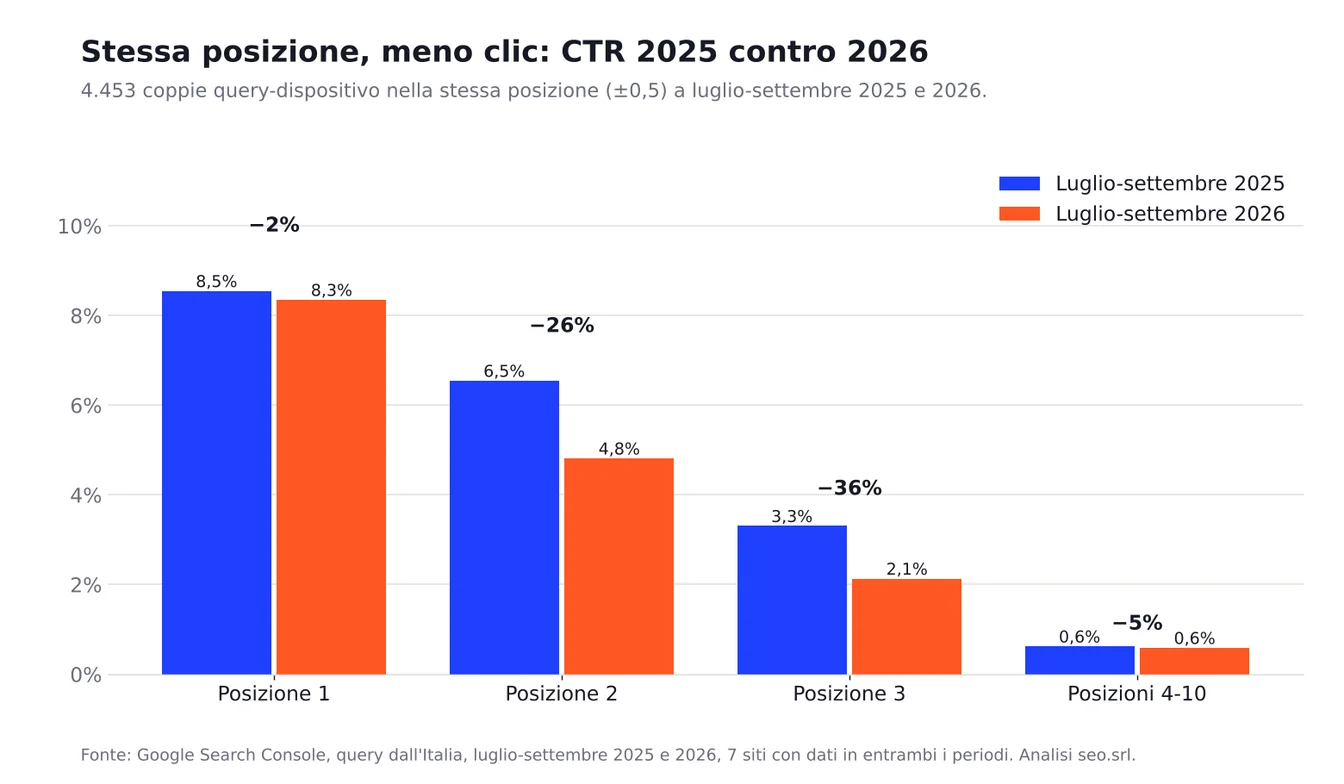
On these queries, CTR across the top ten positions fell by 14%. Whoever was first held steady (8.5% versus 8.3%). Whoever was second lost 26% of clicks, whoever was third 36%. The position stayed the same: what sits above it changed.
The drop doesn't depend on a single site: 6 sites out of 7 declined, and removing the largest one the drop stays at 15%.
Where people search and what matters
Every platform has its own search engine and its own rules, and the work changes accordingly:
| Where people search | What matters to be found | What you work on |
|---|---|---|
| Google and Bing | Relevance, quality, links, usability | Site pages, technical setup, links |
| AI Overviews and AI Mode | The same ranking and quality systems as Search | Indexed pages that answer clearly, with data and sources |
| ChatGPT, Gemini, Perplexity | Access for their crawlers, clear pages, brand mentions on the web | robots.txt, quotable content, reputation outside your site |
| Google Maps | Relevance, distance, prominence | Business profile, reviews |
| YouTube | Relevance (title, description, content), engagement, channel quality | Videos that answer specific questions |
| TikTok and Instagram | Their own algorithms, poorly documented | Keywords in text and speech, short, useful content |
| Amazon and marketplaces | Platform rules | Complete product listings, images, real reviews |
What stays the same: understanding the searcher's intent and giving the best answer. For Google, optimizing for its generative AI features is still SEO. You don't need special files like llms.txt or dedicated markup: to appear, a page must be indexed and eligible to be shown with a snippet.
What changes: the format (a 40-second video is not an article), the metrics (a citation in an AI answer is not a click) and the weight of the brand, because AIs tend to cite those already named by reliable sources.
My opinion: the website remains the foundation. It's the only channel you truly control, and it's where the AIs take their information from. You add the other channels once you've worked out where your audience searches, not all at once.
How long it takes and what to expect
Some changes take effect in a few hours, others take several months. Google itself recommends waiting a few weeks before judging a change. It depends on how often Google visits the site, how well known the site is on the topic and how strong the competition is.
In my work, timing breaks down roughly like this. These are orders of magnitude, not promises:
| Type of work | When you usually see it | What to look at |
|---|---|---|
| Unblocking an excluded page (noindex, robots.txt, wrong redirect) | A few days to a few weeks | Page status in URL Inspection |
| Rewriting title and meta description | After the page is recrawled, usually a few weeks | The page's CTR in Search Console |
| Improving a page already ranking between 5th and 20th | A few weeks to a few months | Average position and clicks on the main search |
| New page on a low-competition search | A few months | First impressions, then the first clicks |
| New page on a highly competitive search, or a new site | Several months to more than a year | Impressions growing before clicks |
What to expect, in order: first impressions grow (Google shows you), then positions, then clicks, finally leads. Someone who looks only at leads in the first month concludes that “SEO doesn't work” just as it's starting to work.
Be wary of anyone who promises timelines and positions. Nobody can guarantee first place on Google, and anyone who claims a special relationship with Google or “priority inclusion” isn't telling you the truth.
How to get started: the first steps one by one
Strategy starts from the audience, not from keywords. The steps below are the ones I would take on a business site that has never worked on SEO, in the order I would take them. For each you'll find what to do, an example and the mistake I see most often.
Step 1: write down who searches and what they ask
What to do. List your three or four types of customer and, for each, the questions they ask before buying. You'll find them in emails, phone calls, the objections your sales team hears.
Example. A company selling management software for car repair shops finds that customers mostly ask “how much does it cost”, “does it connect to electronic invoicing?” and “how long does it take to switch from the old program?”. That's three pages, before even opening a keyword tool.
Typical mistake. Starting from what you want to sell instead of what customers call it. If you say “intralogistics solutions” and they search for “warehouse shelving”, nobody finds you.
Step 2: set up Google Search Console
What to do. Search Console is the free service through which Google tells you how it sees your site. Add a Domain property (verified with a DNS record, and it covers www, subdomains, http and https), then submit the sitemap. Data for a newly added site can take up to a week to appear. While you're at it, do the same for Bing: in Bing Webmaster Tools you can verify the site by importing it directly from Search Console.
Example. For the domain esempio.it you enter just “esempio.it”, with no https and no www. Whoever manages the domain adds the TXT record that Search Console indicates, and the property covers the whole site.
Typical mistake. Creating a URL-prefix property on the wrong version, for example http instead of https or without www, and staring at a nearly empty report for months.
Step 3: check that your important pages are indexed
What to do. First a quick check: search Google for site:esempio.it. If results appear, the site is in the index. Then, for the pages that matter, use Search Console's URL Inspection: paste the address and see whether the page is on Google, which canonical version it picked and when it last crawled it.
Example. The “Prices” page doesn't show up in the site: search. URL Inspection says the page is not indexed because it is marked “noindex”. You remove the tag, run the live URL test and request indexing. Google usually takes about a day, sometimes longer.
Typical mistake. Using site: to count indexed pages. It doesn't necessarily show every URL in the index: for numbers you need Search Console's Page indexing report. And requesting indexing a hundred times is pointless: there is a daily limit and the request doesn't guarantee entry.
Step 4: choose one main search for each page
What to do. For each important page, write down one main search and two or three variants. Then search for it on Google and look at what appears: if guides sit at the top, a product page will struggle; if shops do, an article will struggle.
Example. A law firm in Milan wants to target “consensual separation”. On the first page it finds guides explaining timelines, costs and documents. The service page alone isn't enough: you need a guide that answers those questions and leads to the service page.
Typical mistake. Two pages on the same search, for example “Tax advice” and “Accountant for companies”, competing with each other. Google picks one, often the wrong one.
Step 5: rewrite titles and meta descriptions of key pages
What to do. The title should say what you offer and to whom, with the topic at the start, and be different for every page. The meta description summarizes the page with a concrete detail. There are no official character limits: Google cuts whatever doesn't fit the screen width, and sometimes rewrites the title if yours is vague or repeated.
Hypothetical example, the home page of a physiotherapy practice in Bologna, before and after (the markup is shown in Italian, as it would appear on the Italian site):
<!-- Prima -->
<title>Home</title>
<meta name="description" content="Benvenuti nel nostro sito.">

<!-- Dopo -->
<title>Fisioterapista a Bologna: riabilitazione e tecarterapia | Studio Rossi</title>
<meta name="description" content="Studio di fisioterapia a Bologna: riabilitazione
sportiva, mal di schiena, tecarterapia. Orari, prezzi delle sedute e prenotazione online.">
Typical mistake. The same title on every page (“Studio Rossi - Physiotherapy”) or a list of keywords instead of a sentence. Searchers can't tell the pages apart, and Google tends to rewrite the title its own way. Examples for each type of page are in the guide to titles and meta descriptions.
Step 6: link your pages to each other
What to do. Every important page should have a link from at least one other page on the site. Use real links (an a element with href) and link text that says where it leads.
Example. In the article “How to choose management software for your repair shop”, the paragraph on costs links to the pricing page with the text “how much the software costs”, and the pricing page links back to the article for those who still have doubts.
Typical mistake. Links with the text “click here” or “learn more”: they tell neither the reader nor Google anything. Or new pages reachable only from the sitemap, with no link from the rest of the site.
Step 7: complete your Google Business Profile
What to do. If you have customers in your area, claim and verify your Business Profile. Complete the category, address, hours (holiday hours too), attributes and photos. Ask real customers for reviews and answer all of them, negative ones included.
Example. A plumber in Bologna who works at customers' homes hides the address, as the rules require for businesses that travel to the customer, sets the service area, adds services with a one-line description and, after every job, sends the customer the review link.
Typical mistake. Opening the profile and forgetting it: old hours, changed phone number, reviews unanswered for years. People see it before your site. Every field one by one is covered in the guide to the Google Business Profile.
Step 8: measure once a month
What to do. Once a month, open Search Console's Performance report and note four numbers: clicks, impressions, CTR and average position. Next to them, put the inquiries that came from the site (forms, calls, orders), which you can see in Google Analytics or in your own system.
Example. A spreadsheet with one row per month and one column per number. After six months you can see whether impressions are growing, which pages are close to the first page and which searches bring real inquiries.
Typical mistake. Looking at the position of a single keyword, perhaps checked by hand on your own computer, which Google personalizes. Or comparing a month with the previous one without accounting for seasonality: compare with the same month of the previous year.
Once the first steps are done, you need a plan: goals, pages to create, priorities and a calendar. How to build one is covered in the guide to SEO strategy.
Myths to debunk
- “You have to repeat the keyword many times.” No: unnatural repetition is keyword stuffing, and for Google it is spam.
- “You need articles at least X words long.” No: Google has no preferred word count. A page is as long as it needs to be to answer.
- “The keywords meta tag helps.” Google doesn't use it.
- “A sitemap is mandatory.” It helps, especially on large or new sites, but it isn't mandatory: on a small, well-linked site Google finds pages through links.
- “With Google Ads I rise in organic results too.” No: ads don't buy organic positions, not even on Maps.
- “AI needs special files and markup.” Not for Google: its generative AI features use Search's index and ranking systems.
- “With AI, SEO is dead.” Google's AI relies on the same systems as Search, and the others read the web: the metrics change, not the need to be findable.
- “Writing with AI is forbidden.” It isn't. What is forbidden is mass-publishing pages with no value to manipulate rankings, however they are written.
- “SEO is done once.” Competitors publish, Google updates, content ages. Updating old pages, in my experience, is one of the things that most lifts traffic back up.
SEO tools: free and paid
For the first steps, free tools are enough. Paid ones are needed when you have to study competitors, research keywords in volume or audit large sites. Prices read from the official websites on October 24, 2026, excluding VAT, monthly billing (Screaming Frog only sells annual licenses):
| Tool | What it's for | Cost |
|---|---|---|
| Google Search Console | Indexing, searches you appear for, CTR, position, errors | Free |
| Google Analytics | What people do on the site and how many inquiries come in | Free |
| PageSpeed Insights | Speed and Core Web Vitals, with lab data and real-user data | Free |
| Screaming Frog SEO Spider | Technical crawl of the site, as an engine would do | Free up to 500 URLs; license £199 a year |
| SEOZoom | Keywords and competitors on the Italian market | From €69 a month |
| Semrush | Keywords, links, competitors, audits | Limited free plan; SEO plan from $139 a month |
| Ahrefs | Links, keywords, competitors | Limited free plan; Lite from $129 a month |
Tools give you numbers. Deciding what to do with those numbers is the real work. The full comparison, with what each one does best, is in the guide to SEO tools.
Do it yourself or get help
You can do the basics yourself: the steps in this guide and the linked chapters are enough to get started. On a small site, with a local business or a simple catalog, many companies go on for years this way.
You do need help in some specific cases:
- a large site, with thousands of pages, filters, multiple language versions;
- a migration ahead: new domain, new platform, new site;
- traffic that has collapsed for no obvious reason;
- strong competition, where others already have teams working on SEO;
- nobody at the company has the time to do it consistently, which is the most common case.
If you choose a consultant or an agency, ask the questions that Google also suggests: examples of work done, how long they've been doing it, what results they expect and in what timeframe, how they'll explain the changes to you. Be wary of anyone who guarantees positions.
For an idea of costs, consulting prices and the items that make them vary are on the page about how much SEO costs.
Frequently asked questions
Do I need to rebuild my site to do SEO?
Almost never. Most of the work is done on the site you already have: copy, titles, internal links, new pages, technical fixes. Rebuilding makes sense when the platform prevents you from changing titles, URLs or content, or when it is so slow and outdated that fixing it costs more than replacing it. In that case the migration must be planned with redirects, so you don't lose what the site has already built up.
Does SEO work without a blog?
Yes. A blog is a tool, not a requirement. For many companies the pages that bring in leads are the ones for services, products and locations, well written and linked to each other. A blog is useful when people ask questions before buying and you want to be the one answering.


