
SEO for Blogs: How to Write Articles That Rank on Google
When a blog works for a business, how to choose topics from customer questions, how to write an article that ranks, publishing pace, measuring in Search Console and maintaining old articles, with a downloadable checklist.

Eugenio Tommasi
Founder of SEO SRL
Published 17 min read

SEO for a blog is the work that gets articles found on Google: one search per article, an answer up front, a clear title, internal links, updates and measurement.
Table of contents (12 sections)
- When a blog works for a business and when it doesn't
- How to choose topics from customer questions
- How to write an article that ranks, step by step
- Calendar and pace: how much to publish
- How to measure in Search Console
- Updating old articles and merging those that get in each other's way
- Typical mistakes of a blog that doesn't grow
- Blogs and AI answers
- SEO on Blogger and WordPress: the settings to check
- Why you shouldn't stop blogging: the NP Digital study
- The blog article checklist
- Frequently asked questions
A blog doesn't bring visits because it publishes often. It brings visits when every article is the best answer to a specific search and is connected to the rest of the site.
This chapter of SEO Fundamentals explains how to decide whether a business needs a blog, how to choose topics from customer questions, how to write an article that ranks step by step, what publishing pace you can sustain, how to measure in Search Console, and how to maintain old articles. It applies to a company blog or a personal one, on WordPress, Blogger or any other platform.
When a blog works for a business and when it doesn't
A blog works when your customers look for answers before buying. A company that sells boilers gets searches like "when is a condensing boiler worth it" or "how much does it cost to replace a boiler": each question is an article, and the person asking is a customer in the middle of deciding.
It isn't needed, or helps very little, in three cases:
- nobody searches before buying: a service sold only by word of mouth or direct phone calls has no questions to intercept;
- the SERP shows only products or maps: if Google answers the searches in your sector with e-commerce listings or local businesses, you need a commercial page or a local listing, not an article;
- you can't maintain it: a blog with three articles that are four years old doesn't help and gives an impression of neglect.
The simplest test is this: write down ten questions customers have actually asked you and search for them on Google. If at least five show articles and guides, the blog has room. If only products and commercial pages appear, the work lies elsewhere.
A personal blog follows a different logic: it doesn't have to convert, it has to build an audience. The method for writing articles stays the same; what changes is what you measure (reads, subscribers) instead of leads and sales.
How to choose topics from customer questions
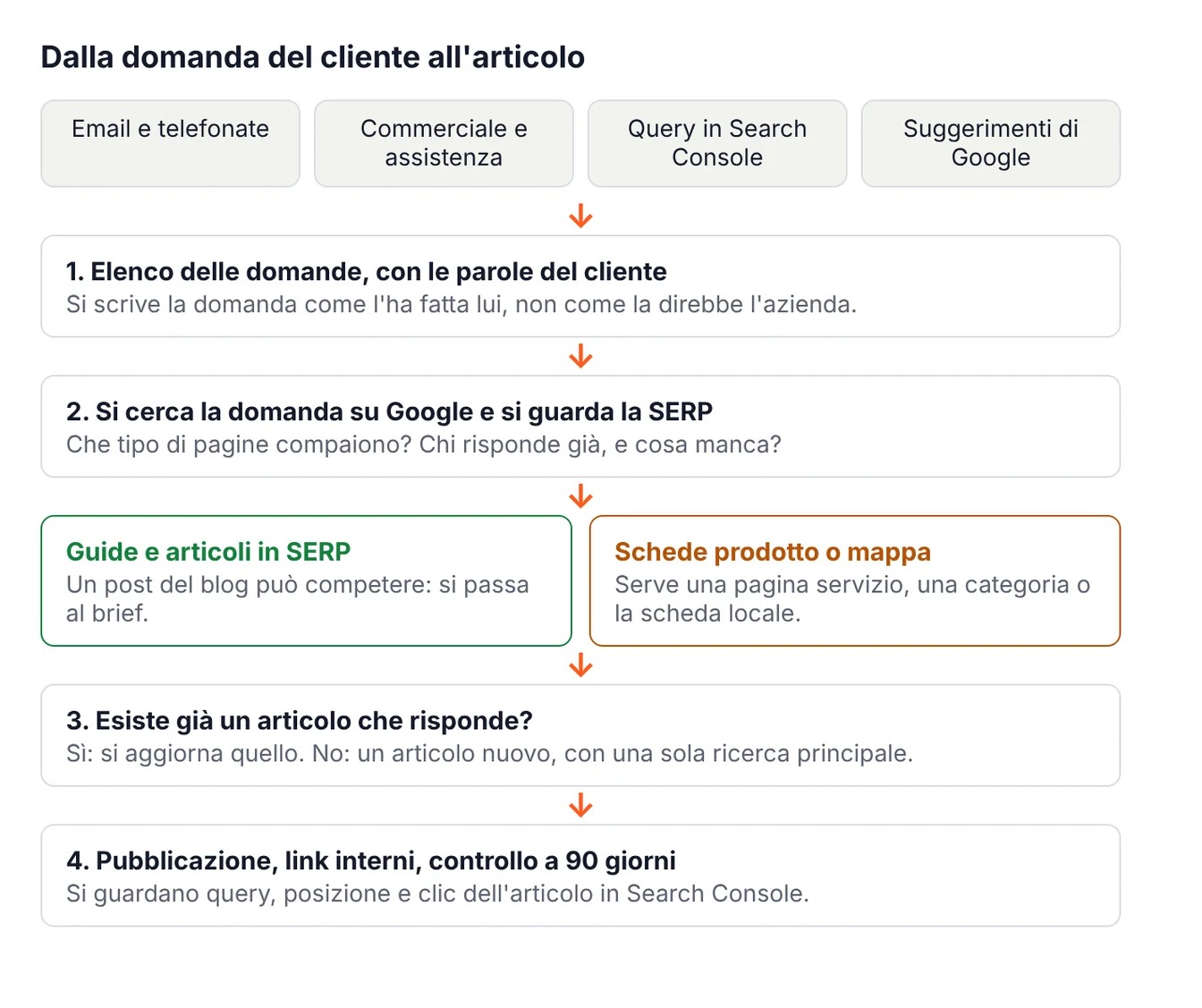
The best topics aren't invented: they're collected. There are four sources, from most to least valuable:
- the questions that reach whoever talks to customers: emails, phone calls, messages, the shop counter;
- the queries the site already receives in Search Console, especially those with many impressions and few clicks;
- Google's autocomplete suggestions and the "People also ask" box;
- keyword research tools, to estimate volumes and difficulty.
The first source is the one competitors don't have: real questions, written in the customer's words and not the company's. A customer writes "the boiler makes noise when it starts", the company writes "burner maintenance". The article title should use the first wording.
Longer searches get more clicks
The search volume of a single word is attractive, but it doesn't deliver the clicks it promises. Across 22 Italian sites I follow (Google Search Console data, searches from Italy, July-September 2026, 14 million impressions, aggregated and anonymous), a one-word query in the top three positions has a median CTR of 0.7%. With two words it rises to 2.4%, and from three words up it sits between 3.8% and 4.1%: five times as much.
Someone typing a single word is often still exploring and finds the answer on the results page. Someone typing "how to choose a condensing boiler for an apartment" wants a specific article. For a blog, that means starting from searches of three or more words, which are also the ones with less competition.
One search, one article
Before opening an empty document, search your own site for the keyword: if an article already answers the same question, you don't write a second one, you update that one. Two articles on the same search compete with each other, and often neither reaches the top.
The rule is one main search per article and one article per search. More details, with the tools to find these searches, in the guide on how to choose keywords.
How to write an article that ranks, step by step
Step 1: look at what's already in the SERP
Search the question on Google and open the first five or six results. Note the format (step-by-step guide, list, comparison, short definition), the subtopics all of them cover, because searchers expect them, and what all of them lack: up-to-date data, an example, a table, a screenshot.
Also check whether an AI Overview appears and which sources it cites. The point isn't to copy the structure, it's to find out what your article must have to be at least equal to the others and what it can have on top.
Step 2: write a half-page brief
The brief gathers your notes in a few lines:
- the main question and the sub-questions to cover;
- the chosen format;
- what you add that others don't have: direct experience, your own data, a case, a diagram;
- the page on the site to link from the article.
The last line is the most neglected. Google asks for content with original information, research or analysis, and an article that summarizes what already exists has no reason to be at the top.
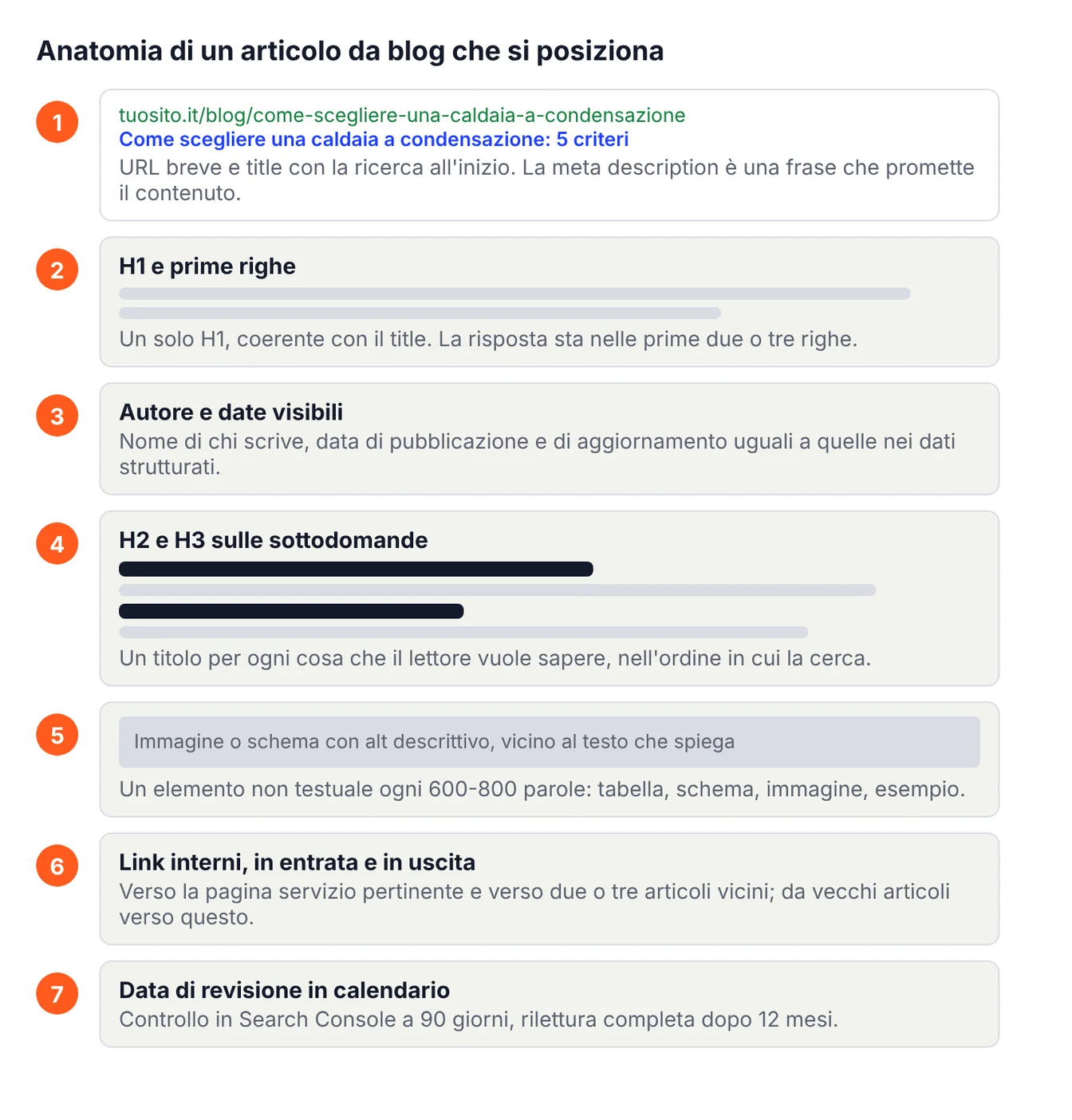
Step 3: title, URL and meta description
The title is the blue line on the results page and decides whether someone clicks. It must be unique, descriptive and concise, with the main search at the start when that comes naturally, and it must not repeat the same words to look more relevant. Google sets no length limit: it truncates titles that are too long to fit the screen width, so the part that matters goes first. I stay under 60 characters.
Google may rewrite a title it finds inaccurate, empty or outdated, for example one with an old year that contradicts the visible heading. That's why the title and the H1 should say the same thing, and the H1 should be the first visible heading on the page.
The URL is short and made of words: /blog/come-scegliere-una-caldaia-a-condensazione rather than /blog/2026/11/post-482. The meta description is a sentence that promises the content: Google uses it as the snippet when it considers it more accurate than the page text. How to write them well is covered in the guide to title and meta description.
Step 4: structure, with the answer up front
The first two or three lines say the essentials: whoever is in a hurry stops there, whoever wants more keeps reading. Then the H2 and H3 headings follow the sub-questions, in the order the reader looks for them, and each heading says what's underneath.
Short paragraphs, lists for procedures, tables for comparisons, a table of contents if the article is long. An FAQ only if it contains real questions the text doesn't already cover.
There is no ideal length. Google says so explicitly: it has no preference for word count. An article is as long as it takes to answer, and every extra word that repeats an idea already stated makes it harder to read.
Step 5: images and alt text
An image is worth including if it explains something: a diagram, a screenshot, an example. Place it next to the text it relates to, with a descriptive file name (caldaia-condensazione-schema.webp, not IMG00023.jpg) and alt text that says what it shows, without stuffing it with keywords. Google indexes images inserted with the img tag, not those set as CSS backgrounds, and supports JPEG, PNG, WebP and AVIF, among others. The rules are in the guidelines for Google Images.
File size matters for people reading on a phone: an image of several megabytes slows the page without adding anything.
Step 6: internal links
Google finds and understands pages by following links. Every important page should receive a link from at least one other page on the site, with anchor text that describes the destination ("boiler buying guide", not "click here"), and the link must be a regular a element with an href.
For a blog this means three things:
- the article points to the relevant service or product page, because that's where blog traffic turns into leads or sales;
- when you publish, add links to the new article from two or three old articles on the same topic;
- articles on the same subject link to each other, with a broader article that gathers them all.
How to design this cluster structure is explained in the guide to SEO strategy.
Step 7: author, dates and structured data
The author is visible (a name and a line about their expertise), and so are the publication date and the update date. If you use Article or BlogPosting structured data, datePublished and dateModified must match the dates visible on the page.
Data, tables and sources are cited with a link to whoever produced them. Paid or sponsored links are marked with rel="sponsored".
| Element | What to do | Typical mistake |
|---|---|---|
| Title | Unique, descriptive, main search at the start | The same title on several articles, or keywords repeated |
| URL | Short, with the words of the topic | Dates, numbers, parameters; changing it without a 301 redirect |
| H1 and H2 | H1 consistent with the title, H2s on sub-questions | Headings used only to make text bigger |
| Images | Descriptive alt text, meaningful file name, reduced size | Empty or keyword-stuffed alt text; multi-megabyte images |
| Author and dates | Named author, visible dates matching the structured data | "Editorial team" or "admin" on topics that require expertise |
| Internal links | To the service page and from two or three related articles | Generic anchors; orphan articles with no inbound links |
If you use WordPress, title, meta description and sitemap are usually handled by a plugin: how to choose one is covered on the page about SEO plugins for WordPress.
Calendar and pace: how much to publish
The right frequency is the one you can keep up for twelve months. One useful article a month, linked to the pages that sell, is worth more than four texts written to fill the calendar.
There is also a policy reason: publishing many low-value pages to rank falls under the scaled content abuse described in Google's spam policies, regardless of how the pages are created. A blog with a few strong articles doesn't run that risk.
A realistic pace for a small business splits the month into four weeks, and gives an old article the same time as a new one:
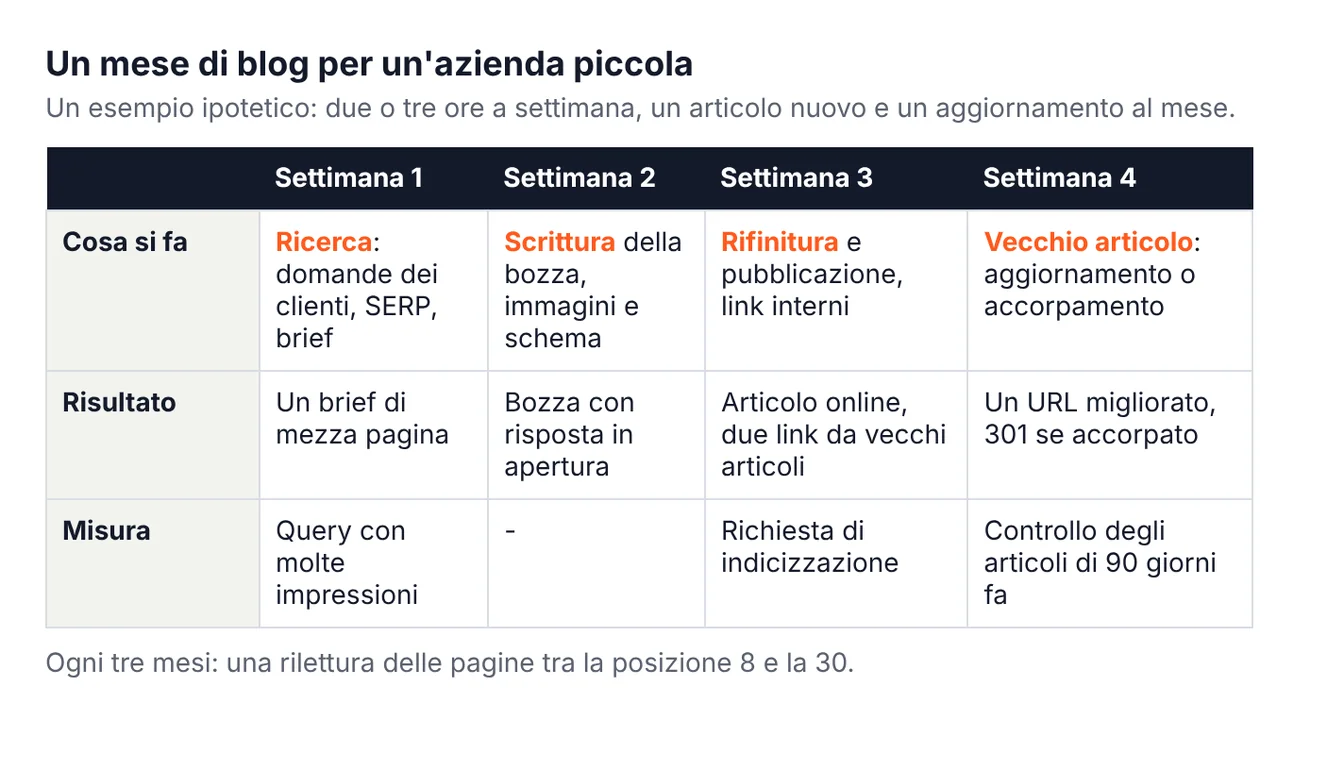
If you can't publish in a given month, skip the new article and keep the update: it has the same effect on the blog and costs less. The blog truly stalls when you stop looking at it too, and you can see what that costs in the study further down.
How to measure in Search Console
A new article needs time: I evaluate it after three to six months, not after a week. The tool is the Performance report in Google Search Console, with the blog pages filtered one at a time.
The four measures you need are those in the report: clicks (how many times someone reached the site from the results), impressions (how many times the page appeared), CTR (clicks divided by impressions) and average position, which for a page is that of the highest-ranking result shown.
They're read together:
- many impressions and a low CTR: the page is seen but doesn't convince, the title needs rewriting;
- position between 8 and 30: the page is close to the first page, so compare it with the top results and fill in what's missing;
- no impressions after three months: check that the page is indexed, then that the search really exists.
For those using Google Analytics 4, the figure that matters is how many people move from the blog to a service page or fill in a form. A blog that brings reads but no leads has an internal linking problem, not a traffic problem.
Updating old articles and merging those that get in each other's way
On a blog that's a few years old, the quickest gain almost always lies in existing articles. A periodic review, which I do at least once a year, splits the posts into four groups:
- to update: they have impressions in Search Console but sit between positions 8 and 30, or contain outdated data;
- to merge: several articles on the same question become a single, complete one, and the other URLs 301-redirect to it;
- to remove: expired news or texts with no traffic or value, with a redirect to the closest page if they have links;
- to leave: they work, just check them now and then.
How to merge two articles
When two articles answer the same search, keep the one with more impressions or the older URL and bring the best of the other into it. Then the other URL gets a 301 redirect, which signals to Google that the destination is the version to show.
- Search the site for articles that answer the same question and compare them with the Search Console queries.
- Choose the article to keep and rewrite it, including the useful parts of the other.
- Set up the 301 redirect from the old URL to the one you kept.
- Fix internal links so they no longer point to the old URL.
- Update the modified date and check the article after 90 days.
The update date
Change the update date only if the changes are substantial. Changing it to make articles look new when they aren't is a practice Google says to avoid, and the visible date must match the one in the structured data.
Typical mistakes of a blog that doesn't grow
When I audit a blog that isn't growing, these are the mistakes I look for first:
- writing what interests the company rather than what the customer searches for: articles about an award won or the new office, which nobody searches for;
- publishing without looking at the SERP: the article targets a search where Google shows only products;
- duplicate articles on the same question, written months apart by different people;
- orphan articles, without a single link from other pages;
- no connection to the page that sells: the blog brings reads and no leads;
- texts with nothing of their own: a summarized copy of the top results;
- wrong expectations: measuring after two weeks and quitting after two months.
Blogs and AI answers
Blog articles are also the pages that AI Overviews and AI Mode can show with a link. Google's AI features don't need special optimizations: the page must be indexed and eligible to show a snippet, and the same search quality rules apply.
Google points to original content, based on direct experience rather than a summary of what's already online, with a clear technical structure, as useful. The topic is covered in depth in the guide to GEO.
To measure it, Search Console has a generative AI performance report, available since August 31, 2026 for all sites globally: not every property sees it right away, because activation happens over time. In GA4, traffic from ChatGPT, Gemini and similar tools ends up in the AI assistant channel.
SEO on Blogger and WordPress: the settings to check
The rules of the method apply on any platform, but the settings to apply them change. Blogger is Google's service for starting a blog without managing hosting; WordPress is software you install on your own web space, or use in a hosted version. In both cases it's worth checking a few basic settings before publishing.
Blogger
The settings are all in the blog dashboard, and the Blogger help guides describe them one by one:
- Visibility: in Settings, in the "Privacy" section, the "Visible to search engines" option must be on, otherwise the blog isn't listed.
- Search description: in the "Meta tags" section of Settings, "Enable search description" lets you write the description the blog shows in results.
- Titles: include keywords that describe the topic and stay under 60 characters, so the title remains readable and isn't cut off.
- Headings and images: in the post editor you choose heading levels (H1, H2, H3) from the "Paragraph" menu, and for images you fill in the "alt" text.
- Permalink: from the post settings in the editor you can customize the URL of an individual post.
- Custom robots header tags: in Settings, in the "Crawlers and indexing" section, "Enable custom robots header tags" lets you choose rules for the home page, for search and archive pages, and for posts and pages. To hide a single post from search engines, turn on "noindex" in the post settings. That section also has "Enable custom robots.txt".
- Custom domain and HTTPS: in Settings, in the "Publishing" section, "Custom domain" connects a registered domain to the blog. For a custom domain there is an "HTTPS redirect" option, in the "HTTPS" section, which always sends visitors to the secure version of the blog.
- Redirects: if you change a post's URL, "Custom redirects", in the "Errors and redirects" section, lets you specify the new address, with the "Permanent" option in the "From" field.
WordPress
- Permalinks: WordPress offers several structures, from the plain one with the post number to "Post name", which produces a URL made only of the article name, with no date or number. An article's URL should stay stable over time.
- Search engine visibility: in the Reading settings there is a checkbox that asks search engines not to index the site ("Discourage search engines from indexing this site"). It should be left off on the published site. The option doesn't block access to the site: it's a request that search engines are expected to respect.
- SEO plugins: title, meta description and sitemap are normally handled with a dedicated plugin.
What changes between the two platforms
The useful comparison isn't which platform is better, but how much control you need. On Blogger the settings are those the dashboard provides: they're enough for titles, descriptions, permalinks, domain, HTTPS and robots rules, and there's no server to manage. With WordPress you have more freedom over site structure, themes and add-on features, but also more to configure and keep updated.
For a blog that has to become part of a company site, with services, content clusters and structured data, the control you need is usually that of a full website. For a personal blog, Blogger's settings may be enough.
Why you shouldn't stop blogging: the NP Digital study
The remaining question is whether it still makes sense to keep a blog now that part of the answers comes directly from AI. An analysis by NP Digital, Neil Patel's agency, published in October 2025, compared 20 companies over 12 months: 10 that kept publishing articles and 10 that stopped.
| Metric (12 months) | Kept publishing | Stopped |
|---|---|---|
| SEO traffic | -18.2% | -39.7% |
| Traffic from LLMs | +85.8% | +6.5% |
| Revenue | +9.1% | -10.4% |
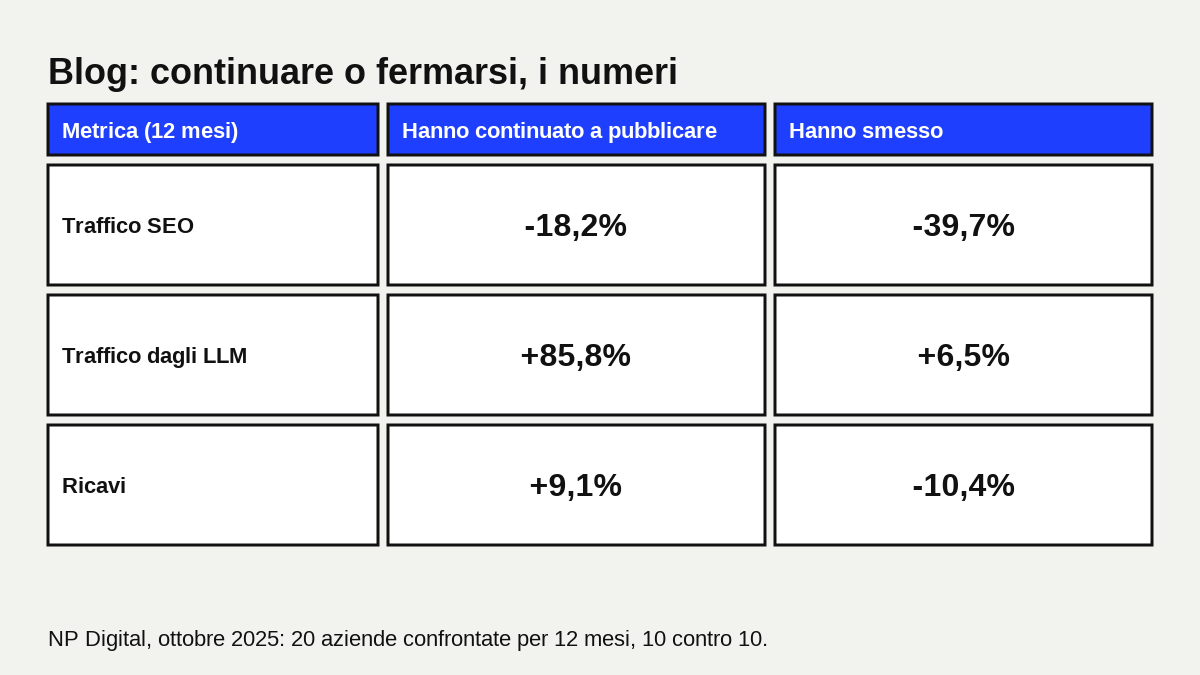
Even those who kept publishing lost organic traffic, but less than half as much as those who stopped. On revenue, the two groups move in opposite directions.
It does suggest, though, that stopping altogether has a cost. If the blog isn't performing, the solution is usually not to close it but to restructure it: fewer articles, more useful, updated and linked to the pages that sell.
The blog article checklist
The checks in this guide are collected in a PDF, to print and tick off for each article: from research to brief, from publication to the 90-day check.
Frequently asked questions
Is Blogger good for SEO?
Blogger offers the basic settings in its dashboard: visibility to search engines, search description, custom permalinks for posts, custom robots header tags, custom domain and HTTPS redirect. For a personal blog or a simple project they may be enough. Rankings still depend on content, search intent and internal links, not on the platform.
How long does it take for an article to rank?
There is no guaranteed time: Google has to crawl and index the page, then evaluate it against competitors. I look at a new article after three to six months and, if it sits between positions 8 and 30, I reread it with the top results beside it.
Can you use AI to write blog articles?
Google doesn't judge the tool but the value for the reader, and recommends explaining how automation was used. Producing many low-value pages to manipulate rankings counts as scaled content abuse, however the pages are created.


