
GPTBot: What It Is, How It Works and How to Manage OpenAI's Crawler
GPTBot collects pages to train OpenAI's models; to appear in ChatGPT search, OAI-SearchBot is what counts. What each bot does and how to set up your robots.txt.

Eugenio Tommasi
Founder of SEO SRL
Published 5 min read

GPTBot is OpenAI's crawler that collects public web pages that may be used to train its models; it does not decide your presence in ChatGPT search, which depends on OAI-SearchBot.
Table of contents (8 sections)
- OpenAI's bots: GPTBot, OAI-SearchBot and ChatGPT-User
- Does GPTBot bring visibility on ChatGPT?
- How to write your robots.txt for OpenAI's bots
- The mistakes that remove your site from ChatGPT
- How to recognize OpenAI's bots in your server logs
- How to measure traffic from ChatGPT
- What matters beyond robots.txt
- Frequently asked questions
GPTBot is the crawler OpenAI uses to collect public web pages that may be used to train its generative AI models. It is not the bot that decides whether your site appears in ChatGPT answers: that one is OAI-SearchBot. Mixing them up leads to two opposite mistakes: blocking everything and disappearing from ChatGPT search, or opening everything up because you think GPTBot brings visibility.
OpenAI's bots: GPTBot, OAI-SearchBot and ChatGPT-User
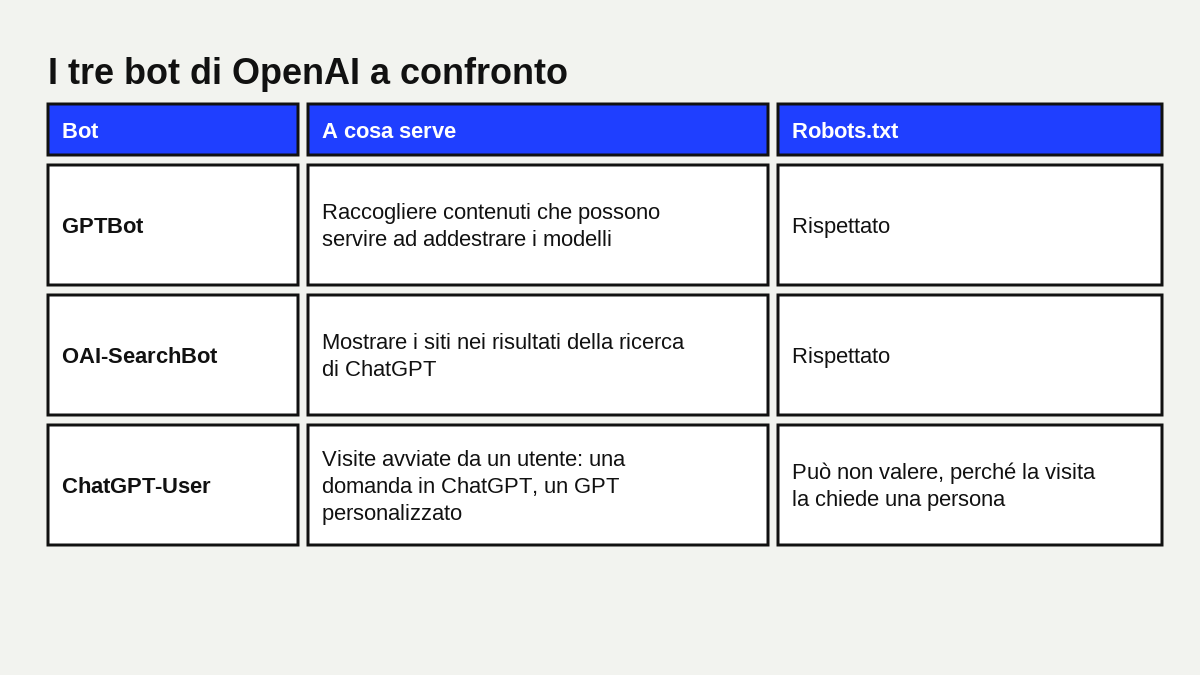
OpenAI uses several user agents, each with a different purpose, and describes them on its crawler documentation page. The robots.txt settings are independent: you can allow one and block another.
| Bot | What it is for | Robots.txt | If you block it |
|---|---|---|---|
| GPTBot | Collecting content that may be used to train OpenAI's foundation models | Respected | A signal that your content should not be used for training. You do not leave ChatGPT search |
| OAI-SearchBot | Showing sites in ChatGPT search results | Respected | You do not appear in ChatGPT search answers, at most as a navigational link |
| ChatGPT-User | User-initiated visits: a question in ChatGPT, a custom GPT, a GPT Action | May not apply, because a person requests the visit | A robots.txt block may have no effect. It does not control what appears in search |
There is also OAI-AdsBot, which only visits pages submitted as ads on ChatGPT to check that they comply with OpenAI's rules. If you do not advertise there, you will not see it.
If you allow both GPTBot and OAI-SearchBot, OpenAI may use the results of a single crawl for both purposes, so your server receives fewer requests.
Does GPTBot bring visibility on ChatGPT?
No, not directly. For ChatGPT search, OAI-SearchBot is what matters: any public site can appear in summaries and snippets as long as you do not block it. GPTBot, on the other hand, is about training: if you want to exclude your content, you need to block GPTBot.
It is the same distinction I use in my guide to Generative Engine Optimization: search bots are let in, training bots are a business decision. And the decision carries weight, because in February 2026 OpenAI reported 900 million weekly active users on ChatGPT.
Letting GPTBot in may have an indirect effect that cannot be measured: future models might "know" your brand better. But OpenAI promises nothing of the kind, so I do not consider it a good enough reason to open your site to a crawler you do not want.
How to write your robots.txt for OpenAI's bots
The robots.txt file sits at the root of the domain (for example https://www.yoursite.com/robots.txt). Changes affect search results after roughly 24 hours. These are the three most common cases.
1. You want to appear in ChatGPT search but not be used for training (the most common choice for companies and publishers):
User-agent: OAI-SearchBot
Allow: /

User-agent: GPTBot
Disallow: /
2. You want to appear in search and you accept training:
User-agent: OAI-SearchBot
Allow: /

User-agent: GPTBot
Allow: /
3. You only want to exclude some sections from training (members area, paid content, documents):
User-agent: GPTBot
Disallow: /area-clienti/
Disallow: /documenti/
If your robots.txt has a generic User-agent: * rule with Disallow: /, it also applies to OpenAI bots that do not have a dedicated group. Check it first: it is the mistake that most often makes a site vanish from AI answers.
The mistakes that remove your site from ChatGPT
- Blocking "AI bots" wholesale. Some plugins and hosting panels offer a single switch that can stop GPTBot and OAI-SearchBot together. Open the published robots.txt and see what it actually says.
- Firewalls and CDNs. Your robots.txt can say "Allow", but if the firewall or CDN rejects the requests, the bot reads nothing. Cloudflare, for example, made blocking AI crawlers the default from July 1, 2025. Allow requests from the IP addresses OpenAI publishes for each bot.
- Using robots.txt to hide a page. If ChatGPT knows about a blocked page from other sources, it can still show its link and title. To prevent that you need the
noindexmeta tag, and the crawler must be able to crawl the page to read it. - Content visible only with JavaScript. If the text reaches the browser only after scripts run, a crawler that reads the HTML may find an empty page. Text, prices and key information belong in the HTML served by the server (see also the guide to the noscript tag).
How to recognize OpenAI's bots in your server logs
Each bot introduces itself with its own user agent, which contains a link to an OpenAI page (the version number may change):
- GPTBot:
GPTBot/1.4; +https://openai.com/gptbot - OAI-SearchBot:
OAI-SearchBot/1.4; +https://openai.com/searchbot - ChatGPT-User:
ChatGPT-User/1.0; +https://openai.com/bot
A user agent can be spoofed. To be sure a visit really comes from OpenAI, compare the IP address with the official lists: gptbot.json, searchbot.json and chatgpt-user.json. In the logs you can also see how often they visit and which pages they hit. If a bot puts too much load on the server, limit the request rate at server level instead of blocking it entirely.
How to measure traffic from ChatGPT
If OAI-SearchBot can read your site, the traffic coming from citations shows up in your analytics tools: ChatGPT automatically adds the utm_source=chatgpt.com parameter to links to websites. In Google Analytics 4 you find it as the source chatgpt.com; the steps to read it alongside other AI sources are in the GEO guide.
What matters beyond robots.txt
Letting OAI-SearchBot in is the starting condition, not the strategy. To be chosen as a source, the same rules apply as for good content on Google: clear pages that answer the question right away, with verifiable data, information only you have, and a brand people talk about outside your own site. Search rankings still matter: in a 2025 Seer Interactive study of 10,000 finance and SaaS questions put to GPT-4o, brands on Google's first page show a correlation of about 0.65 with the model's mentions. SEO remains the foundation.
Not sure whether ChatGPT's bots can read your site? Find out what is wrong with your site: request the SEO audit. You get the 5 things to fix first, including a look at robots.txt and AI crawler access.
Frequently asked questions
If I block GPTBot, do I disappear from ChatGPT?
No. Your presence in ChatGPT search depends on OAI-SearchBot, not GPTBot. The robots.txt settings are independent: you can block GPTBot and allow OAI-SearchBot, so you appear in answers without your content being used for training.
How do I block GPTBot in robots.txt?
Add a dedicated group: User-agent: GPTBot followed by Disallow: / for the whole site, or Disallow: /folder/ for a single section. If you want to stay in ChatGPT search, leave OAI-SearchBot with Allow: / and check that your firewall or CDN is not blocking it.


