
Proxy Server: What It Is, How It Works and What It's Used For
What a proxy server is, the difference between a forward proxy and a reverse proxy, types of proxy, proxy vs VPN, and what happens to your SEO when a CDN or firewall blocks Googlebot.

Eugenio Tommasi
Founder of SEO SRL
Published 7 min read

A proxy server is a server that acts as an intermediary between a device and websites: a forward proxy hides the browsing user's IP from websites, while a reverse proxy receives visitors in place of a website's server.
Table of contents (8 sections)
- What a proxy server is and how it works
- Forward proxy and reverse proxy: the differences
- Types of proxy
- What a proxy is really for, and what it doesn't do
- Proxy vs VPN: the differences
- Reverse proxy, CDN and SEO: when the proxy blocks Googlebot
- Proxy and SEO: checking results in other countries
- Checklist for sites behind a proxy or CDN
A proxy server is a server that sits between a device and the websites it visits and forwards requests on behalf of one side or the other. The proxy used by people browsing shows websites its own IP address instead of yours; the reverse proxy used by site owners receives visitors in place of the real server and protects it.
They are two different tools with the same name. I explain both, with more space for what matters to site owners: what happens to your SEO when the proxy in front of your site blocks Googlebot.
What a proxy server is and how it works
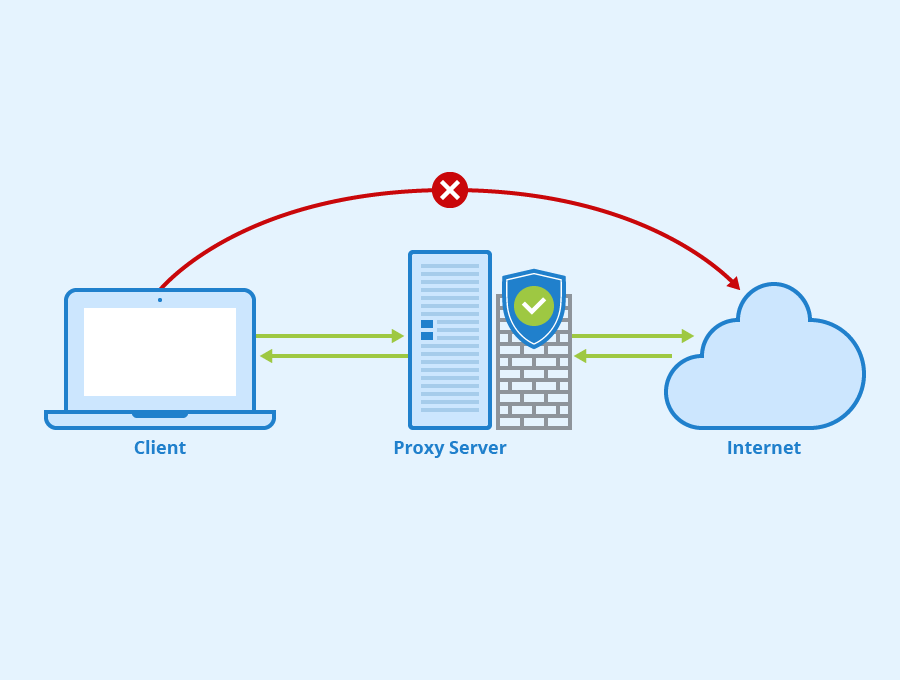
Without a proxy, the browser connects directly to the website's server (after the DNS server has translated the name into an IP address). With a proxy, the path becomes:
- the browser sends the request to the proxy;
- the proxy forwards it to the website, using its own IP address;
- the website answers the proxy;
- the proxy passes the response back to the browser, sometimes after filtering it or caching it.
The website sees the proxy's IP, not yours. The proxy, on the other hand, sees which sites you visit and, if the connection is not encrypted, the content too. A proxy adds no encryption of its own. With HTTPS sites it opens a tunnel (the CONNECT method) and the encryption stays the one between the browser and the site: the proxy knows where you are going, but not what you read or type.
Forward proxy and reverse proxy: the differences
| Forward proxy | Reverse proxy | |
|---|---|---|
| Where it sits | In front of the people browsing | In front of a website's servers |
| Works for | The user or the company | The website |
| What it hides | The browsing user's IP | The origin server's IP |
| What it's for | Filters and rules at work or school, changing the IP websites see, local cache | Load balancing, cache, HTTPS, protection from attacks and bots |
| Examples | Corporate proxy, paid proxy services | CDN, web application firewall, Nginx in front of an application |
If you run a website, you probably already have a reverse proxy, even without knowing it: many CDNs and many hosting providers work exactly this way.
Types of proxy
Forward proxies come with plenty of labels, often more marketing than technical. These are the distinctions that really matter:
| Type | What it does |
|---|---|
| HTTP/HTTPS | Handles web traffic only |
| SOCKS (SOCKS5) | Also forwards other types of traffic, not just web |
| Web proxy | A website where you type the address to visit; no configuration, lots of ads and questionable privacy |
What a proxy is really for, and what it doesn't do
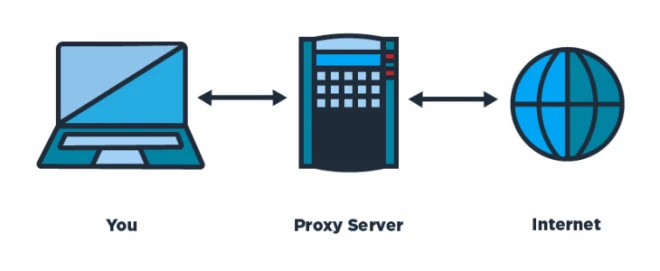
For people browsing, a forward proxy is used to:
- show websites an IP different from yours, even from another country;
- apply common rules in a company or school: blocked sites, access logging, shared cache;
- get through a network that requires it, such as some corporate or university networks.
What a proxy does not do, even though many websites promise it:
- It doesn't add encryption. On public Wi-Fi it doesn't protect you the way a VPN does; HTTPS sites stay encrypted on their own.
- It doesn't make you anonymous to whoever runs the proxy, who sees the sites you visit. A free proxy run by strangers is a risky choice for your browsing: someone is paying for that service, and often with your data.
- It doesn't speed up your connection. A distant or overloaded proxy slows it down. Caching only helps if many people visit the same pages, as in an office.
In Italy, using a proxy is not illegal in itself. What would be unlawful without a proxy stays unlawful with one: bypassing a block ordered by law, for example, is still a violation.
Proxy vs VPN: the differences
Both route traffic through an intermediate server and change the IP that websites see. The similarities end there.
| Proxy | VPN | |
|---|---|---|
| Encryption | None added: HTTPS sites stay encrypted on their own | Yes, between the device and the VPN server |
| Traffic covered | Only the apps that use the proxy (usually the browser) | All of the device's traffic |
| Speed | Depends on the proxy; no encryption overhead | A bit slower, because of the route and the encryption |
| Typical use | Corporate filters, a different IP for the web | Privacy on untrusted networks, remote work |
In both cases the service operator sees your outgoing traffic, so choose carefully.
Reverse proxy, CDN and SEO: when the proxy blocks Googlebot
For site owners, this is the part that matters. A reverse proxy or a CDN in front of your site is almost always a good idea: they hide the origin server, absorb traffic spikes and serve pages from the cache closest to the visitor. They also help crawling: when Google detects that a site sits behind a CDN, it raises the threshold at which it slows crawling down, because it assumes the server can handle more simultaneous requests.
The flip side: protections against bots and attacks sometimes block the very bots you want. These blocks have very different consequences depending on what Googlebot receives.
| What Googlebot receives | Effect | What to do |
|---|---|---|
| 503 status code | A temporary-block signal: it gives you time to fix things | The response to prefer for temporary blocks |
| Network timeout | A "hard" error: Google treats it like a 5xx, crawling slows down and already indexed URLs that are unreachable are removed within a few days | Check the firewall rules with your provider |
| Error page with a 200 status code | The worst case: URLs can be removed or treated as duplicates, and recovery is slow | Never return 200 for an error page |
| "Are you human?" page | Googlebot sees only the verification, not the site | Crawlers should get a 503, not the verification page |
How to spot it: use the URL Inspection tool in Search Console and look at the screenshot of the rendered page. If you see the page, all is well; if you see a blank page, an error or a verification request, talk to your CDN provider. Google publishes the IP addresses of its crawlers, as the page on how to verify Googlebot explains, precisely so you can exclude them from blocking rules or put them on an allowlist. The same goes for the crawlers of AI systems: firewalls and CDNs can block them even when robots.txt is open, as I explain in the guide to GPTBot.
A practical tip: when you turn on a CDN or change firewall rules, write down the date and watch the Crawl Stats in Search Console for a few weeks. A sudden drop in crawl requests, or a rise in error responses, is the first sign that something is stopping Googlebot.
Proxy and SEO: checking results in other countries
People working on sites for several markets often use proxies or VPNs to see Google results the way a user in another country sees them. For an occasional manual check, that's fine. Querying Google automatically and in bulk, perhaps rotating proxies, is another matter: Google's policies prohibit sending automated queries, including scraping results to check rankings. To monitor positions over time, Search Console data is almost always enough, and it's the real data.
Checklist for sites behind a proxy or CDN
- URL Inspection in Search Console shows the real page, not an anti-bot check or a blank page.
- Firewall rules don't block the official IPs of Googlebot and of any other crawlers you want to let in.
- Temporary blocks return 503, never an error page with a 200 status code.
- Crawl Stats show no sudden drops after changes to the CDN or firewall.
- The origin server is not reachable directly through its IP, if the goal is to protect it.
- The cache doesn't serve outdated pages after an update: check the invalidation rules.
These are checks to run in a technical SEO audit, especially after a migration or after turning on a CDN. If indexed pages have dropped after a CDN or firewall change, find out what's wrong with your site: request the SEO audit.


