
Google Penguin: What It Is and How It Affects Links
Google Penguin is the 2012 update against artificial links. Its versions, what changed in 2016, how Google treats link spam today and how to recover step by step.

Eugenio Tommasi
Founder of SEO SRL
Published 9 min read

Google Penguin is the Google algorithm update, launched in 2012, that counters artificial links and webspam; since 2016 it has been part of the core algorithm and devalues spam links in real time.
Table of contents (11 sections)
- Google Penguin at a glance
- Why it was created
- What Penguin targeted
- Penguin versions
- Penguin 4.0: real time and granular
- Penguin today: link spam policies, SpamBrain and manual actions
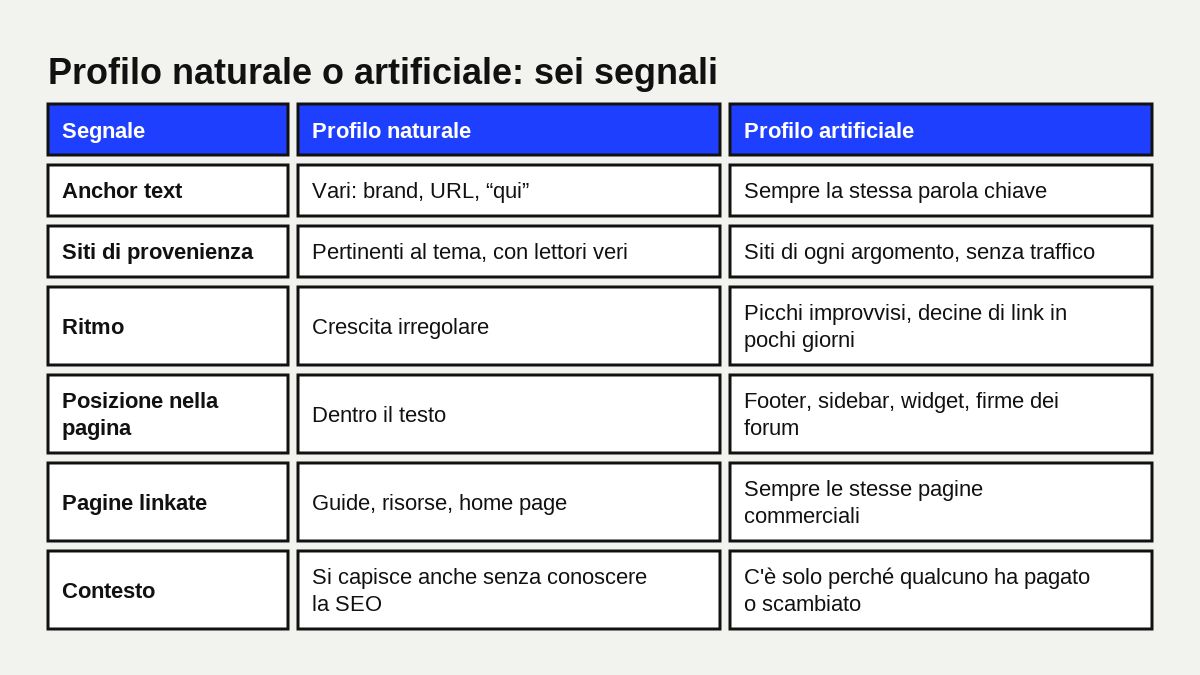
- Natural and artificial links: how to tell them apart
- How to tell if you have a link problem
- How to recover, step by step
- What I learned from spam
- Frequently asked questions
Google Penguin is the Google algorithm update, launched on April 24, 2012, that lowers the rankings of sites trying to manipulate search results with artificial links and other webspam tactics. Since 2016 it has been part of the core algorithm and works in real time, and instead of demoting a whole site, it strips value from spam links.
Google Penguin at a glance
| Question | Answer |
|---|---|
| When it launched | April 24, 2012, in all languages at once. In the announcement post Google did not yet call it Penguin, but “an important algorithm change targeted at webspam”. |
| What it targets | Bought or swapped links, site networks built to link, over-optimized anchor text, keyword stuffing. |
| How much it affected | About 3.1% of English queries and 3% of German, Chinese and Arabic queries; 5% of Polish queries. |
| How it works today | Since September 23, 2016 it runs in real time and is granular: it devalues spam instead of demoting the whole site. |
| Does it still exist? | Not as a separate update. Google lists it among its retired systems and describes it as “a system designed to combat link spam”. |
Why it was created
A year earlier Google had launched Panda against low-quality content. The other front was still open: links. Ever since PageRank, links had been the signal that separated an authoritative site from an unknown one, and therefore the most manipulated signal. Buy enough of them, with the right anchor text, and you would climb.
In the announcement Matt Cutts wrote that the affected sites were doing “much more than white hat SEO”: they used webspam tactics to manipulate rankings. Penguin was the automated answer to that Black Hat SEO.
What Penguin targeted
- Link schemes. Bought links, mass link swaps, networks of sites created only to link, links inserted in bulk with automated programs.
- Over-optimized anchor text. Hundreds of links with the same commercial text, something no site earns naturally.
- Keyword stuffing. Pages packed with repeated keywords: it was one of the examples Google showed in the announcement.
- Automatically rewritten text. The other example in the announcement: text “spun” until it was unreadable, with outbound links unrelated to the topic.
Cloaking, doorway pages and copied content are also spam, but they are handled by other systems and other policies.
Penguin versions
| Date | Version | Queries affected |
|---|---|---|
| April 24, 2012 | Penguin 1.0 | About 3.1% in English |
| May 2012 | Penguin 1.1 | Less than 0.1% in English |
| October 5, 2012 | Penguin 1.2 | About 0.3% |
| May 22, 2013 | Penguin 2.0 | 2.3% |
| October 4, 2013 | Penguin 2.1 | About 1% |
| October 17-18, 2014 | Penguin 3.0 | Less than 1% in English |
| September 23, 2016 | Penguin 4.0 | Joins the core algorithm, real time |
Until 2016 Penguin worked in “waves”: the list of affected sites was recalculated only with each update. Anyone who cleaned up their links could wait months for the next version. It was the most hated problem among SEOs. Already in April 2012, after the launch, Google had opened a form for those who believed they had been hit by mistake.
Penguin 4.0: real time and granular
On September 23, 2016 Gary Illyes announced the two changes everyone had been waiting for:
- Real time. Penguin data is refreshed continuously: the effects of a cleanup usually show up shortly after Google has crawled and reindexed the pages. Google also said it would no longer comment on future updates.
- Granular. Penguin “devalues spam by adjusting ranking based on spam signals, rather than affecting ranking of the whole site”.
In practice, since then an artificial link tends to be worth zero instead of sinking the site. The risk has not gone away, it has shifted: if link schemes are obvious and large-scale, a manual action can still arrive today.
Penguin today: link spam policies, SpamBrain and manual actions
Penguin is among the retired systems, but its work continues through three tools:
- Google's spam policies. On link spam, the policies prohibit, among other things: buying or selling links for ranking (with money, goods or services), excessive link exchanges, automated programs to create links, sponsored articles and guest posts with links that pass value, optimized anchors in press releases, low-quality directories and social bookmarking, links hidden in widgets, links in the footers of multiple sites, forum comments with optimized links. A paid link is not a violation if it carries
rel="sponsored"orrel="nofollow". - SpamBrain. With the link spam update of December 2022, Google extended its AI-based spam prevention system to links: it detects both sites that buy links and domains used mainly to pass links to other sites, and it nullifies the value of unnatural links.
- Manual actions. Search Console has two specific manual actions: “Unnatural links to your site” and “Unnatural links from your site”, for those who sell links.
The internal documentation leaked in 2024 also confirms the topic is alive: among the attributes there are checks on spikes of spam anchor text and a demotion for anchors that do not match the destination page. I cover this in the article on the Google Leak.
Natural and artificial links: how to tell them apart
| Signal | Natural profile | Artificial profile |
|---|---|---|
| Anchor text | Varied: brand name, URL, “here”, different phrases | Always the same commercial keyword |
| Source sites | Relevant to the topic, with real readers | Sites on every subject, with no traffic, created to host links |
| Pace | Irregular growth, tied to content or news | Sudden spikes, dozens of links in a few days |
| Position on the page | Inside the text, where they help readers | Footer, sidebar, widgets, forum signatures |
| Linked pages | Guides, resources, home page | Always the same commercial pages |
| Context | The link makes sense even to someone who knows nothing about SEO | The link exists only because someone paid or swapped |
An anchor text example
Take a football site that wants to rank for “league fixtures”. If a hundred different sites all link to it with the exact text “league fixtures”, the profile does not look spontaneous: a journalist would have written “according to site X”, a fan on a forum “check this out”, a blog would have cited the publication's name. A real profile is varied because it comes from different people. A built profile gives itself away through repetition.
How to tell if you have a link problem
- Check manual actions. In Search Console, Security & Manual Actions → Manual actions. If there is an action for unnatural links, the cause is clear.
- Export your links. Search Console Links report, top linking sites. An external backlink tool adds data, but start with Google's.
- Look at the anchors. If the most frequent link texts are commercial keywords and not your name, that is a warning sign.
- Look for patterns. Directories in series, press release sites, blogs that cover everything, domains with the same design template, links in the footer of many sites.
- Reconstruct the history. Who worked on the site before you? An old campaign of bought links explains more than a hundred hypotheses.
- Rule out other causes. A drop during a core update is not necessarily a link problem: it may be content quality, technical issues or a change in the SERP.
One clarification: low-quality links that show up on their own (scraper sites, automatic aggregators) are received by everyone and Google usually ignores them. The problem is the schemes that you built, or someone built for you.
How to recover, step by step
If you have a manual action
- Download the list of links from Search Console and prioritize domains with many links or with recent links.
- Ask the site owners to remove the links or to add
rel="nofollow"orrel="sponsored". Keep track of whom you contacted and when. - For links you cannot get removed, use the disavow tool. Do not disavow all backlinks without first trying to remove them.
- Submit the reconsideration request from the Manual actions report, with documentation of the links removed and an explanation for those that remain.
If you do not have a manual action
Stop building artificial links and have the ones you control removed (swaps, your own sites, paid articles without the attribute). Disavow is usually not needed: use it only if there are many spam, artificial or low-quality links and they have caused, or could cause, a manual action. In other cases Google works out on its own which links to ignore.
The disavow file, if you really need it
It is a text file (.txt, UTF-8 or 7-bit ASCII encoding), with one URL or domain per line. Lines starting with # are comments.
# Blog network contacted on March 3 and 17, no reply
domain:esempio-rete-blog.com
domain:altro-esempio-directory.net

# Single page with paid link and no attribute
https://www.esempio-sito.it/articolo-sponsorizzato.html
The rules to know:
- Each upload replaces the previous file: always upload the complete list.
- Limits: 100,000 lines and 2 MB.
- The tool is not available for Search Console Domain properties: you need a URL-prefix property, and http and https have separate lists.
- Effects take weeks, because Google has to recrawl the pages.
- Disavowing good links by mistake does more harm than leaving the poor ones. When in doubt, do not disavow.
After the cleanup
The next step is to earn real links with content that others have a reason to cite. That is the work we do in our link building service.
What I learned from spam
My first penalty came from pure spam. It was a useful lesson: it showed me up close where the line is. Since then I run spam tests on my own projects, never on clients' projects. If you only ever do white hat, you never understand it: you do not know what Google recognizes, how quickly, and what it lets through for a while before closing the door.
What I take away from those tests is simple. Link shortcuts work until they stop working, and when they stop, they give no warning. On a site that has to live for years, with a business behind it, that risk makes no sense. That is why with clients I only work on links that would survive a manual review.
Worried that your site's drop comes from links? With the penalty analysis I check manual actions, link profile and anchor text, and tell you whether you need a cleanup or whether the problem lies elsewhere. For a first look there is also the SEO audit: the 5 things to fix first.
Frequently asked questions
Does Google Penguin still exist?
Not as a separate update. Since 2016 it has been part of the core algorithm, and Google's guide to ranking systems lists it among the retired systems. Paid or artificial links remain a violation of the spam policies, though, countered by SpamBrain and manual actions.
What is the difference between Penguin and Panda?
Penguin (2012) concerns the artificial links a site receives; Panda (2011) concerns the quality of a site's content. Panda joined the core systems in 2015, Penguin in 2016.


