
Google Ads Manager Account (MCC): What It Is, How to Create It and Link Accounts
A Google Ads manager account (MCC) lets you manage multiple accounts from one login. How to create it, link clients, the technical limits and who should own the account.

Eugenio Tommasi
Founder of SEO SRL
Published 7 min read

A Google Ads manager account (MCC, in Italian centro clienti) is a separate account that links and manages multiple Google Ads accounts from a single login, for example those of an agency's clients or of a company's locations.
Table of contents (10 sections)
- What a manager account is and what it is for
- Who needs one
- How to create a Google Ads manager account
- How to link an existing Google Ads account
- Hierarchy and technical limits
- Access and account ownership
- Consolidated billing
- The rules I follow with manager accounts
- Common mistakes
- Frequently asked questions
A Google Ads manager account (known in Italian as centro clienti and still widely called MCC, from the old name My Client Center) is a separate account from which you manage multiple Google Ads accounts with a single login: your own, your clients' or those of different locations of the same company. It is not an upgrade of your existing account: you create it separately and then link the accounts you want to manage.
I have been managing Google Ads campaigns for over 15 years and I always work from a manager account. The rules I follow to avoid surprises when a working relationship ends are further down.
What a manager account is and what it is for
From the manager account you can:
- access all linked accounts with a single set of credentials, without switching from one login to another;
- search, open and manage accounts and campaigns from one dashboard;
- compare performance and build reports that combine multiple accounts;
- set up alerts on linked accounts;
- create new Google Ads accounts that are already linked;
- give users different access levels;
- handle consolidated monthly billing, which requires a manager account linked to a payments profile.
Users of a client account cannot see the manager account or the other accounts linked to the same manager: each client only sees their own.
Who needs one
| Situation | Do you need a manager account? |
|---|---|
| A company with a single Google Ads account | No. The account is enough, with the right users invited |
| A company with multiple accounts (countries, brands, locations) | Yes, to see everything together and consolidate billing |
| A freelancer or agency managing clients | Yes, it is the standard working tool |
| Anyone with more than 20 accounts associated with the same email | Yes, Google points to it as the solution |
How to create a Google Ads manager account
You don't need a new email address: sign in with the Google Account you will use for management. The same address can be associated with up to 20 Google Ads accounts, manager accounts included.
- Go to the Google Ads manager accounts home page and choose to sign in to manager accounts.
- Sign in with the address that will manage the account. If you work for a company, it's better to use a company address that doesn't depend on a single person's mailbox.
- Enter the name: this is what your clients will see in their accounts. Use the name they know you by; URLs are not accepted.
- Say whether you will manage your own accounts or other people's.
- Choose the country and time zone. The time zone cannot be changed and is used for reporting and billing: pick the one you work in.
- Choose the currency, which is also permanent: the one your business operates in.
- Click "Explore your account".
A secondary manager account can also be created from an existing one: Accounts icon, Sub-account settings, Plus button, "Create new manager account". It is useful, for example, for separating clients by service line or by country.
How to link an existing Google Ads account
You need the customer ID of the account to link: a unique number. The client finds it at the top right of their Google Ads account, by clicking the profile picture. In the manager account, your own ID is at the top left, under the name.
- In the manager account, open the Accounts icon and then Sub-account settings.
- Click the Plus button and choose Link existing account.
- Enter the customer ID; for multiple accounts, one ID per line.
- Check with "Preview" and submit with "Send request".
The link is not active until the client accepts. The administrator of the invited account receives an email and can accept from the link, or from their account: Admin menu, Access and security, Managers tab, Actions column. Once the invitation is accepted, the link is automatic and a confirmation email is sent.
Requests that have been sent but not yet accepted can be withdrawn from Sub-account settings, "Sent requests" tab.
Creating new accounts from the manager account
From the manager account you can also create a new Google Ads account that is already linked. It is convenient, but think first about who will own it: I explain this below.
Hierarchy and technical limits
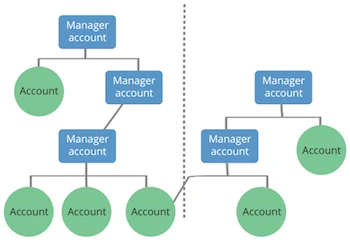
The structure can be nested: a manager account can contain other manager accounts, which in turn contain client accounts. The limits are as follows:
| Limit | Value |
|---|---|
| Maximum hierarchy levels | 6 |
| Manager accounts that can manage the same Google Ads account | 5 |
| Pending invitations per manager account | 20 |
| Google Ads accounts associated with the same email (manager accounts included) | 20 |
The number of client accounts a manager can handle is not fixed: it varies by account.
Access and account ownership
From the manager account you invite users with different levels: Admin, Standard, Read-only. Access granted at manager level applies to all the accounts linked beneath it, so invite carefully.
A manager account can receive administrative ownership of a client account, which lets it manage that account's access. It cannot, however, change the client's ownership information, such as their sign-in details. And the client can always unlink the manager from their own account.
From your manager account you can also see whether other managers are linked to the same client accounts: Admin icon, Access and security, "Related managers". This is the check to run when you take over an account that someone else managed before.
Consolidated billing
Anyone paying for multiple accounts with a single monthly invoice needs a manager account linked to a payments profile. It is the typical setup for companies with several accounts and for agencies that re-invoice ad spend to clients. If instead each client pays for Google Ads with their own card or payments profile, billing stays separate and the manager account is used only for management.
The manager account has nothing to do with what you charge clients for your work: the agency's fee stays outside Google Ads.

The rules I follow with manager accounts
The delicate moment is not the start but the end of a working relationship: who owns the account, who has access, where the data stays. To avoid problems I follow a few rules:
- The Google Ads account belongs to the client. They create it, with their own address and payment method, and then accept the link. If the relationship ends, they unlink the manager and keep their campaigns, data and conversions.
- Always at least two administrators, both on the manager account and on the client's. If one person leaves the company, the account isn't left orphaned.
- Clear names for accounts and campaigns, and labels to group clients (by industry, by account lead, by contract type).
- Active alerts on budget, paused campaigns and disapproved ads: from the manager account you see them all together instead of opening one account at a time.
- A periodic access review: anyone who no longer works on the project is removed.
Onboarding checklist for a new client
- The client provides their account ID (or creates the account if they don't have one).
- The agency sends the link request and the client accepts it.
- Before touching the campaigns, check that conversion tracking works.
- Check the other linked managers: if a previous agency is still there, decide with the client whether to unlink it.
- Set up labels and alerts.
Common mistakes
- Choosing the wrong time zone: it can't be changed, and the manager account's reports and billing follow a different clock from yours.
- Creating the client's account in the agency's name: when the relationship ends, the transfer becomes a negotiation.
- Confusing the manager account with a regular account: campaigns are not created in the manager account but in the linked client accounts.
- Forgetting pending requests: beyond 20 you can't send any more.
Once the accounts are in order, the next step is understanding whether the campaigns pay off: for that, look at ROAS, and if you sell online, connect Google Merchant Center too. If on the other side you have a site that hosts ads, the right platform is Google AdSense, not Google Ads.
Want a second opinion on how your Google Ads account is organized? Our agency also handles paid campaigns: write to us from the contact page with your account ID and we'll tell you what we would fix first.
Frequently asked questions
Is a Google Ads MCC the same thing as a manager account?
Yes. MCC is the old name (My Client Center) for what Google now calls a manager account. It is a separate account from which you manage multiple Google Ads accounts, including other manager accounts.
Do I need a new email address to create an MCC?
No. You sign in with the Google Account you will use for management; the same address can be associated with up to 20 Google Ads accounts, manager accounts included. The time zone and currency chosen at creation cannot be changed.
How do I link a client's account to the manager account?
From the manager account: Accounts icon, Sub-account settings, Plus button, Link existing account; enter the customer ID (one per line for multiple accounts) and send the request. The client accepts from the email or from Admin, Access and security, Managers tab.
How many manager accounts can manage the same Google Ads account?
At most 5. A hierarchy can have up to 6 levels, and each manager account can have at most 20 pending invitations.
Can a client see the other accounts the agency manages?
No. Users of a client account cannot see the manager account or the other accounts linked to the same manager: each client only sees their own account.
How do I unlink an account from a manager account?
The client can always unlink the manager account from their own account. That is why it is best for the client to remain the owner of their account and for there to always be at least two administrators.

