
Google AI Overviews: What They Are, What They Do to Clicks and How to Get Cited
An AI summary above Google's results can take clicks even from sites that stay in first place. How it is built, what studies and data say, how to get into the sources and how to keep it under control.

Eugenio Tommasi
Founder of SEO SRL
Published 24 min read

AI Overviews are AI-generated summaries that Google shows at the top of the results for some searches, with the key information and links to sources for further reading.
Table of contents (13 sections)
- What AI Overviews are and how an answer is built
- Anatomy of an AI Overview, piece by piece
- Which searches trigger them (and which don't)
- What happens to clicks: the studies compared
- Data from the sites I follow: same position, fewer clicks
- How to get into the cited sources: 8 factors
- Snippet controls: nosnippet, data-nosnippet and max-snippet
- Excluding your site from AI Overviews: the Search Console control
- How to measure AI Overviews with official data
- Monitoring your keywords, step by step
- How to turn off AI Overviews as a user
- AI Overview vs AI Mode: the differences in a table
- Frequently asked questions
A site can stay in first place on Google and still get fewer visits than a year ago. It hasn't lost rankings: an AI-written summary has appeared above its result, and it sometimes cites the site and sometimes doesn't.
This guide takes the AI Overview apart piece by piece, shows what it does to clicks with studies and my own data, and explains how to get into the sources, how to limit what Google takes from your pages and how to keep your keywords under control. It is for anyone with a site that lives on informational searches.
What AI Overviews are and how an answer is built
AI Overviews are AI-generated summaries that Google shows at the top of the results for some searches, with the key information and links to the pages it comes from. For Google they are a core Search feature, not an experiment: the official help page says they appear when its systems determine that generative AI can be especially helpful.
The summary only appears when it adds something to the classic results. That is why you don't see it on every search, and the same keyword can show it one day and not the next.
The three steps behind a summary
- The model. A Gemini model customized for Search writes it. Since January 27, 2026, the default model for AI Overviews worldwide is Gemini 3.
- The query fan-out. The system doesn't just search for your phrase: it launches several related searches on different subtopics and sources, then assembles the answer. That's why a page can be cited for a sub-question even if it doesn't rank high for the main keyword.
- The supporting links. The sentences in the summary rest on pages from the index, which appear as links. These are the "cited sources" you want to be among.
Example: for "how to choose a dehumidifier" the system may also search for capacity in liters, power consumption, noise and the differences between compressor and desiccant models. A page that answers only the consumption question still has a chance of being cited.
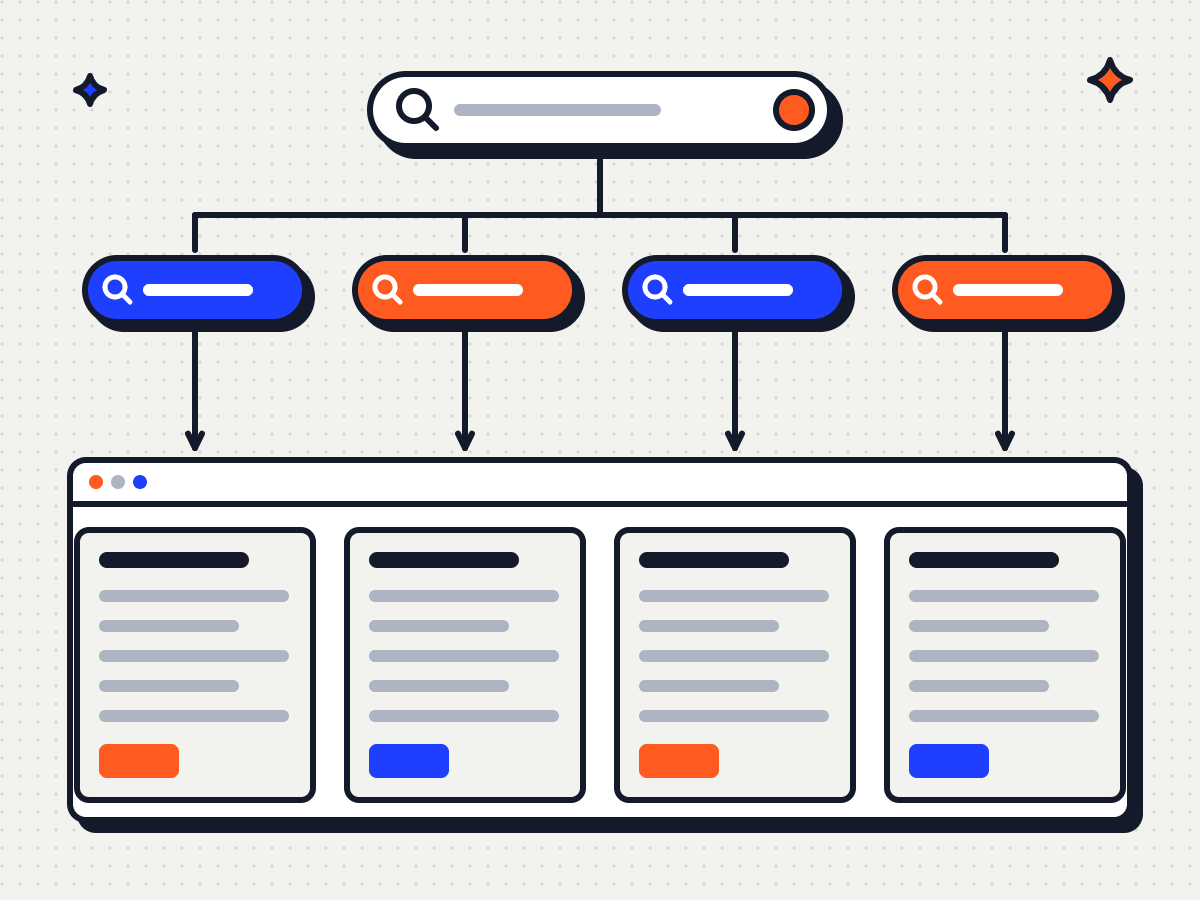
SEOs link AI Overviews to Google's patent "Generative summaries for search results", granted on September 26, 2023. It doesn't mention AI Overviews, but it describes a summary written by a language model from the content of some results, including related searches, with sentences linked to the pages that confirm them. A patent doesn't prove the method is in use: claims and limits are in the AI Overview patent breakdown, and the parallel-search mechanism in the article on query fan-out.
The dates that matter in Italy
- May 2024: launch in the United States.
- March 26, 2025: arrival in Italy, in Italian, for adult users signed in to Google.
- October 2025: AI Mode arrives in Italy (October 8); FIEG, the Italian federation of publishers, files a complaint with Agcom, the Italian communications authority, and calls AI Overviews a "traffic killer".
- January 2026: Gemini 3 becomes the default model; on mobile, a follow-up question asked inside the AI Overview leads into AI Mode. The same month, after a Guardian investigation, Google removes AI Overviews from some health searches, such as those on normal liver test values.
- April 2026: Agcom refers AI Overviews and AI Mode to the European Commission for possible violations of the Digital Services Act.
- August 31, 2026: generative AI report and opt-out control in Search Console for all sites, after a launch in the United Kingdom in June.
- October 15, 2026: Google announces more inline links in AI answers, shown more often in the upper part.
The answers can be wrong, and Google says so on the same help page: important information should be checked in more than one place. Crawling, indexing and ranking remain the foundation all of this rests on; the full picture is in how Google really works.
Anatomy of an AI Overview, piece by piece
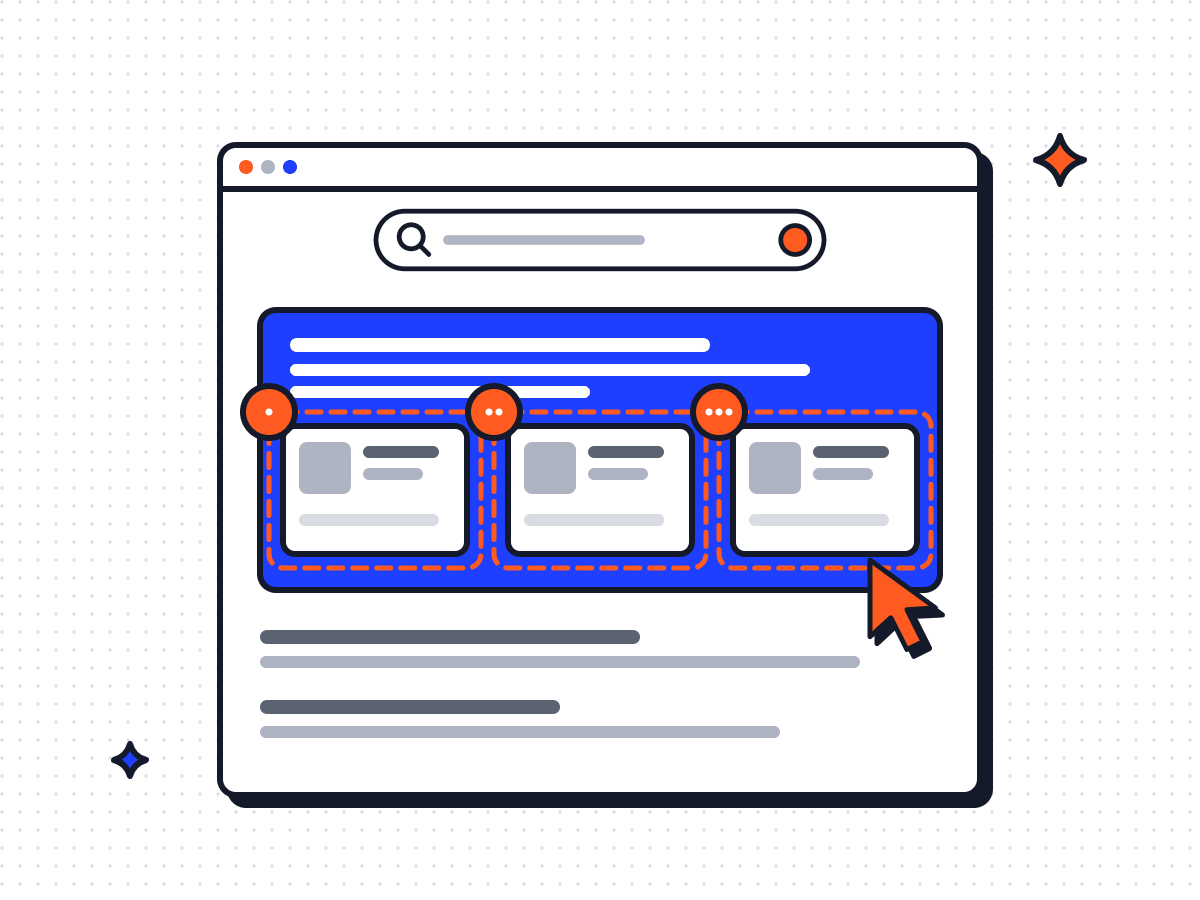
To understand where your site can appear, you need to know the parts of the box. Each one brings clicks in a different way.
1. The summary text
This is the part people read first: a few sentences, often a bulleted list. In the 2025 Pew Research Center study of 900 US adults, the median summary was 67 words long, ranging from 7 to 369.
Sixty-seven words are enough to answer a simple question. If your page says only that, the reader has no reason to click.
2. The inline links
These are links placed inside the text, next to the sentence they support. Google introduced them as a test in August 2024; on October 15, 2026 it wrote that it had greatly increased their presence and that it shows them more often in the upper part of the answer.
For a site these are the most valuable links, because they sit exactly where the reader is already reading.
3. The link panel
Since August 2024, on desktop the supporting links sit in a column to the right of the summary, with title, site name and icon. On mobile they open by tapping the site icons at the top right.
In Pew's research, 88% of summaries cited three or more sources and only 1% cited a single source. So you are never alone: you are one of three, five, eight links, and how your title stands out from the others matters.
4. "Show more" and the links at the bottom
Many AI Overviews are collapsed halfway: the rest opens with "Show more" at the bottom of the box. The expanded view shows more paragraphs and more links. In October 2026 Google also made links to related articles at the end of some answers more visible, with thumbnails.
5. Feedback and follow-up
At the bottom there are thumbs up and thumbs down icons, and at the top right the three-dot menu. On mobile, since January 2026, a follow-up question typed below the summary opens AI Mode, that is, a conversation with more searches and more sources.
What it means for you. Being "cited" can mean three different things: an inline link visible right away, a card in the side panel, or a link that appears only after "Show more". When you check your keywords, note which of the three it is: the downloadable sheet has a column for it.
Which searches trigger them (and which don't)
Google doesn't publish a list. Independent studies, many on the US market and with different samples, point in the same direction: informational, long questions on topics where trust matters.
| Type of search | Searches with an AI Overview | Who measured it and when |
|---|---|---|
| Italian keywords (all) | about 25% | SISTRIX, late 2025 |
| Google searches (US panel) | 18% | Pew Research Center, March 2025 |
| Questions (who, what, when, why) | 60% | Pew, March 2025 |
| Searches of 10 or more words | 53% | Pew, March 2025 |
| Searches of 1-2 words | 8% | Pew, March 2025 |
| Education sector | 85.2% | BrightEdge, September 2025 |
| Health sector | 83.6% | BrightEdge, September 2025 |
| E-commerce | 18.5% | BrightEdge, September 2025 |
| Finance | 17.9% | BrightEdge, September 2025 |
In Italy, YMYL topics, meaning health and money, weigh heavily: according to SISTRIX, informational health sites are the most present in Italian AI Overviews, followed by finance.
But AI Overviews are no longer only informational. In Semrush data on more than 10 million keywords, informational queries were 91.3% of those with an AI Overview in January 2025 and 57.1% in October 2025. From October 2024 to October 2025, commercial queries rose from 8.15% to 18.57% and transactional ones from 1.98% to 13.94%.
What it means for you. If you run an e-commerce site, according to BrightEdge pure purchase searches ("buy X online") have an AI Overview in less than 20% of cases, while "what is" and "how does it work" questions reach 60-85%.
If you are a B2B company or a professional firm, the most exposed queries are your customers' long questions: "how does it work", "how much does it cost", "what's the difference between". The numbers show the direction; how much it weighs on your site you measure with the procedure in chapter 10.
What happens to clicks: the studies compared
Keep two metrics apart: impressions, meaning how many times your link is seen, and clicks, how many times it is chosen. AI Overviews move them in opposite directions.
| Study | Data year | Sample | Main result |
|---|---|---|---|
| Pew Research Center | March 2025 | 900 US adults, 68,879 searches | click on a classic result in 8% of visits with a summary, 15% without; links inside the summary clicked in 1% of visits |
| Ahrefs | March 2025 | 300,000 informational keywords, desktop | position 1 CTR 34.5% lower with an AI Overview |
| Ahrefs, update | December 2025 | same methodology, compared with December 2023 | position 1 CTR down 58% |
| Seer Interactive | September-November 2025 | 53 brands, 5.47 million queries | organic CTR of cited pages from 2.52% to 0.76%, with impressions from 15.8 to 39.5 million |
| Seer Interactive | December 2025-February 2026 | same sample | CTR on queries with an AI Overview from 1.3% to 2.4%: for Seer a stabilization, not a recovery |
Pew adds a figure that explains the rest: 26% of pages with a summary ended the browsing session, against 16% of those without. People who read the answer often stopped there.
The second useful figure comes from Seer Interactive: on informational queries, cited pages get 120% more clicks per impression than uncited ones, while still sitting 38% below searches without an AI Overview.
Google's position. Google maintains that, in its tests, links inside AI Overviews get more clicks than the same result in classic form, that those clicks are of higher quality and that AI features send sites "billions of clicks every week". This doesn't contradict the studies: more impressions, fewer clicks per impression.
An example with Seer's numbers
Example: a guide with 10,000 impressions a month on informational queries, using the average annual CTRs Seer measured for these queries.
| Scenario | Average CTR | Clicks per month |
|---|---|---|
| Query without an AI Overview | 3.35% | about 335 |
| AI Overview, page cited | 2.07% | about 207 |
| AI Overview, page not cited | 0.94% | about 94 |
Being cited is worth more than double the clicks of staying out, but it doesn't bring you back to previous levels. And Seer warns that it isn't proven that the advantage comes from the citation: cited pages often belong to more authoritative brands, which would get more clicks anyway.
Data from the sites I follow: same position, fewer clicks
The studies above are almost all on the US market. I wanted to see what happens in Italy, on the sites I follow, with a comparison that takes position out of the equation.
Same query, same position, a year later
I took the same queries, on the same sites, at the same average position, a year apart: 4,453 pairs between July-September 2025 and July-September 2026. CTR in the top ten positions fell by 14%. Those in first place held up (8.5% against 8.3%). Those in second place lost 26% of their clicks, those in third place 36%. The position stayed the same: what changed is what's above it.
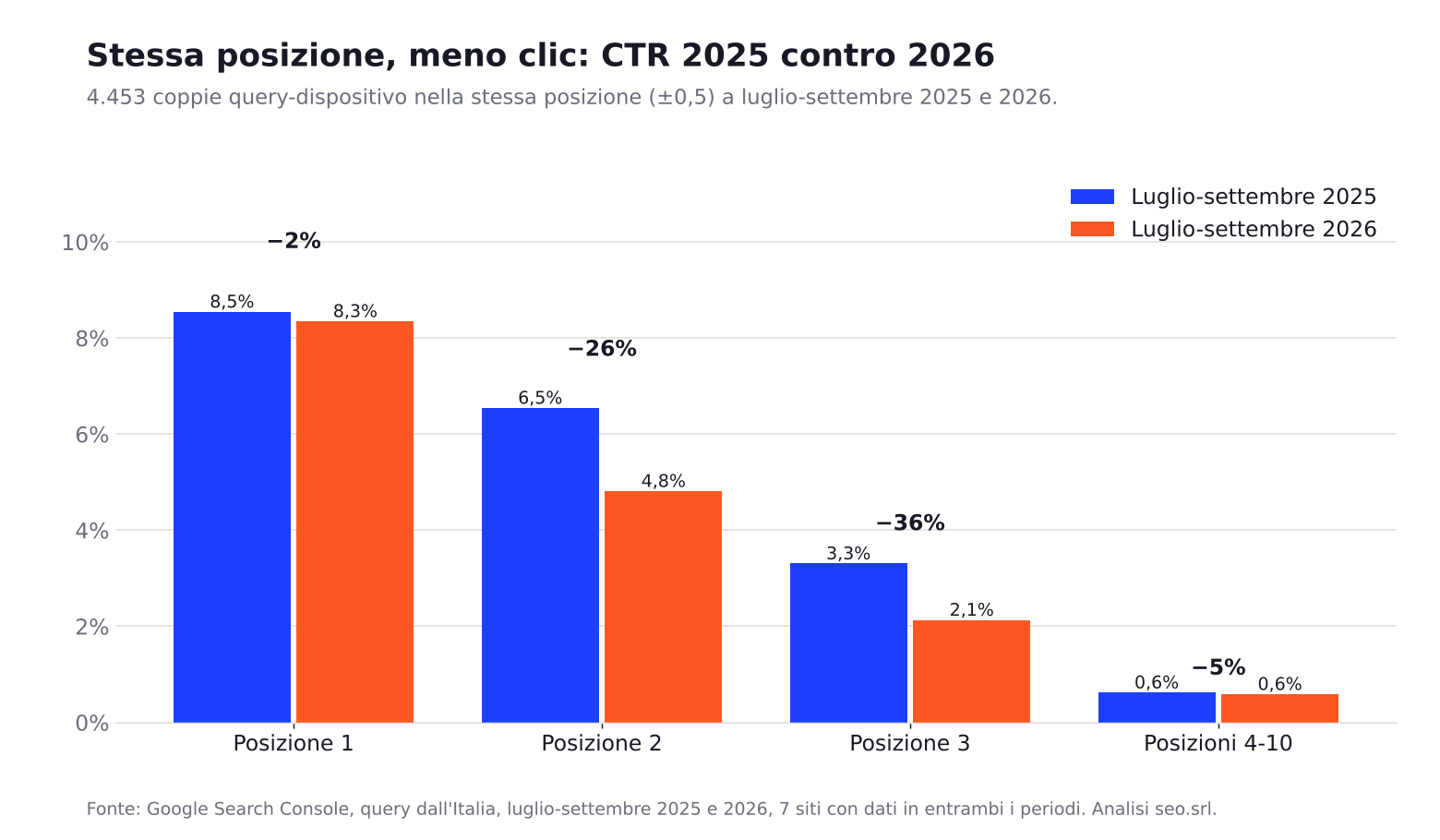
The drop doesn't depend on a single site: 6 sites out of 7 went down, and removing the largest one the drop stays at 15%.
Questions lose twice as much
Queries starting with how, what, why, when lost 28% of CTR at equal position. The others lost 13%. A year ago, in the top three positions, a question brought more clicks than an average query (7.2% against 5.8%). Today the advantage is gone (5.0% against 4.6%).
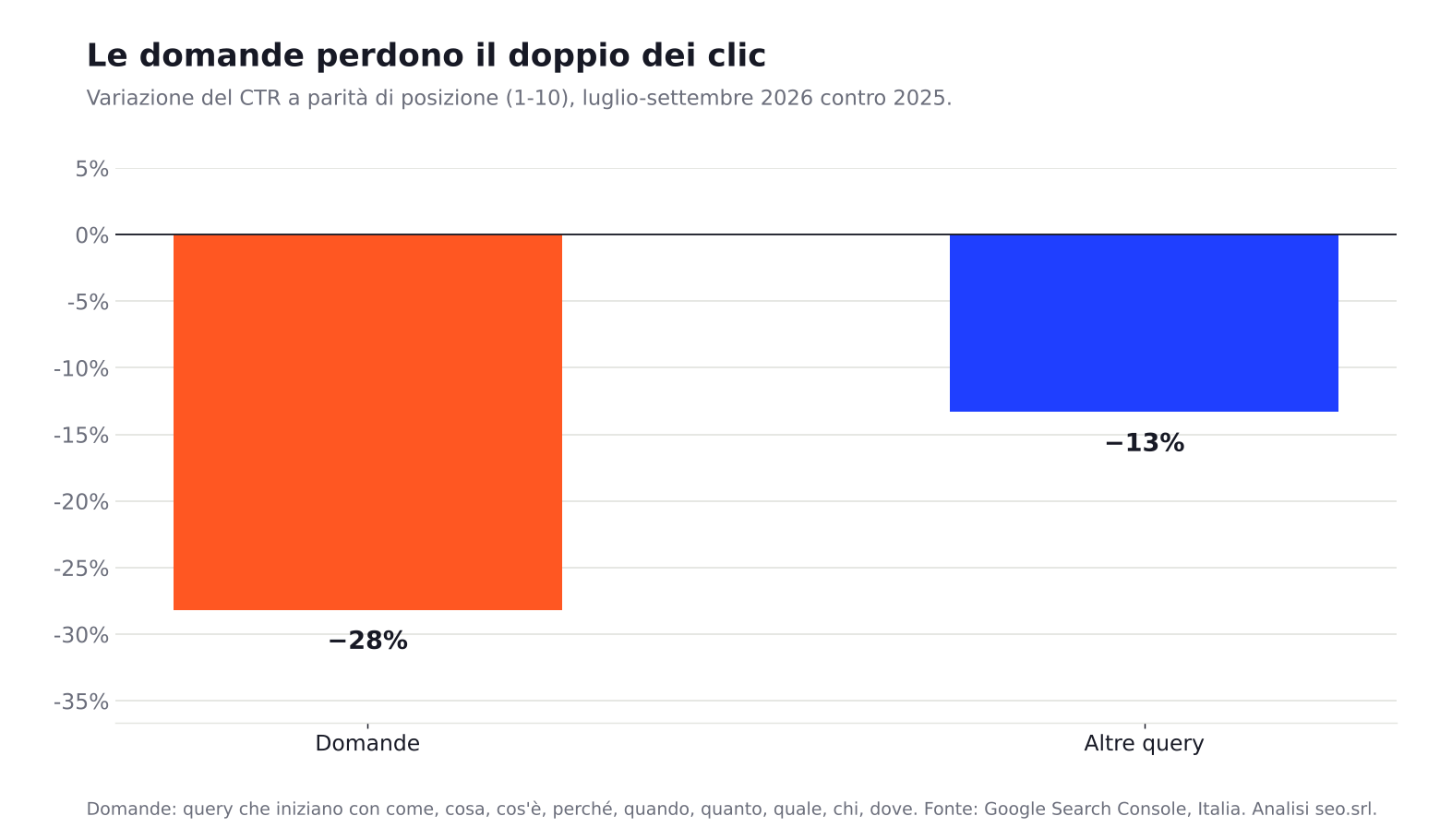
Search Console doesn't say when an AI Overview was above your result, so I can't attribute the whole drop to AI answers. But question queries are exactly the ones Google answers by itself, and they are the ones that lost the most.
Queries that are shown and nothing else
I counted queries with at least 100 impressions in three months that didn't bring a single click. In the top three positions they are 9%. Between fourth and tenth, 37%, and 44% if the query is a question. On the second page, 64%.
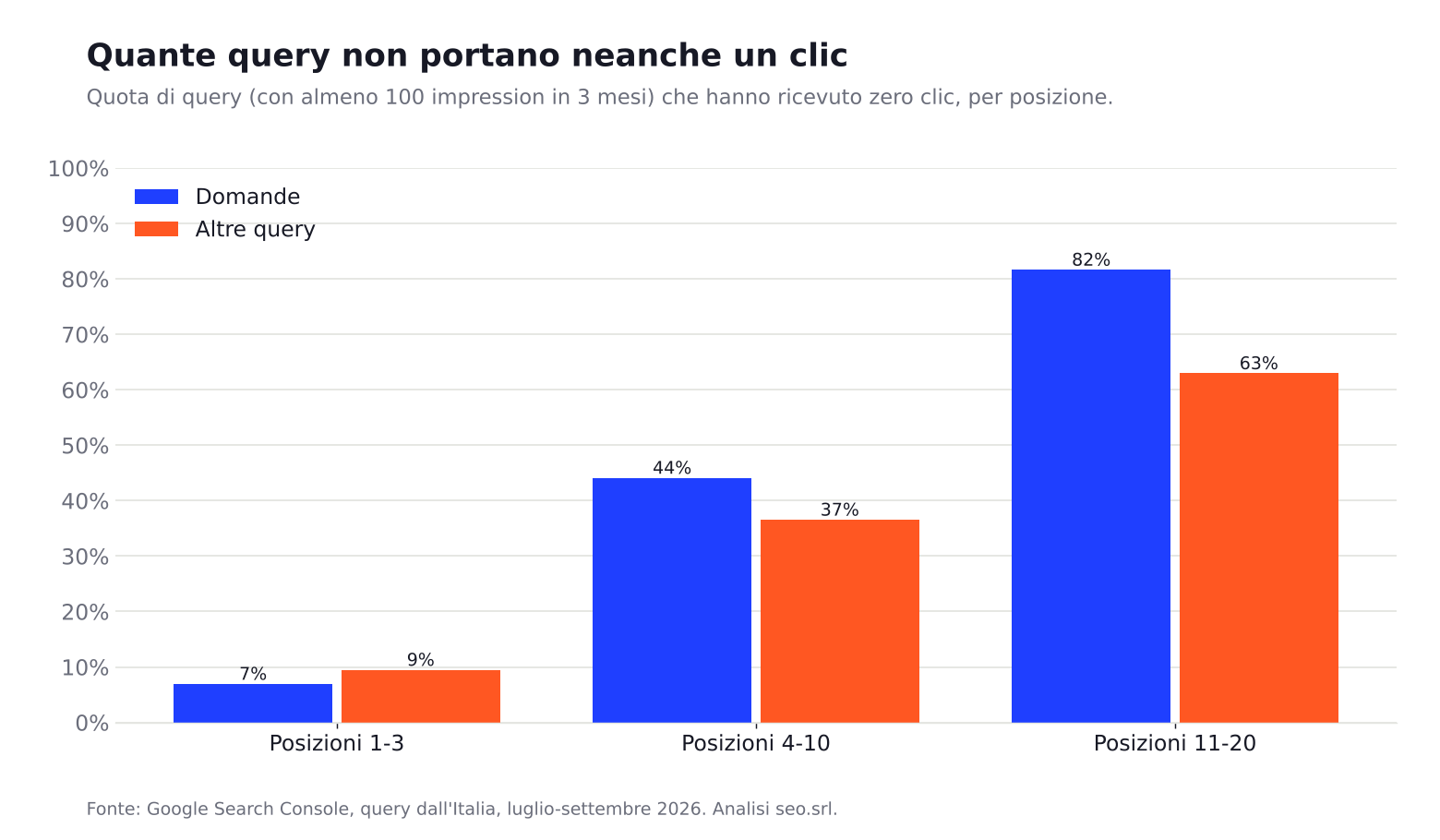
Being on the first page is no longer enough: between fourth and tenth position, one query in three is shown and nothing more.
The sample has a limit that I'll state: 22 sites are not Italy, they are the sites I follow, mostly informational and with two health sites that weigh heavily. The useful figure isn't the absolute value, it's the direction: at equal position, questions bring fewer clicks than a year ago.
How to get into the cited sources: 8 factors
To appear in AI Overviews there are no additional requirements or special optimizations, and you don't need files "for AI" or new markup: this is what the Search Central documentation on AI features says. But there are 8 concrete factors that raise your chances.
1. Make the page indexable and eligible for snippets
To be a supporting link, a page must be indexed and eligible to appear with a snippet. This also applies to the rest of the chain: crawling must not be blocked by robots.txt, nor by the CDN or hosting.
Example: a "how to choose a mattress" guide with a nosnippet inherited from the template can sit on the first page but can't be cited. Typical mistake: a CDN anti-bot rule that answers Googlebot with an error while the browser sees the page normally.
2. Get into the top 10 for the main query
Classic ranking still matters, but less than before. In Ahrefs' July 2025 analysis, across 1.9 million citations, 76.1% of cited pages were in the top 10; in the March 2026 update the share dropped to 37.9%, and between 31.0% and 36.7% of citations (depending on the test) were outside the top 100 results.
The studies don't agree, but they tell practitioners the same thing: the top 10 helps, the fan-out opens other doors. Example: a compressor manufacturer in seventh place for "how to choose an industrial compressor" gains more by pushing that page than by opening a new keyword.
3. Cover the fan-out sub-questions
Every sub-question is a chance to be cited. Collect the real questions (Google's related questions, related searches, questions that reach your sales team) and give each one an H2 or an H3.
Example: for "professional liability insurance for engineers" the typical sub-questions are cost, coverage limits, whether it's mandatory and differences between policies: four chances instead of one. Typical mistake: writing the four answers in one long paragraph, where no sentence stands on its own.
4. Answer right away, in text
Google asks you to keep important content in text form. Under each heading put the answer in the first one or two sentences, then the details.
Example: under "How much does maintenance of a photovoltaic system cost?" the first sentence gives the price range and what it depends on. Typical mistake: the price list only in a PDF or an image, which the summary can't cite as a sentence.
5. Use a readable structure: lists, tables, comparisons
The more orderly the page, the easier it is to extract an answer: tables for comparisons, numbered lists for steps, one idea per paragraph. Example: a flooring e-commerce site that compares stoneware, parquet and laminate in a table, with cost, durability and maintenance, offers a ready-made answer.
6. Use structured data consistent with the visible text
You don't need markup "for AI": you need correct markup that says the same things as the page. Use the right types (Organization, Article, Product, LocalBusiness) and align prices, availability, authors and dates.
Example: a product page that shows "available" with markup saying "out of stock" sends an inconsistent signal.
7. Show experience, original data and a clear author
The helpful content guidelines ask whether the page offers original information, research or analysis, whether it shows first-hand experience and whether it's clear who wrote it; in E-E-A-T, trust is the most important element. A summary can repeat what everyone says without citing anyone, but a figure that exists only on your site has to cite it.
Example: an installer who publishes the annual output of ten systems they built offers a number found nowhere else.
8. Take care of images, video and up-to-date listings
Quality images and video next to the text, and up-to-date information in Merchant Center and in the Business Profile, are among the practices Google lists for AI features. If you sell online, take care of your product feed; if you have a physical location, update hours, services and photos.
Example: a garage with up-to-date hours and services answers whoever searches "car service open Saturday".
Snippet controls: nosnippet, data-nosnippet and max-snippet
These are the rules that decide how much of a page Google can show. Their official documentation states plainly that they also act as a limit on the use of content in AI Overviews and AI Mode. They are useful in two cases: protecting part of a page, or understanding why a page is never cited.
nosnippet: no snippet, no AI
With this rule Google shows no snippet of the page in any type of result: web search, Images, Discover, AI Overviews, AI Mode. The content isn't used as direct input for AI answers.
<meta name="robots" content="nosnippet">The cost is high: you also lose the description in classic results, and a result without a description gets fewer clicks. It makes sense on pages that shouldn't be summarized, not on a blog.
data-nosnippet: hide only one piece
This is an HTML attribute that excludes from the snippet, and therefore from AI answers, only the text it wraps. It works on three elements: span, div and section. It is boolean: any value is ignored.
<p>The base price of the service is shown in the price list.
<span data-nosnippet>The discount reserved for subscribers is 15%.</span></p>

<section data-nosnippet>
  <h3>Full review</h3>
  <p>The review text, reserved for subscribers...</p>
</section>
Example: a paid review site leaves the verdict free in one line and closes the full analyses with data-nosnippet, so the summary can cite the judgment but not rewrite its reasoning.
Typical mistake: putting the attribute on a <p>, an <li> or an invented tag. It isn't valid and Google ignores it: the text stays available.
max-snippet: a character limit
It sets the maximum number of characters of the snippet, and also limits how much text can be used as direct input in AI answers. The value 0 equals nosnippet; -1 lets Google decide; without the rule, Google decides.
<meta name="robots" content="max-snippet:160">The limit doesn't apply when the publisher has granted Google the use of the content through a separate agreement.
For non-HTML files: X-Robots-Tag
For a PDF, which has no <head>, the same rules go in the HTTP header of the response, set on the server.
HTTP/1.1 200 OK
Content-Type: application/pdf
X-Robots-Tag: max-snippet:0
Three rules to know before touching them
- The most restrictive wins. With
max-snippet:50andnosnippeton the same page, nosnippet applies. - If robots.txt blocks crawling, the rules can't be read. Google doesn't see the meta tag of a page it can't download, so it ignores it.
- Images are separate. With nosnippet a static thumbnail can remain visible; for image previews there is
max-image-preview(none, standard, large).
Excluding your site from AI Overviews: the Search Console control
Snippet controls also cut classic results. Since June 2026 there is a tool that separates the two: the "Search generative AI" control in Search Console, announced on June 3, 2026 while Google was in talks with regulators, including the UK competition authority (CMA), and available to all sites from August 31, 2026.
What it does and where to find it
The control is in Settings > Search generative AI. The help page describes these effects:
- it excludes the site's links and content from AI Overviews, AI Mode and Discover's generative AI features;
- it applies to the whole property; a child property inherits the choice of the nearest parent property, but can change it for itself;
- it is not a ranking signal or an inclusion signal for the rest of Search;
- it generally takes effect within a few days, with exclusion within 1-2 days of activation and some delay for caches;
- it doesn't cover model training, which is managed with Google-Extended;
- it can be undone by returning to the same page and choosing the inclusion option.
Two limits matter. Excluded content can still help Google understand queries and pages in general. And summaries may show content from other sites similar to yours.
When it makes sense to opt out
- you live on full reads (publishing, paid content) and the data shows AI impressions don't bring clicks;
- you have legal or contractual constraints on the use of your content.
When it doesn't, which is most cases
- you are a small or mid-sized business, an e-commerce site or a B2B company: a citation is brand visibility, and with the control on you get neither traffic nor impressions from AI features;
- you hope to recover rankings: the control is not a ranking signal, so you gain nothing in classic results;
- you leave room to competitors: the summary stays, with their sources.
Before deciding you need at least two or three months of data from the new report. If one section of the site needs protecting and the rest doesn't, data-nosnippet is more precise than a switch that applies to the whole property.
How to measure AI Overviews with official data
Since August 31, 2026 you have an official data point. It is partial, and it needs to be cross-checked with two others.
1. The Search Console generative AI report
It shows how many times links to your site appeared in AI Overviews and AI Mode. You find it among the performance reports, with four dimensions: page, country, date (day, week or month) and device. A filter separates text searches from image searches, such as Google Lens.
The generative AI report has three limits you should know:
- it shows only impressions: no clicks, no queries;
- in the chart, several links from the same site in the same summary count as a single impression, while the per-page table counts them page by page, so totals may not match;
- the Performance report limits apply, such as the 1,000 rows; in the export, cells with "~" or "-" become zero.
If the report doesn't appear, the site has too few impressions in AI features or is excluded from them.
2. The Performance report
Clicks from AI Overviews are already there, mixed into the "Web" search type. A click on an external link inside the summary counts as a click. All the links in an AI Overview take the position of the box: a cited page can improve its average position while CTR falls.
3. GA4
Traffic from AI Overviews and AI Mode falls under Organic Search. The default "AI Assistant" channel collects ChatGPT, Gemini, Copilot and the like, but by definition excludes Google's AI features. How to set up reports on AI assistants is explained in the guide to AI traffic in GA4.
Monitoring your keywords, step by step
The reports tell you how many times you appeared, not where and in place of whom. That's why I recommend a manual log of 20-30 queries per site, updated once a month. The sheet below already has the columns.
Step 1. Choose the queries to follow
Start from the Performance report for the last three months. Take 20-30 queries with these characteristics: many impressions, position between 1 and 15, question or comparison form. Add 3-5 queries that bring conversions even if they have few impressions.
Typical mistake: choosing only the highest-volume keywords. They are often one or two words, which is where AI Overviews appear least.
Step 2. Check the results page cleanly
Open an incognito window, with Google set to the country version and language of your market (google.it and Italian for Italian sites). Search the query and take a screenshot of the box, opened with "Show more". The box can change from one day to the next: what you note is a sample, not a measurement.
Step 3. Note what you see
For each query write in the sheet: whether the AI Overview is there, whether your site is cited, in what form (inline link, panel, only after "Show more"), which page, and the first two domains cited in your place.
Example: for "how to clean solar panels" the AI Overview is there, the site is cited only in the side panel with the maintenance guide, and the first sources are a manufacturer and a forum. This is information no report gives you.
Step 4. Add the Search Console numbers
For the page that should answer, take the month's impressions from the generative AI report and, from the Performance report, clicks, CTR and average position of the query. Put the same month of the previous year beside them, so you remove seasonality.
Step 5. Read the combinations
- AI Overview present, site not cited, CTR falling: the page has the answer but not in a citable form. Review factors 3, 4 and 5.
- Cited, CTR falling, impressions growing: this is the normal pattern of the phenomenon. Work on the reason to click: a figure, a tool, an example the summary doesn't contain.
- No AI Overview, CTR falling: the cause is elsewhere, for example another SERP element or a competitor that moved up.
Step 6. Intervene on one page at a time
Pick the three pages with the worst combination, change one thing per page and note the date in the sheet. If you change everything at once, the following month you won't know what worked.
Step 7. Repeat every month, compare every three
The monthly check is for noticing changes; the quarterly comparison is for deciding. AI Overviews change often, and a single month isn't enough to say a change worked.
How to turn off AI Overviews as a user
If you are the one who doesn't want to see them: Google clearly says they can't be turned off. You can work around them in three ways.
- Web filter (official). After the search choose "Web" under the search bar; if it isn't there, it's under "More". You see only text links, without AI Overviews.
- The udm=14 parameter (unofficial, desktop). It is the Web filter inside the URL. In Chrome: Settings > Search engine > Manage search engines, add an engine with the URL
https://www.google.com/search?q=%s&udm=14and set it as default. The method is described by Proton, not by Google, and it may stop working. - On a smartphone. Use the Web tab after every search. Remember that a follow-up question typed below the summary takes you to AI Mode.
There are also browser extensions that hide the box. They are third-party and read the pages you visit: check permissions and developer before installing them.
AI Overview vs AI Mode: the differences in a table
The two features are often confused, but for those who use them they are different. For those who own a site, much less so: same technical foundations, same report, same control.
| AI Overview | AI Mode | |
|---|---|---|
| Where it appears | At the top of the normal results page | Dedicated tab in the results and in the Google app |
| When it appears | When Google considers it useful | When you choose it |
| What it is for | The gist of a topic, quickly | Exploring, reasoning, making complex comparisons |
| Conversation | On mobile a follow-up leads into AI Mode | Native follow-up questions |
| Default model | Gemini 3 (since January 2026) | Gemini 3.5 Flash (since May 2026) |
| In Italy since | March 26, 2025 | October 8, 2025 |
| Users worldwide | Over 2 billion a month (July 2025) | Over 1 billion a month (July 2026) |
| Measurement and exclusion | Generative AI report and control in Search Console | Same report, same control |
Both can use the query fan-out, so the factors in chapter 6 apply to both.
Frequently asked questions
How do I report an error in an AI Overview?
Below the summary there are thumbs up and thumbs down icons: after clicking you can choose Share more feedback or Report a problem. You can do the same from the three-dot menu at the top right of the box.
Do AI Overviews also appear in image searches?
Yes: they can also appear when you search with an image, for example with Google Lens. In the Search Console generative AI report these impressions are separated from text searches with the search type filter Web: multimodal.
Does blocking Google-Extended in robots.txt remove the site from AI Overviews?
No. Google-Extended decides whether content can be used to train Gemini models and for grounding in Gemini Apps and Vertex AI, and Google states that it affects neither inclusion in Search nor ranking. For AI Overviews, what matters are the snippet rules and the Search generative AI control in Search Console.


