
Email marketing: the complete guide (strategy, rules, tools and examples)
In 2024, worldwide, about one email in six did not reach the inbox. And the rules have changed: Gmail, Yahoo and Outlook filter or reject non-compliant senders, and Italy's data protection authority (the Garante) fines those who write without consent.

Eugenio Tommasi
Founder of SEO SRL
Published 18 min read

Email marketing is the use of email to find, convert and retain customers who have given you permission to write to them: newsletters, promotions (DEM), transactional emails and automations.
Table of contents (11 sections)
- What email marketing is and why it still pays off
- Newsletters, DEM, transactional emails, automations: the 4 families
- The rules to follow: GDPR, soft opt-in, unsubscribe, and Gmail, Yahoo and Outlook requirements
- How to build your list without buying it: 7 lawful ways
- How to write emails that get opened and clicked
- The 5 automated flows to turn on right away
- Deliverability: 8 checks to reach the inbox
- How to measure: the metrics that matter (and why open rate matters less)
- 7 email marketing mistakes to avoid
- Where to start
- Frequently asked questions
In short
- Automations, with only a few sends, bring in a much larger share of revenue than campaigns: start with the welcome flow and abandoned cart.
- Gmail, Yahoo and Outlook require bulk senders to use SPF, DKIM and DMARC; Gmail and Yahoo also require one-click unsubscribe.
- In Italy, the tracking pixel must be brought into compliance by October 29, 2026: measuring individual recipients' opens generally requires consent.
- Open rate changes with the calculation method and is inflated by Apple's automatic opens: decide on clicks, conversions and revenue.
- In Italy, without consent you can only write to customers, about similar products (the soft opt-in, known as "soft spam"); site sign-ups and free trials are not enough.
In 2024, worldwide, about one email in six did not reach the inbox, according to the Validity report. And the rules have changed: Gmail, Yahoo and Outlook filter or reject non-compliant senders, and Italy's data protection authority (the Garante) fines those who write without consent. From October 29, 2026, the pixel that measures opens also has to comply with the Garante's rules.
What email marketing is and why it still pays off
It pays off because the list is yours: you don't lose it when a social network changes its algorithm, and you decide when to write and to whom.
ROI: what the original sources say
"€36 for every €1" appears everywhere, almost always without a source. In Litmus's 2025 State of Email Survey (Litmus, nearly 500 marketing professionals), 35% report a return between $10 and $36 per dollar, 30% between $36 and $50, 5% above $50; 21% don't measure it. The UK's DMA estimated £35.41 per pound in 2020. These are marketers' estimates: calculate your own ROI, (email revenue − costs) ÷ costs.
2025-2026 benchmarks: overall averages
| Source (period and sample) | Open rate | Click rate | Unsubscribes |
|---|---|---|---|
| Brevo (2025 data, over 175,000 customers) | 20.73% (33.87% with Apple MPP) | 2.27% | 0.46% |
| MailerLite (Dec. 2024-Nov. 2025, medians) | 43.46% | 2.09% | 0.22% |
| GetResponse, Italy only (2023 data) | 44.38% | 2.87% | 0.19% |
| Mailchimp (data as of December 2023) | 35.63% | 2.62% | 0.22% |
Open rate varies by more than double depending on the method: Apple's automatic opens excluded or included, averages or medians, different customer bases. Click rate stays between 2% and 3%.
Benchmarks by industry
| Industry | Brevo open rate (without MPP) | Brevo click rate | MailerLite open rate | MailerLite click rate |
|---|---|---|---|---|
| E-commerce | 15.50% | 2.15% | 32.67% | 1.07% |
| Software and IT | 20.68% | 1.88% | 39.31% | 1.15% |
| Health and wellness | 19.47% | 2.06% | 38.40% | 0.95% |
| Food service and hospitality | 19.01% | 2.15% | 44.32% | 1.06% |
| Professional services and consulting | 22.74% | 2.20% | 45.96% | 2.41% |
The categories are not identical across the two reports. A wine e-commerce store with a 2% click rate is in line with the Brevo average (2.15%) and above the MailerLite median (1.07%).
Tools: what the platform needs to have
The best known: Mailchimp, Brevo, MailerLite, GetResponse, Klaviyo, ActiveCampaign. None is the best in absolute terms. I compare them on five questions:
- How many contacts do you have and how many emails do you send? Plans are priced by contact tier or monthly sends: compare the price for your tier, and the tier you'll be in a year from now, on the official price list on the day.
- Which automations do you need? A monthly newsletter needs little. For abandoned cart and abandoned browsing you need a direct integration with your e-commerce platform: check that it exists for the one you use.
- Where is the data stored? Ask where the servers are, whether data leaves the European Union and with what safeguards, and get the data processing agreement.
- Can you turn tracking off? After the Garante's guidelines you need to be able to disable the pixel for people who don't consent, or measure opens anonymously (see tracking pixel), and to record consents.
- Does it help you deliver? Guidance on SPF, DKIM and DMARC, one-click unsubscribe in the header, A/B tests.
Newsletters, DEM, transactional emails, automations: the 4 families
| Family | Purpose | Frequency | Marketing consent (Italy) | Example |
|---|---|---|---|---|
| Newsletter | Inform, build trust | Fixed, for example monthly | Yes, or soft opt-in for customers | B2B software: 3 usage tips a month |
| DEM (Direct Email Marketing) | Sell a specific offer | Per campaign | Yes; for third-party lists, specific consent to transfer of data | Wine e-commerce: a case of sparkling wine for the holidays |
| Transactional | Complete a requested operation | When needed | No, it is part of the service | Order confirmation, invoice, password reset |
| Automation | Respond to a behavior | Event-based | Depends: promotional yes, service no | Beauty salon: email to people who haven't booked in 90 days |
DEM aims at the sale, the newsletter at the relationship. Watch the boundaries: Gmail excludes transactional emails from the one-click unsubscribe requirement, but a promotion inside an order confirmation is marketing. And abandoned cart is not transactional: for someone who has never bought, you need consent.
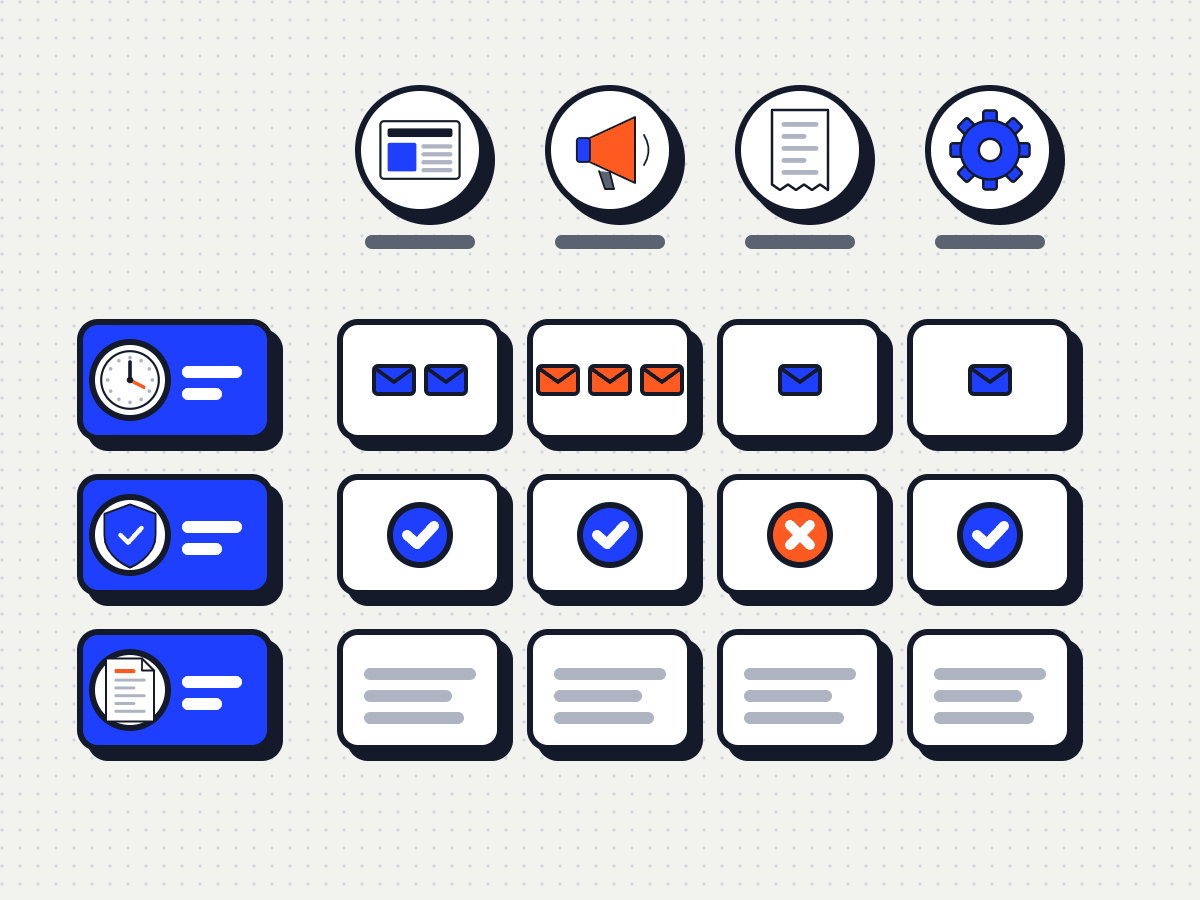
How to create a newsletter in 5 steps
The steps, in order:
- Promise: "every month, 3 ideas to close your books faster."
- Form: separate consent, not pre-checked, with double opt-in.
- Template: one column, one main topic, one call to action.
- Calendar: a sustainable cadence, and stick to it.
- Measurement: clicks and unsubscribes at every send.
The newsletter distributes your content marketing: without useful content it is just a flyer.
The rules to follow: GDPR, soft opt-in, unsubscribe, and Gmail, Yahoo and Outlook requirements
Consent: email marketing and GDPR
In Italy, promotional emails require prior consent (art. 130, paragraphs 1 and 2, of the Italian Privacy Code): freely given, specific, informed and documented, and you must be able to prove it (art. 7 GDPR). In practice:
- No addresses taken from the web, directories or public registers. Even in B2B: the Garante reprimanded a company that had written to a lawyer using the address from the bar register (October 23, 2025).
- No first promotional email asking for consent: it is not lawful.
- Double opt-in: for lists bought from third-party suppliers, the Garante considers it "state of the art, a minimum safeguard." The IP address alone is not enough as proof (September 25, 2025), nor are editable log files (€45,000 fine, June 4, 2025).
The soft opt-in: the only exception
In Italy, without consent you can write only if all of these conditions apply (art. 130, paragraph 4):
- the customer gave you the address in the context of a sale;
- you promote your own products or services, similar to those purchased;
- the customer was informed and did not object;
- every email reminds them they can object at any time, easily and free of charge.
The wine e-commerce store can offer the new vintage to someone who bought wine, not a partner's courses. Site registration, a free trial or a free service are not enough (Court of Cassation, order no. 15881 of June 13, 2025). On June 18, 2026, the Garante fined a publisher €280,000 for treating as customers even users without a confirmed account.
Unsubscribe: an obligation
Every promotional email must identify itself as commercial, say on whose behalf it is sent and how to opt out (Italian Legislative Decree 70/2003, arts. 8 and 9). The right to object to direct marketing always applies (art. 21 GDPR), withdrawing consent must be as easy as giving it (art. 7), and hiding the sender is prohibited (art. 130, paragraph 5).
Tracking pixel: what the Garante requires by October 29, 2026
Platforms count opens with a tracking pixel: an invisible one-pixel image hosted on an external server. When the mail client downloads it, the sender knows the email was opened and can record IP address, device, reading time and number of opens. The pixel is usually different for each recipient, so it tells you who opened, not just how many.
The rules are in the guidelines of the Italian data protection authority (decision no. 284 of April 17, 2026, art. 122 of the Privacy Code), published in the Official Gazette on April 29, 2026 with six months to comply: the deadline is October 29, 2026, as the October 5 vademecum also reminds. The timeline is in the news piece on the deadline.
When consent is needed. As a rule, the recipient's prior consent is required: informed, freely given, specific and unambiguous. The Garante's examples: measuring an individual's opens to improve promotional campaigns, adapting or stopping sends based on their interest, building commercial profiles from them.
When it is not needed. The exceptions in the decision, to be assessed case by case in any event:
- the statistical count of the overall percentage of opens, if anonymous: the Garante suggests one pixel identical for all recipients of the campaign and anonymization of IP and other technical data;
- security, for example authentication (account activation, password reset);
- institutional or service messages the sender is obliged to send, when it matters to know they were read, such as contract changes.
Privacy notice and withdrawal. The use of pixels must be declared beforehand, in the privacy notice, even across multiple layers; without a notice the data cannot be used. For new subscribers, consent is preferably requested when they leave their address, with a neutral, non-forced request. Withdrawal must be easy and also selective: stop receiving the emails, or receive them without the pixel, with no reduced service for those who refuse. The Garante suggests a footer link to an area for exercising rights. Choices must be recorded.
People already on your list. For ongoing processing, the transitional regime requires the notice with the first useful send (or at the first moment of discontinuity in the relationship) and selective withdrawal. It does not explicitly say a new consent is needed. The cautious reading, which I recommend and which is worth sharing with your DPO, is to use only the anonymous count for them and ask for tracking consent with the first send.
What to do before October 29:
- Check on the platform whether the pixel is active and different for each recipient, whether you can turn it off for those who haven't consented or switch to an anonymous count per campaign, and whether the email address is passed in the pixel request (the Garante suggests an unreadable, non-sequential identifier, stored separately).
- Update the sign-up form and privacy notice: tracking consent, what you measure, how to withdraw, with the footer link.
- Send the notice to existing subscribers with the first useful send.
- Review automations and segments based on opens (resending to non-openers, reactivation): without consent, the individual-level data is gone.
Which metrics remain. The overall open rate measured anonymously and, for those who consented, individual opens. The decision is about pixels, not tracked links: a link that identifies the recipient, especially if you use it for profiling, should be treated with the same caution. Aggregate clicks, conversions and revenue per campaign remain the numbers to decide on.
Gmail, Yahoo and Outlook requirements
Gmail and Yahoo have applied these requirements since February 2024. For Google, a bulk sender, permanently, is anyone sending about 5,000 messages or more in 24 hours to personal Gmail accounts; since November 2025 checks are stricter. Since May 5, 2025, Outlook rejects non-compliant messages from senders sending 5,000 emails a day or more to outlook.com, hotmail.com and live.com. Details are in Google's announcement.
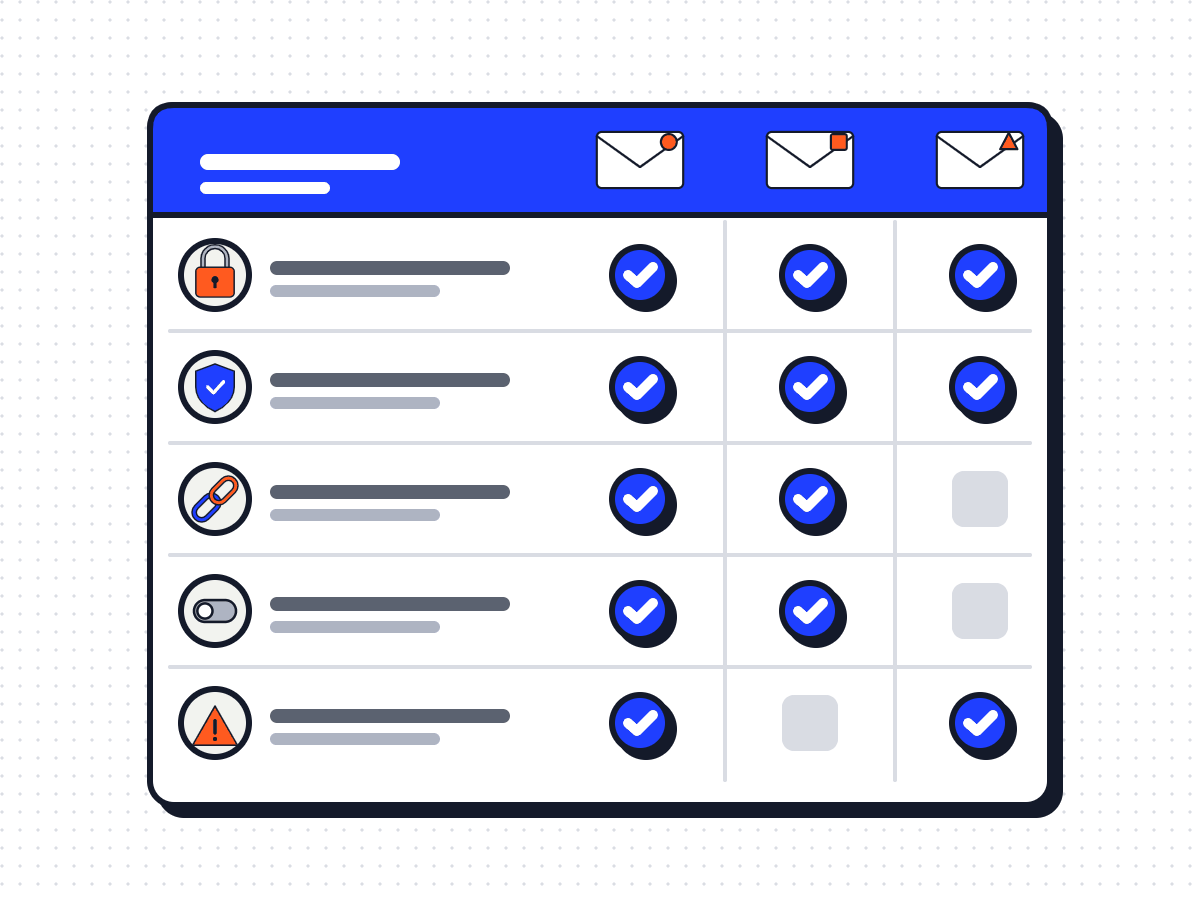
| Requirement (bulk senders) | Gmail | Yahoo | Outlook |
|---|---|---|---|
| SPF and DKIM | Yes | Yes | Yes |
| DMARC aligned with the sender (at least p=none) | Yes | Yes | Yes |
| One-click unsubscribe (List-Unsubscribe, RFC 8058) | Yes, for promotional emails | Yes | A working link is recommended |
| Unsubscribe processed within | 48 hours | 2 days | Not specified |
| Spam rate | Under 0.1%, never reaching 0.3% | Under 0.3% | Not specified |
Penalties and checklist
In Italy, violations of art. 130 fall into the highest GDPR tier: up to €20 million or 4% of worldwide annual turnover, whichever is higher (art. 166 Privacy Code; art. 83 GDPR). Another case: €400,000 to Verisure Italia: a former customer kept receiving promotional SMS after opting out, and someone who had only asked for a quote was contacted by phone, email and SMS, treating the number given for the quote as marketing consent (Garante, December 2025).
Checklist before every send:
- separate consent, not pre-checked, with double opt-in;
- a log with date, time, source and text of the privacy notice;
- soft opt-in only toward paying customers;
- unsubscribe in every email and in the header;
- opt-outs processed within 48 hours;
- tracking pixel: consent to individual tracking or anonymous count, updated notice, withdrawal of tracking alone also possible.
How to build your list without buying it: 7 lawful ways
No bought lists: consent given to others is valid for you only if it was specific to communication to third parties, and you have to prove it.
1. Useful content in exchange for the email
Example: the software company offers the checklist "10 checks before changing your management software."
2. A welcome benefit
Example: the beauty salon offers, with a pop-up, the calendar of seasonal treatments and a discount on the first session.
3. A separate checkbox at checkout
Optional and not pre-checked. Example: the wine e-commerce store asks "Would you like to receive new vintages and offers?" under the shipping details.
4. Webinars and events
Someone attending a free webinar is not a customer: a separate checkbox is needed. Example: the software company adds it to the sign-up form for the e-invoicing webinar.
5. On site, with a QR code
Example: at the beauty salon's reception, a QR code opens the sign-up form, with confirmation by email.
6. The newsletter archive
Example: the software company publishes past issues on the site, with a form on every page.
7. Customers who have already bought (soft opt-in)
Example: at checkout, the wine e-commerce store notifies that it will suggest similar wines; the customer can refuse right away and in every email.
How to write emails that get opened and clicked
Subject line
Short and specific. In GetResponse's 2023 data, subject lines under 70 characters have the highest open rates, and personalized ones get opened less than others (35.78% versus 41.87%). The promise matters, not the name: put the benefit in the first words.
Preheader and first lines
The preheader follows the subject line in the preview: complete it, don't repeat it. And put the point in the first lines: according to a Validity study from June 2026, 55% of US consumers decide based only on AI-generated email summaries.
Structure, call to action and mobile
One goal, one call to action: a headline with the benefit, two or three short paragraphs, a button with a verb ("Book your session"), as in SEO copywriting. One column, large buttons and a test on Apple Mail and Gmail: in September 2026 Apple (iPhone, iPad and Mac, automatic opens included) accounted for 76.56% and Gmail for 16.10% of the opens tracked by Litmus.
A/B tests on subject line and send time
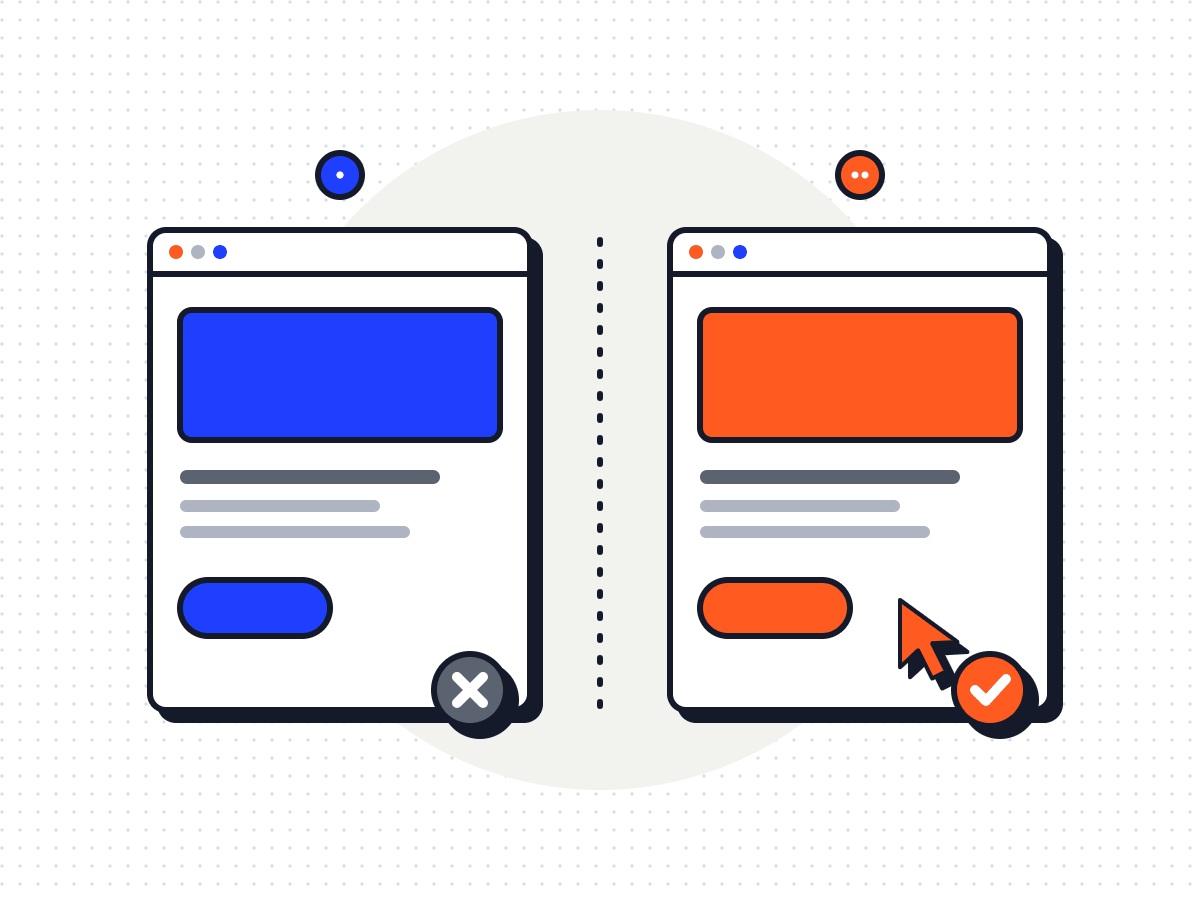
Test subject line, sender, content or send time, one variable at a time (Mailchimp allows up to 3 variants), and pick the winner on clicks or revenue, not opens. According to Brevo, Mondays and Tuesdays generally have the highest rates, weekends the lowest: check on your own list.
Personalization and AI
71% of consumers expect personalized interactions (McKinsey, 2023). Use AI to segment and choose the right product, not to write for you: 40% of US consumers trust promotional emails written by AI less (Validity, 2026).
3 complete examples
Example 1. Monthly newsletter of a B2B management software company
- Subject line: 3 checks to close the month in 2 hours instead of 2 days
- Preheader: The report most used by your peers, and how to turn it on
- Body:
Hi Marco,
every month-end your team exports data from three programs. You can shorten it like this:
- turn on automatic invoice reconciliation (10 minutes);
- save the "Monthly due dates" report to your favorites;
- schedule the report to go to your accountant on day 1.
What's new: the e-invoicing integration is now available to everyone.
[Watch the 4-minute tutorial]
Don't need this anymore? Unsubscribe in one click.
Why it works: measurable promise, usefulness first and news second, a single call to action.
Example 2. DEM from a wine e-commerce store
- Subject line: Sparkling wines for the holidays: 6 bottles, free shipping until Sunday
- Preheader: Three traditional-method and three Charmat wines chosen by our sommelier
- Body:
The holidays arrive before the couriers do. We've put together a case of 6 bottles: three traditional-method and three Charmat wines, for aperitifs and toasts.
Price: €89. Free shipping on orders placed by Sunday, December 13, delivery before Christmas.
[Choose your case]
Don't want to receive offers anymore? Unsubscribe in one click.
Why it works: clear offer, real deadline, visible price, prominent unsubscribe.
Example 3. Automated reactivation email from a beauty salon
- Subject line: It's been a while: this week we have 6 open slots
- Preheader: Seasonal facial cleanse, 50 minutes, book in 30 seconds
- Body:
Hi Giulia,
the last time you came in was June, for a facial cleanse: with the change of season, it's time to do it again.
This week we have 6 slots between Tuesday and Thursday, even at lunchtime.
[Book your time]
Prefer fewer reminders? Manage your preferences or unsubscribe.
Why it works: real data, a reason to come back now, preferences in addition to unsubscribing. It is promotional: it needs consent or the soft opt-in.
The 5 automated flows to turn on right away
In Omnisend's 2025 data (150,000 brands, 27 billion emails), email automations were 2% of sends and 30% of email revenue: an automated email earned $2.87 against $0.18 for a campaign email. Abandoned cart and welcome produced 76% of the orders from automations.
1. Welcome
It starts right after sign-up. In GetResponse's data (2023) it has an average open rate of 83.63% and a click rate of 16.60%; for Klaviyo it earns $2.65 per recipient. Example: the software company sends the checklist and, 3 days later, a use case.
2. Abandoned cart
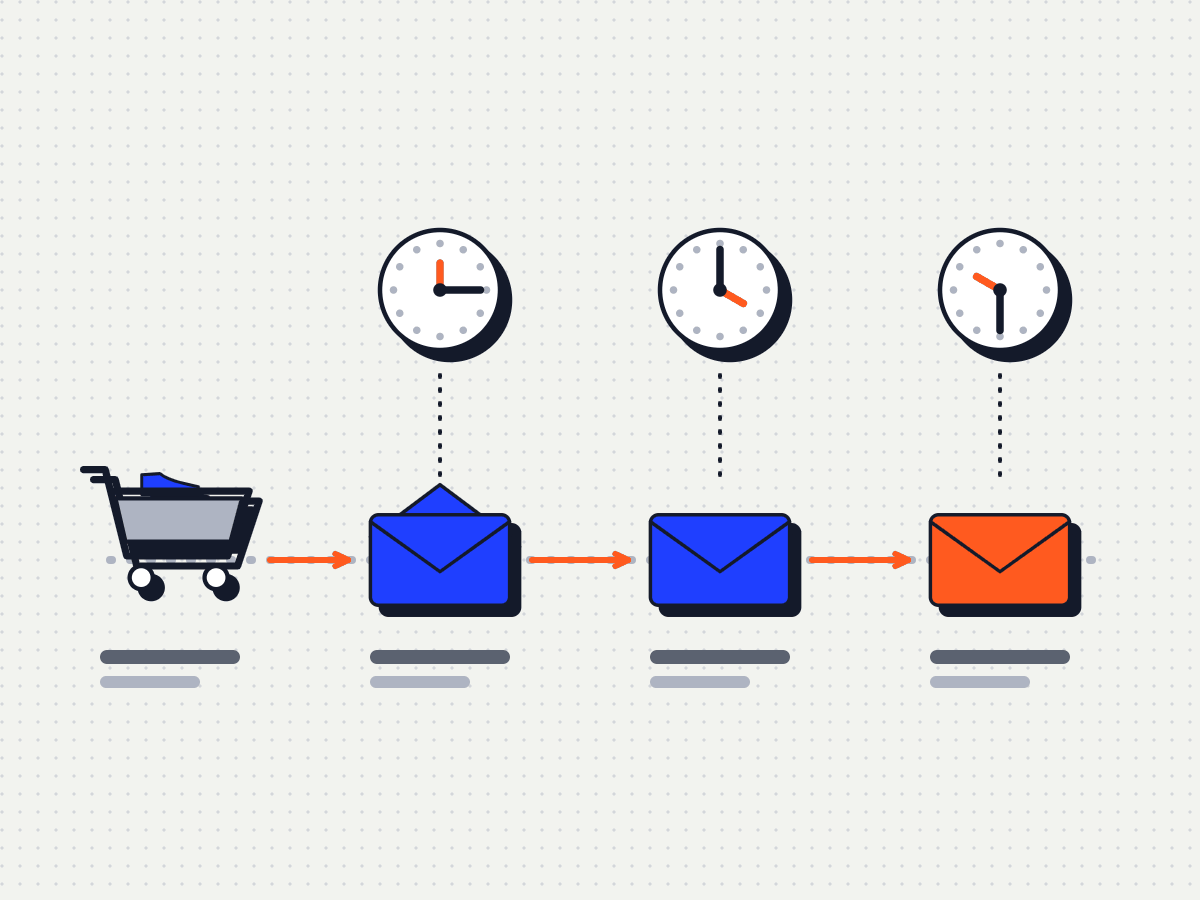
Klaviyo's 2026 data on more than 110,000 customers show an average click rate of 6.0% (11.3% for the top 10%) and $6.77 revenue per recipient. The typical sequence: an email after 2-4 hours, an SMS with a possible discount after 24 hours, a final message after 48 hours. Example: in services, the quote requested but not confirmed.
3. Abandoned browsing
It triggers when a subscriber looks at a product without adding it to the cart: average click rate of 5.48% in Klaviyo's data. Example: the wine e-commerce store shows the viewed label again with two alternatives at the same price.
4. Post-purchase
Thank you, instructions, review request, then a complementary product. It is the flow with the highest open rate in Klaviyo's data: 61.68%. Example: the beauty salon sends aftercare tips and, 4 weeks later, the reminder.
5. Reactivation
It asks those who haven't clicked for months (and haven't opened, if they gave tracking consent) whether they still want your emails; those who stay silent should be removed or paused, before they flag you as spam. Example: the software company offers inactive subscribers a quarterly recap.
How to choose the first flow, under what conditions, and how to measure it applies beyond email too: it is the subject of the page on marketing automation.
Deliverability: 8 checks to reach the inbox
In 2024, 83.5% of emails reached the inbox, 6.7% went to spam and 9.8% went nowhere; in Europe, 89.1% reached the inbox. The 8 checks:
- SPF, DKIM and DMARC on your domain, with DMARC aligned with the sender.
- Your own domain and a stable sender name, no free mailboxes.
- One-click unsubscribe (List-Unsubscribe header) and a visible link.
- Spam rate under 0.1% in Google Postmaster Tools: above 0.3% you lose Gmail's support on delivery problems.
- Only contacts with consent, confirmed with double opt-in.
- List hygiene: remove nonexistent addresses (hard bounces) immediately, pause inactive subscribers after the reactivation flow.
- Regular volumes: with a new domain or one idle for months, restart from the most active contacts and grow slowly.
- Infrastructure and testing: without a TLS connection Gmail limits messages, without a PTR record it flags an error; check that the platform handles them and test every send on Gmail and Apple Mail.
How to measure: the metrics that matter (and why open rate matters less)
Apple Mail Privacy Protection downloads email content in the background, whether opened or not: the pixel loads and, for the platform, it counts as an open. That's why Brevo publishes two open rates, with and without these opens (see the benchmark table), and MailerLite warns that real open rates are lower than those in the dashboard. On top of that, under the Garante's guidelines, you can measure an individual's opens only for those who gave you consent.
| Metric | How it's calculated | Why it matters |
|---|---|---|
| Click rate | unique clicks ÷ delivered emails | Real interest |
| Click-to-open | unique clicks ÷ unique opens | Whether the promise is kept, but skewed by Apple MPP |
| Conversion | orders or leads ÷ delivered emails | Link to revenue |
| Revenue per recipient | revenue ÷ recipients | Comparison across campaigns and flows |
| Unsubscribes | unsubscribed ÷ delivered emails | Wrong frequency or target |
| Spam rate | complaints ÷ delivered emails | The signal providers look at most |
| Bounce | bounces ÷ sent emails | List health |
After the click: UTM parameters on links and conversions in GA4; to track forms and bookings on the site, use Google Tag Manager.
7 email marketing mistakes to avoid
- Buying lists or using addresses found online.
- Using the soft opt-in with people who have never paid.
- Hiding or slowing down unsubscribing.
- Judging campaigns by open rate, inflated by Apple's automatic opens.
- Sending everyone the same email: at least separate customers and non-customers, active and inactive.
- Sending in fits and starts: months of silence, then bursts of promotions.
- Delegating everything to AI: readers trust promotions written by a machine less.
Where to start
Start with the rules: a list with consent and an authenticated domain. Turn on welcome and abandoned cart, then run one test at a time and measure on clicks and revenue. It is the channel you truly own, within a multichannel marketing strategy.
Frequently asked questions
If the sending platform inserts the pixel, who is responsible for it?
Everyone involved (sender, sending platform, mail provider) has to identify their own role in the processing, case by case, based on what they do and the agreements between the parties. There may also be joint controllership. Beyond the data processing agreement, ask the platform what it does with open data and define roles with your DPO.
How often should you send the newsletter?
At the frequency promised when people signed up and that you can sustain. Many companies start with one send a month or every two weeks, then increase if clicks and sales hold up. The sign that you're overdoing it is unsubscribes and spam complaints that rise after every send. Newsletters and promotions can have different rhythms, as long as subscribers know what to expect.
How much does email marketing cost?
There are three items: the platform, the time to write and manage sends, and the initial technical work (domain, authentication, forms, e-commerce integration). Platforms are priced by contact tier or sends, and many have a free plan for small lists, with limited features. For a small business, the biggest expense is usually not the subscription but the time spent on content.
Can you do email marketing with a personal Gmail or Outlook account?
For a few emails to customers, yes; for a newsletter, no. A personal mailbox has daily sending limits, doesn't offer one-click unsubscribe, doesn't record consents and doesn't segment the list. With a dedicated platform and an authenticated domain of your own, you have proof of consent, send reports and less risk of landing in spam.

